
6Refunds and Service Charges
Option 6Edit Service Charges
Use this function to edit the service charge transactions that were generated by the Calculate Service Charges function, if they need to be changed before posting.
On the following pages, the screen displayed by this function is shown.
The screen shown below presents information about Service Charges
Edit Service Charges screen
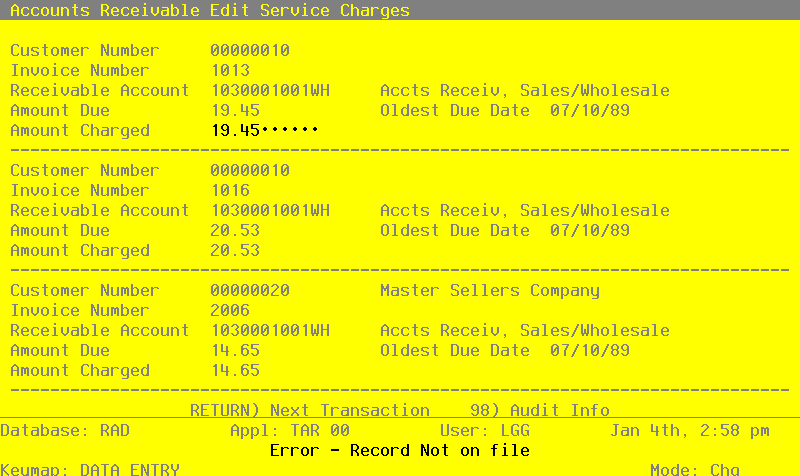
When the key value for a particular record is requested, you can review all the records in the file by selecting the Scan option. The records will be presented on an “Access” screen, and you will be allowed to scan the available data until you find the record you want. Then, position the cursor by that record and press ENTER; the record will be displayed for editing.
Data items for the preceding screen are described below:
- Customer Number
Upper case, up to 8 characters Display only Numbers only
Identify the customer to whom the service charges apply. This number must be on file in the Customers file. The system displays the customer’s name so that you can verify your entry.
- Invoice Number
Upper case, up to 8 characters Display only
Identify the invoice to which service charges will be applied. For summary service charges, including average daily balance, the invoice number will be SC plus the date the service charge was created. For example, if service charges are calculated on January 29, 1990, the summary invoice number will be SC900129.
- Receivable Account
Upper case, up to 12 characters Display only
This is the receivable account from the invoice (or from the Customer file, for summary service charges). If your system includes General Ledger, this number must be on file in the General Ledger Chart of Accounts file, and the system displays the account description from that file.
- Amount Due
Number, up to 7 digits and 2 decimals Display only
This is the total amount of the service charge due, as calculated by the Calculate Service Charges function. This amount was calculated by multiplying the invoice balance (or the customer balance, for summary service charges) by the service charge percentage located on the Terms record for this invoice or customer. This amount is also affected by the number of days and minimum service charge on that record.
- Oldest Due Date
Date (YMD) Display only
The due date from the oldest invoice is saved, to be printed for reference on the Service Charge Register.
- Amount Charged
Number, up to 7 digits and 2 decimals
Specify the amount of the service charge that will actually be applied. By default, the system displays the Amount Due in this field. You can override the display.
Press ENTER to display system-supplied information and then press ENTER again to save the information on this screen.
Select the Next Record option to go to the next Service Charges record.
At this screen, the use of the MODE keys - DEL, CHG, or INQ - pertain to those records in the Service Charges file.