
3File Maintenance
Option 11Customers List
Use this function to print a list of the Customer file. A complete detail list can be printed, as well as a short list. The short list prints one line per customer. The following processing steps accomplish this job.
- Step 1This function allows you to choose either the standard Customer List or the shortened version.
On the following pages, the screen displayed by this function is shown.
The screen shown below allows you to choose to print the “short” form of the Customers List.
Print Customers List screen
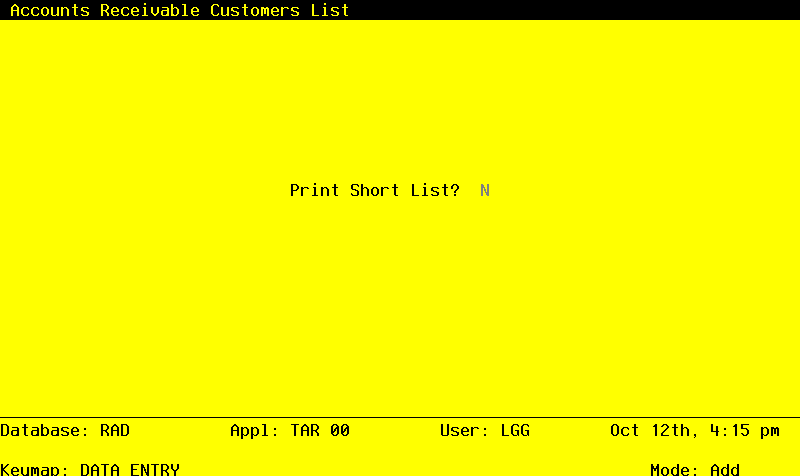
Data items for the preceding screen are described below:
- Print Short List?
Y or N Default N Required
You can choose to print the “short” customer list — one line per customer — by entering ‘Y’. If you leave the entry as ‘N’, you will print the fully detailed customer list.
Press ENTER to save the information on this screen.
- Step 2In preparation for performing a sort/selection process on the customers information, this step provides you with a default sequencing of data records by Customer Alpha and Customer, giving additional sort order choice by Receivable Account, Zip Code, Terms Code, Customer Type, Division, and Area, with the option to change modifiable parameters at run time. Selection of data records is provided by Customer, Customer Alpha, Zip Code, Credit Status, Customer Hold OK?, Terms Code, Changed On, Salesperson, Tax Code, Service Charges?, Write Off Service Charge?, Statement Type, Customer Type, Division, And Area, with the option to enter user-specified comparisons at run time.
- Step 3This is the standard disposition used for all lists of master files.
- Step 4According to previously specified criteria, this step actually performs the desired selection and/or sorting process.
- Step 5In order to print the customers List, this step formats the Customers information. The following data items are shown: Customer Alpha, Customer, Phone, Contact, Salesperson, FAX Number, Name, Terms Code, Description, Open Item?, Address, Tax Code, Statement Type, Tax District, Statement Period, City, State, Zip Code, Division, Service Charges?, Country, Area, Write Off Service Charge?, Type, Sales History?, Balance, Warehouse, Customer Hold OK?, On order, Vendor No (for Refunds), Post to Sales Analysis?, Credit Limit, Receivable Account, Credit Status, Offset Account, Dunning Code, Dunning Sent, First Transaction Date, Last Payment Date, Last Transaction Date, and Comments.
A sample output is shown below.
                                                       Expert Computing, Inc.
10/17/94 14:50                                                                                                       LGG Page:     1
                                                           Customers List
====================================================================================================================================


Atest        99999990   Phone: (   )    -         Contact:                          Salesperson:
                          FAX: (   )    -

THE TEST CO                             Tax Code:     001           No Sales Tax                         Statement Type           Y
                                        Terms:        001           Due Upon Receipt                     Open Item?               Y
                                        Tax District: 1             No tax                               Statement Period
                                        Division:                                                        Miscellaneous Customer?  N
                                        Area:                                                            Service Charge?          Y
                                        Type:         01            Retail Customer                      Write Off Svc Charge?    N
Balance:          .00                   Warehouse:                                                       Keep Sales History?      Y
On Order:         .00                   Vendor:                                                          Customer Hold OK?        Y
Credit Limit: 9999999                   Receiv Acct:  1030001000  Accts Receiv, Intercompany             Post to Sales Analysis?  N
Credit Status: OK                       Offset Acct:  1100001001WH  Resale Inventory, Sales Outlet

Dunning Code:                                         Dunning Sent:                                    First Transaction:
                                                      Last Payment:                                     Last Transaction:
Comments:
_____________________________________________________________________________________________________________________________________

BELLWOOD     00000160   Phone: (   )    -         Contact:                          Salesperson:
                          FAX: (   )    -

Bellwood RV Sales                       Tax Code:     001           No Sales Tax                         Statement Type           Y
                                        Terms:        001           Due Upon Receipt                     Open Item?               Y
                                        Tax District: 1             No tax                               Statement Period
                                        Division:                                                        Miscellaneous Customer?  N
                                        Area:                                                            Service Charge?          Y
                                        Type:                                                            Write Off Svc Charge?    N
Balance:          .00                   Warehouse:                                                       Keep Sales History?      Y
On Order:         .00                   Vendor:                                                          Customer Hold OK?        Y
Credit Limit: 9999999                   Receiv Acct:  1  1                                               Post to Sales Analysis?  N
Credit Status: OK                       Offset Acct:

Dunning Code:                                         Dunning Sent:                                    First Transaction:
                                                      Last Payment:                                     Last Transaction:
Comments:
_____________________________________________________________________________________________________________________________________- Step 6In order to print the Customers List (Short), this step formats the Customers information. The following data items are shown: Name, Customer, Contact, Phone, FAX Number, Terms Code, and Description.
A sample output is shown below.
                                                       Expert Computing, Inc.
10/17/94 14:51                                                                                                       LGG Page:     1
                                                       Customers List (Short)

Customer                           Customer                                                                  Terms
Name                                 Number     Contact                  Phone              FAX               Code  Description
====================================================================================================================================

THE TEST CO                        99999990                              (   )    -         (   )    -         001  Due Upon Receipt
Bellwood RV Sales                  00000160                              (   )    -         (   )    -         001  Due Upon Receipt
Burlington Enterprises             00000040     Molly Mogan              (205) 787-9987     (205) 765-8765     002  2/10, Net 30
Capital Truck Center               00000150                              (   )    -         (   )    -         001  Due Upon Receipt
Dietz Press, Inc.                  00000140                              (   )    -         (   )    -         001  Due Upon Receipt
Dominion Business Machines         00000080                              (   )    -         (   )    -         001  Due Upon Receipt
Duplex Envelope Co.                00000120                              (   )    -         (   )    -         001  Due Upon Receipt
Fox Technical, Inc.                00000110                              (   )    -         (   )    -         001  Due Upon Receipt
Fiberlux                           00000444     Bill Edelman             (914) 855-1738     (   )    -         003  Net 30
Hale’s Interiors                   00000060     Helen Walls              (   )    -         (   )    -         002  2/10, Net 30
Highland Park Variety Shop         00000100                              (   )    -         (   )    -         001  Due Upon Receipt
Commonwealth Kennel LTD            00000130                              (   )    -         (   )    -         001  Due Upon Receipt