
1Transaction Processing
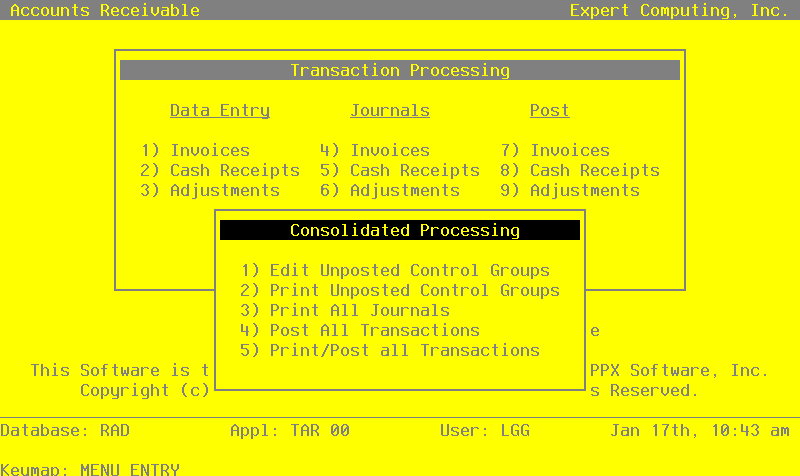
Option 10Consolidated Processing
Use this option to access the Consolidated Processing overlay. The options available from this overlay are described below.
Edit Unposted Control Groups
Use this function to change the value of the “Print Journal?” and “Post Now?” fields on the control group records of all outstanding transactions.
On the following pages, the screen displayed by this function is shown.
The screen shown below presents information about Control Groups.
Unposted Control Groups screen

When the key value for a particular record is requested, you can review all the records in the file by selecting the Scan option. The records will be presented on an “Access” screen, and you will be allowed to scan the available data until you find the record you want. Then, position the cursor by that record and press ENTER; the record will be displayed for editing.
Data items for the preceding screen are described below:
- Operator ID
Upper case, up to 3 characters Display only Letters and numbers only
Identify the operator who entered the control group you wish to edit.
- Control No
Positive number, up to 4 digits Display only
Supply the control number of the control group you want to edit.
- File
Upper case, up to 4 characters Display only
The originating file is identified.
- Description
Alphanumeric, up to 30 characters Display only
The description of this control group is displayed.
- Print Journal?
Y or N Default Y Required
Enter ‘N’ if you want to delay printing the journal for any reason.
- Post Now?
Y or N Default Y Required
Enter ‘N’ if you want to delay posting for any reason.
- Invoices Printed?
Y or N Display only Default N
This indicates whether or not Invoices have been printed. It has no meaning for Cash Receipts or Adjustments.
- Journal OK?
Y or N Display only Default N
This indicates whether or not the journal has been printed without errors. If ‘N’, the control group may contain errors and cannot be posted.
The entered data is validated. During validation, including access to other files, conditions may be found which cause messages to be displayed. Errors (E), Warnings (W), and Messages (M) that may result are shown below:
Press ENTER to save the information on this screen.
Select the Next Record option to go to the next Control Groups record.
At this screen, the use of the MODE keys - CHG, or INQ - pertain to those records in the Control Groups file.
Print Unposted Control Groups
Use this function to print listings itemizing each control group that still remains to be posted. The number of transactions will also be included. The following processing steps accomplish this job.
- Step 1This is the standard disposition used for all reports not printed on special forms.
- Step 2In order to print the Unposted Transactions - Invoices, this step formats the Invoice Control Groups information. The following data items are shown: Operator ID, Control Number, Description, Number of Transactions, Operator Exclusive?, Print Journal?, Journal OK?, Post Now?, Post in Progress?, Control Total, and Hash Total.
A sample output is shown below.
                                                       Expert Computing, Inc.
10/12/94 15:48                                                                                                       LGG Page:  1
                                                  Unposted Transactions - Invoices


                                                      Invcs   No     Op   Prnt  Jour  Post  Post
Op/Cntrl      Description                             Prntd  Trx     Ex   Jour  OK    Now   Strt   Cntrl Total           Hash
Total
=================================================================================================================================

SRR / 0013 Orders through 8/20/89 Y 5 N Y N N N 130- Step 3In order to print the Unposted Transactions - Cash Receipts, this step formats the Cash Receipts Control Groups information. The following data items are shown: Operator ID, Control Number, Description, Number of Transactions, Operator Exclusive?, Print Journal?, Journal OK?, Post Now?, Post in Progress?, Control Total, And Hash Total.
A sample output is shown below.
                                                       Expert Computing, Inc.
10/12/94 15:49                                                                                                       LGG Page:  1
                                               Unposted Transactions - Cash Receipts


                                                              No     Op   Prnt  Jour  Post  Post
Op/Cntrl      Description                                    Trx     Ex   Jour  OK    Now   Strt   Cntrl Total           Hash
Total
=================================================================================================================================

SRR / 0009 Receipts through 8/21/90 4 N Y N N N 6552.66 170- Step 4In order to print the Unposted Transactions - Adjustments, this step formats the Adjustments Control Groups information. The following data items are shown: Operator ID, Control Number, Description, Number of Transactions., Operator Exclusive?, Print Journal?, Journal OK?, Post Now?, Post Started?, Control Total, And Hash Total.
A sample output is shown below.
                                                       Expert Computing, Inc.
10/12/94 15:49                                                                                                       LGG Page:  1
                                                Unposted Transactions - Adjustments


                                                              No     Op   Prnt  Jour  Post  Post
Op/Cntrl      Description                                    Trx     Ex   Jour  OK    Now   Strt   Cntrl Total           Hash
Total
=================================================================================================================================

SRR / 0001    August - group 2                                 5     N    Y     Y     N     N            28.70-              240
Print All Journals
Use this function to print the invoices, cash receipts, and adjustment journals, as well as invoice forms and bank deposit slips. The following processing steps accomplish this job.
- Step 1This is the standard disposition used for all transaction journals.
- Step 2In preparation for performing a sort/selection process on the Invoices information, this step provides sequencing of data records by Post Now?, Operator ID, Control Number, Post Year, and Post Month, with no option to change the sequence at run time. Selection of data records is provided by Operator ID, Control Number, Print Journal?, Journal OK?, and Invoices Printed?, with the option to enter userspecified comparisons at run time.
- Step 3According to previously specified criteria, this step actually performs the desired selection and/or sorting process.
- Step 4In order to print the accounts Receivable Invoices Journal, this step formats the Invoices and Invoice Line Items information. The following data items are shown: Transaction No, Customer, Name, Tax Code and District, Terms, Post Month and Year, Invoice and Due Date, Customer PO, Comm on Sub?, Order No, Subtotal, Receivable Account, Description, Transaction Type, Salespersons, Comm Percent, Comm Basis, Invoice Number, Apply To, Invoice Amount, Deposit, Discount, Freight, Sales Tax, Line Item, Offset Account, Line Item Type, Price, Quantity, Amount, Item Code, Description, Sub Type, Sub Code, and Cost. As appropriate, group headings appear whenever a change occurs in Control Number or Post Month. If requested, totals appear whenever a change occurs in Post Month or Control Number. When totals are specified, the following items are accumulated: Invoice Total, Deposit Total, Discount Total, Freight Total, Tax Total, Control Total, and Hash Total. Grand totals print at the end, showing Journal Errors and Journal Warnings.
A sample output is shown below:
                                                       Expert Computing, Inc.
10/12/94 15:10                                                                                                       LGG Page:  1
                                                Accounts Receivable Invoices Journal


 Trx  Customer                                  Tax Cd/Dst Trms Mo/Yr Inv Date  Due Date   Customr PO  C/Sub?  Order No
Subtotal
      Receiv Account                                Trx Type                 Description                       Sls   Comm    Comm
      Invoice      Apply To    Invc Amount         Deposit       Cust Disc       Freight    Sales Tax          Rep    Pct   Basis
=================================================================================================================================

Control Group SRR / 0013  Orders through 8/20/89


Post Month/Year 08 / 89


0001  00000040  Burlington Enterprises          002 001    002  08 89 08/21/89  09/20/89   89A-556             007210     1850.00
      1030001001WH Accts Receiv, Sales/Wholesale    AR Invoice               special order shipped 8/18/89     010    5.0
      3011         3011             685.32         1200.00             .00         35.32          .00

Line Account/Item Cd  Description                    Item Type/Sub Code  Price/Cost    Quantity Comm Pct      Amount

0001 3010001001MA     Sales, Manufacturing           Taxable Sales         1200.000        1.00              1200.00
                      special order desk             GL JONES               985.630
0002 3010001001WH     Sales, Wholesale               Taxable Sales          325.000        2.00               650.00
                      leather office chair                                  489.550
                                                                                                              —————
                                                                              — Line Items Total —>          1850.00
_________________________________________________________________________________________________________________________________

0002  00000020  Master Sellers Company          002 001    001  08 89 08/21/89  08/21/89                                  1358.25
      1030001001WH Accts Receiv, Sales/Wholesale    AR Invoice               8/15/89 shipment                  020    5.0
      3012         3012            1452.20             .00             .00         24.62        69.33

Line Account/Item Cd  Description                    Item Type/Sub Code  Price/Cost    Quantity Comm Pct      Amount

0001 3010001001WH     Sales, Wholesale               Taxable Sales          271.650        5.00              1358.25
                      file cabinet                                         1064.870
                                                                                                              —————
                                                                              — Line Items Total —>          1358.25
_________________________________________________________________________________________________________________________________

0003  00000040  Burlington Enterprises          002 001    002  08 89 08/21/89  09/20/89                       099852     3580.11
      1030001001WH Accts Receiv, Sales/Wholesale    AR Invoice               8/18/89 shipment                  010    5.0
      3013         3013            3854.21             .00             .00           .00       274.10

Line Account/Item Cd  Description                    Item Type/Sub Code  Price/Cost    Quantity Comm Pct      Amount

0001 3010001001WH     Sales, Wholesale               Taxable Sales          675.200        2.00              1350.40
                      10’x8' shelving unit                                 1147.200
0002 3010001001WH     Sales, Wholesale               Taxable Sales          154.360       10.00              1543.60
                      metal shelf                                          1241.030
0003 3010001001WH     Sales, Wholesale               Taxable Sales          206.980        3.00               620.94
                      6’x3' bookcase                                        510.600
0004 3010001001WH     Sales, Wholesale               Taxable Sales           65.170        1.00                65.17
                      desk set                                               50.250
0005 3010001001WH Sales, Wholesale Sales Tax 274.100 1.00 274.10- Step 5In preparation for performing a sort/selection process on the Invoices information, this step provides sequencing of data records by Operator ID, Control Number, and Invoice Number, with no option to change the sequence at run time. Selection of data records is provided by Operator ID, Control Number, and Invoices Printed?, with the option to enter user-specified comparisons at run time.
- Step 6According to previously specified criteria, this step actually performs the desired selection and/or sorting process.
- Step 7This function checks the Parameters file to see if preprinted forms are to be used.
- Step 8In order to print Invoices on plain 8-1/2 x 11 inch paper, this step formats the Invoices and Invoice Line Items information. The following data items are shown: Line Item Description, Quantity, Price and Amount.
A sample output is shown below.
    APPX Demonstration Company                                                1
    990 Hammond Dr
    Ste 800
    Atlanta, GA  30328

                                  I N V O I C E

                Invoice Number: 3011            Invoice Date: 08/21/89
                      Apply To: 3011
         Sold To:

         Burlington Enterprises
         404 W. 12th Street

         Spokane, WA 98003

                                 Due Date: 09/20/89
    Your PO No:  89A-556            Terms: 2/10, Net 30
    Salesperson: Mr. Jarvis W. Payne

    ===========================================================================
    Description                          Quantity         Price         Amount
    special order desk                       1.00      1200.000        1200.00
leather office chair 2.00 325.000 650.00- Step 9In preparation for performing a sort/selection process on the Cash Receipts information, this step provides sequencing of data records by Post Now?, Operator ID, Control Number, Post Year, and Post Month, with no option to change the sequence at run time. Selection of data records is provided by Operator ID, Control Number, Print Journal?, and Journal OK?, with the option to enter user-specified comparisons at run time.
- Step 10According to previously specified criteria, this step actually performs the desired selection an/or sorting process.
- Step 11In order to print the Cash Receipts Journal, this step formats the Cash Receipts and Cash Receipts Line Items information. The following data items are shown: Transaction No, Customer, Name, Check Amount, Check No, Date, Bank Transit No, Post Month, Post Year, Cash Account, Description, Line No, Apply To, Apply Type Description, Credit Amount, Write Off Amount, Discount Given, Direct Amount, Receivable Account, Write Off?, Subsidiary Type, Subsidiary Code, Direct Account, Receivable Total, Discount Amount Total, Direct Total, and Line Items Total. As appropriate, group headings appear whenever a change occurs in Control Number or Post Month. If requested, totals appear whenever a change occurs in Post Month or Control Number. When totals are specified, the following items are accumulated: Receivable Amount, Write Off Amount, Discount Amount, Direct Amount, Check Amount, Control Total, and Hash Total. Grand totals print at the end, showing Journal Errors and Journal Warnings.
A sample output is shown below:
                                                     APPX Demonstration Company
11/30/94 10:30                                                                                                       LGG Page:  1
                                                       Cash Receipts Journal


 Trx Customer                                 Check Amt   Check No Date    Transit Mo/Yr Cash Account
=================================================================================================================================

Control Group SRR / 0009  Receipts through 8/21/90


Post Month/Year 08 / 89


0001 00000010 Alexander's, Inc.    1640.00  000006179 08/22/89 1166   08 89 1010001001  Cash, Sales Outlets
              payment


              Apply Type                CR Receiv  W/O Amount  Disc Given      Direct  GL Receivable Account
Item Apply To Description                  Amount  W/O SvcChg? Sub Type/Code   Amount  GL Direct Account

0001 1016     Apply to Invoice            1368.54                     .00         .00  1030001001WH Accts Receiv, Sales/Wholesale
              shelving units shipped 6/13/89            N
0002 1018     Apply to Invoice             275.98        4.52         .00         .00  1030001001WH Accts Receiv, Sales/Wholesale
              write off disputed charge                 N
                                            —————       —————       —————       —————
          — Line Items Totals —>          1644.52        4.52         .00         .00              Check Total:     1640.00
—————————————————————————————————————————————————————————————————————————————————————————————————————————————————————————————————

0002 00000040 Burlington Enterprises            1500.00  000011690 08/22/89 807    08 89 1010001001  Cash, Sales Outlets
              deposit

              Apply Type                CR Receiv  W/O Amount  Disc Given      Direct  GL Receivable Account
Item Apply To Description                  Amount  W/O SvcChg? Sub Type/Code   Amount  GL Direct Account

0001 8010     Deposit                     1500.00                     .00         .00  2051000000  Sales Deposits
              deposit on special order                  N
                                            —————       —————       —————       —————
          — Line Items Totals —>          1500.00         .00         .00         .00              Check Total:     1500.00
—————————————————————————————————————————————————————————————————————————————————————————————————————————————————————————————————

0003 00000070 Richards & Wright, PC             3200.00  000005208 08/22/89 1258   08 89 1010001001  Cash, Sales Outlets
              payment on account

              Apply Type                CR Receiv  W/O Amount  Disc Given      Direct  GL Receivable Account
Item Apply To Description                  Amount  W/O SvcChg? Sub Type/Code   Amount  GL Direct Account

0001          Apply On Account            3228.70                     .00         .00  1030001001WH Accts Receiv, Sales/Wholesale
              payment on account                        N
                                           —————        —————       —————       —————
          — Line Items Totals —>          3228.70         .00         .00         .00              Check Total:     3228.70

—————————————————————————————————————————————————————————————————————————————————————————————————————————————————————————————————- Step 12In preparation for performing a sort/selection process on the Cash Receipts information, this step provides sequencing of data records by Cash Account and Check Number, with no option to change the sequence at run time. Selection of data records is provided by Cash Account and Check Number, with the option to enter user-specified comparisons at run time.
- Step 13According to previously specified criteria, this step actually performs the desired selection and/or sorting process.
- Step 14In order to print the bank Deposit Slip, this step formats the Cash Receipts information. The following data items are shown: Bank Transit No, Check No, Customer, Name, Date, and Check Amount.
A sample output is shown below.
                                                     APPX Demonstration Company
11/30/94 10:31                                                                                                       LGG Page:  1
                                                         Bank Deposit Slip

         Transit         Check                  Customer                            Date               Check
         No                 No       Cust No    Name                                Received          Amount
=================================================================================================================================


Account 1010001001    Cash, Sales Outlets

         1258        000005208      00000070    Richards & Wright, PC               08/22/89         3200.00
         1166        000006179      00000010    Alexander's, Inc.                    08/22/89         1640.00
         807         000011690      00000040    Burlington Enterprises               08/22/89         1500.00
         987         000654654      00000050    Miscellaneous Customer               08/22/89          212.66
                                                                                                       —————
                                                                — Cash Account Subtotals —>           6552.66
===========- Step 15In preparation for performing a sort/selection process on the Adjustments information, this step provides sequencing of data records by Post Now?, Operator ID, Control Number, Post year, and Post Month, with no option to change the sequence at run time. Selection of data records is provided by Operator ID, Control Number, Print Journal?, and Journal OK?, with the option to enter user-specified comparisons at run time.
- Step 16According to previously specified criteria, this step actually performs the desired selection and/or sorting process.
- Step 17In order to print the Accounts Receivable Adjustments Journal, this step formats the Adjustments information. The following data items are shown: Transaction Number, Customer, Name, Apply To, Adjust Date, Remark, Amount, Offset Account, Description, Post Month, Post Year, Subsidiary Type, Subsidiary Code, and Receivable Account. As appropriate, group headings appear whenever a change occurs in Control Number of Post Month. If requested, totals appear whenever a change occurs in Post Month or Control Number. When totals are specified, the following items are accumulated: Adjustment Total, Control Total, and Hash Total. Grand totals print at the end, showing Journal Errors and Journal Warnings.
A sample output is shown below.
                                                     APPX Demonstration Company
11/30/94 15:48                                                                                                       SRR Page:  1
                                              Accounts Receivable Adjustments Journal


 Trx      Customer                                      Apply To      Adj Date     Description                        Adj Amount
          Offset Account                                              Post Mo/Yr   Sub Type/Code
          Receivable Account
=================================================================================================================================

Control Group SRR / 0001  August - group 2


Post Month/Year 08 / 89

 0001     00000040   Burlington Enterprises             3004          08/30/89     wrong customer invoiced               1896.35-
          3010001001WH  Sales, Wholesale                                 08 89
          1030001001WH  Accts Receiv, Sales/Wholesale
 0002     00000010   Alexander's, Inc.                  3004          08/30/89     correction                            1896.35
          3010001001WH  Sales, Wholesale                                 08 89
          1030001001WH  Accts Receiv, Sales/Wholesale
 0003     00000060   Hale’s Interiors                   906           08/30/89     order cancelled-apply deposit          600.00
          3010001001WH  Sales, Wholesale                                 08 89
          1030001001WH  Accts Receiv, Sales/Wholesale
 0004     00000060   Hale’s Interiors                   2023          08/30/89     order cancelled-apply deposit          600.00-
          3010001001WH  Sales, Wholesale                                 08 89
          1030001001WH  Accts Receiv, Sales/Wholesale
 0005     00000070   Richards & Wright, PC              BF890630      03/16/90     write off service charge                28.70-
          3060000000  Miscellaneous Income                               08 89
          1030001001WH  Accts Receiv, Sales/Wholesale
                                                                                                                         ——————
                                                                            — Post Month/Year 08 89 Totals —>              28.70-
                                                                                                                    ============

                                                                                                                         ——————
                                                                                    — Control Group Totals —>              28.70-

                                                                                              Entered    Calculated    Difference
Control Group: SRR / 0001  August - group 2                             Control Totals:         28.70-        28.70-
Exclusive?     N                                                        Hash Totals:              240           240
Post Now?      N
=================================================================================================================================

                                                                                                                          ——————
                                                                                             — Grand Total —>              28.70-

Number of Errors in This Journal:         0     Number of Warnings:         0
=================================================================================================================================
=================================================================================================================================- Step 18In order to print the Accounts Receivable Journals Summary, this step formats the Summarized Distributions information. The following data items are shown: Post Year, Post Month, GL Account, Description, Journal Code, Operator ID, Transaction Date, Debits, and Credits.
A sample output is shown below.
                                                     APPX Demonstration Company
11/30/94 10:32                                                                                                       LGG Page:  1
                                                Accounts Receivable Journals Summary


        !!!  ONE OR MORE OF THE CONTROL GROUPS ON THE DETAIL JOURNAL CONTAINED ERRORS; GROUPS WITH ERRORS WILL NOT POST  !!!


Yr   Mo   Account       Account Name                    Jrnl  ID        Trx Date        Debits        Credits
=================================================================================================================================
89   08   1010001001    Cash, Sales Outlets             ARCR  SRR       08/22/89       6552.66
89   08   1030001001WH  Accts Receiv, Sales/Wholesale   ARCR  SRR       08/22/89                      4873.22-
89   08   1030001001WH  Accts Receiv, Sales/Wholesale   ARIV  SRR       08/21/89       7121.99
89   08   2020001001    Sales Tax Payable, Sales        ARIV  SRR       08/21/89                       343.43-
89   08   2051000000    Sales Deposits                  ARCR  SRR       08/22/89                      1500.00-
89   08   2051000000    Sales Deposits                  ARIV  SRR       08/21/89       1200.00
89   08   3010001001MA  Sales, Manufacturing            ARIV  SRR       08/21/89                      1200.00-
89   08   3010001001WH  Sales, Wholesale                ARCR  SRR       08/22/89                       212.66-
89   08   3010001001WH  Sales, Wholesale                ARIV  SRR       08/21/89                      6790.61-
89   08   3060000000    Miscellaneous Income            ARCR  SRR       08/22/89          4.52
89   08   4071000001WH  Customer Disct, Sales/Wholesal  ARIV  SRR       08/21/89        120.00
89   08   4190000001WH  Freight Out, Sales/Wholesale    ARIV  SRR       08/21/89                       107.95-
                                                                                        ——————         ——————
                                                          — Grand Totals —>           14999.17       15027.87-
                                                                                  =============  =============
Post All Transactions
Use this function to post the invoice, cash receipt, and adjustment transactions to the appropriate master and holding files. The following processing steps accomplish this job.
- Step 1This is the standard disposition used for all posting functions.
- Step 2In preparation for performing a sort/selection process on the Invoice Control Groups information, this step provides sequencing of data records by key, with no option to change the sequence at run time. Selection of data records is provided by Operator ID, Control Number, Journal OK?, Post Now?, and Invoices Printed?, with the option to enter user specified comparisons at run time.
- Step 3This step prevents CANCEL from canceling the current job.
- Step 4According to previously specified criteria, this step actually performs the desired selection and/or sorting process.
- Step 5This step processes the information for invoice Control Groups, Invoices, and Invoice Line Items. Under certain conditions, records in the General Ledger Transaction Control file will be added. Updates to certain fields in the Invoice Control Groups, Invoices, Invoice Line Items, and General Ledger Transaction Control files will occur. Generalized routines are performed to do Month to Date Postings in Accounts Receivable, Post GL Transactions in General Ledger, and Convert Calendar to Fiscal in General Ledger.
- Step 6This step processes the information for Invoice Control Groups, Invoices, and Invoice Line Items. Under certain conditions, records in the Accounts Receivable Transaction Control and Miscellaneous Customers files will be added. Updates to certain fields in the Parameters, Invoice Control groups, Miscellaneous Customers, and Accounts Receivable Transaction Control files will occur. Generalized routines are performed to Post Sales Tax in Accounts Receivable, roll over commissions in Accounts Receivable, Post AR Transactions in Accounts Receivable, calculate commissions in Accounts Receivable, Post CA Transactions in Commission Accounting, and Post SA Transactions in Sales Analysis. Records in the Invoice Line Items, Invoices, and Invoice Control Groups files will then be deleted.
- Step 7In preparation for performing a sort/selection process on the Cash Receipts Control Groups information, this step provides sequencing of data records by key, with no option to change the sequence at run time. Selection of data records is provided by Operator ID, Control Number, Journal OK?, and Post Now?, with the option to enter user-specified comparisons at run time.
- Step 8This step prevents CANCEL from canceling the current job.
- Step 9According to previously specified criteria, this step actually performs the desired selection and/or sorting process.
- Step 10This step processes the information for Cash Receipts Control Groups, Cash Receipts, and Cash Receipts Line Items. Under certain conditions, records in the General Ledger Transaction Control file will be added. Updates to certain fields in the Cash Receipts Control Groups, Cash Receipts, Cash Receipts Line Items, and General Ledger Transaction Control files will Occur. Generalized routines are performed to do Month to Date Postings in Accounts Receivable, Post GL Transactions in General Ledger, and Convert Calendar To Fiscal in General Ledger.
- Step 11This step processes the information for Cash Receipts Control Groups, Cash Receipts., and Cash Receipts Line Items. The Accounts Payable Receipts file will be created. Under certain conditions, records in the Accounts Receivable Transaction Control and Accounts Payable Receipts files will be added. Updates to certain fields in the Parameters, Cash Receipts Control Groups, Cash Receipts, and Accounts Receivable Transaction Control Files will occur. Generalized routines are performed to Post AR Transactions in Accounts Receivable. Records in the Cash Receipts, and Cash Receipts Control Groups files will then be deleted.
- Step 12This step processes the information for accounts Payable receipts. Under certain conditions, records in the Accounts Payable Outstanding Checks file will be added.
- Step 13In preparation for performing a sort/selection process on the Adjustments Control Groups information, this step provides sequencing of data records by key, with no option to change the sequence at run time. Selection of data records is provided by Operator ID, Control Number, Journal OK?, and Post Now?, with the option to enter user-specified comparisons at run time.
- Step 14This step prevents CANCEL from canceling the current job.
- Step 15According to previously specified criteria, this step actually performs the desired selection and/or sorting process.
- Step 16This step processes the information for Adjustments Control Groups and Adjustments. Under certain conditions,, records in the General Ledger transaction Control file will be added. Updates to certain fields in the Adjustments Control Groups, Adjustments, and General Ledger Transaction Control files will occur. Generalized routines are performed to do Month to Date Postings in Account Receivable, Post GL Transactions in General Ledger, and Convert Calendar To Fiscal in General Ledger.
- Step 17This step processes the information for Adjustments Control Groups and Adjustments. Under certain conditions, records in the Accounts Receivable Transaction Control file will be added. Updates to certain fields in the Parameters, Adjustments Control Groups, and Accounts Receivable Transaction Control files will occur. Generalized routines are performed to Post AR Transactions in Accounts Receivable. Records in the Adjustments and Adjustments Control Groups files will then be deleted.
- Step 18This function displays a warning to the operator if any errors were encountered during posting.
Print/Post All Transactions
Use this function to print the invoices, cash receipts, and adjustments journals, as well ass bank deposits slips and invoice forms, and then post these transactions. The following processing steps accomplish this job.
- Step 1This is the standard disposition used for all transaction journals.
- Step 2In preparation for performing a sort/selection process on the Invoices information, this step provides sequencing of data records by Post Now?, Operator ID, Control Number, Post Year, and Post Month, with no option to change the sequence at run time. Selection of data records is provided by Operator ID, Control Number, Print Journal?, Journal OK?, and Invoices Printed?, with the option to enter userspecified comparisons at run time.
- Step 3According to previously specified criteria, this step actually performs the desired selection and/or sorting process.
- Step 4In order to print the Accounts Receivable Invoices Journal, this step formats the Invoices and Invoice Line Items information. The following data items are shown: Transaction No, Customer, Name, Tax Code and District, Terms, Post Month and Year, Invoice and Due Date, Customer PO, Comm on Sub?, Order No, Subtotal, Receivable Account, Description, Transaction Type, Salespersons, Comm Percent, Comm Basis, Invoice Number, Apply To, Invoice Amount, Deposit, Discount, Freight, Sales Tax, Line Item, Offset Account, Line Item Type, Price, Quantity, Amount, Item Code, Description, Sub Type, Sub Code, and Cost. As appropriate, group headings appear whenever a change occurs in Control Number or Post Month, If requested, totals appear whenever a change occurs in Control Number or Post Month. If totals are specified, the following items are accumulated: Invoice Total, Deposit Total, Discount Total, Freight Total, Tax Total, Control Total, and Hash Total. Grand totals print at the end, showing Journal Errors and Journal Warnings.
                                                       Expert Computing, Inc.
10/12/94 15:10                                                                                                       LGG Page:  1
                                                Accounts Receivable Invoices Journal


 Trx  Customer                                  Tax Cd/Dst Trms Mo/Yr Inv Date  Due Date   Customr PO  C/Sub?  Order No
Subtotal
      Receiv Account                                Trx Type                 Description                       Sls   Comm    Comm
      Invoice      Apply To    Invc Amount         Deposit       Cust Disc       Freight    Sales Tax          Rep    Pct   Basis
=================================================================================================================================

Control Group SRR / 0013  Orders through 8/20/89


Post Month/Year 08 / 89


0001  00000040  Burlington Enterprises          002 001    002  08 89 08/21/89  09/20/89   89A-556             007210     1850.00
      1030001001WH Accts Receiv, Sales/Wholesale    AR Invoice               special order shipped 8/18/89     010    5.0
      3011         3011             685.32         1200.00             .00         35.32          .00

Line Account/Item Cd  Description                    Item Type/Sub Code  Price/Cost    Quantity Comm Pct      Amount

0001 3010001001MA     Sales, Manufacturing           Taxable Sales         1200.000        1.00              1200.00
                      special order desk             GL JONES               985.630
0002 3010001001WH     Sales, Wholesale               Taxable Sales          325.000        2.00               650.00
                      leather office chair                                  489.550
                                                                                                              —————
                                                                              — Line Items Total —>          1850.00
_________________________________________________________________________________________________________________________________

0002  00000020  Master Sellers Company          002 001    001  08 89 08/21/89  08/21/89                                  1358.25
      1030001001WH Accts Receiv, Sales/Wholesale    AR Invoice               8/15/89 shipment                  020    5.0
      3012         3012            1452.20             .00             .00         24.62        69.33

Line Account/Item Cd  Description                    Item Type/Sub Code  Price/Cost    Quantity Comm Pct      Amount

0001 3010001001WH     Sales, Wholesale               Taxable Sales          271.650        5.00              1358.25
                      file cabinet                                         1064.870
                                                                                                              —————
                                                                              — Line Items Total —>          1358.25
_________________________________________________________________________________________________________________________________

0003  00000040  Burlington Enterprises          002 001    002  08 89 08/21/89  09/20/89                       099852     3580.11
      1030001001WH Accts Receiv, Sales/Wholesale    AR Invoice               8/18/89 shipment                  010    5.0
      3013         3013            3854.21             .00             .00           .00       274.10

Line Account/Item Cd  Description                    Item Type/Sub Code  Price/Cost    Quantity Comm Pct      Amount

0001 3010001001WH     Sales, Wholesale               Taxable Sales          675.200        2.00              1350.40
                      10’x8' shelving unit                                 1147.200
0002 3010001001WH     Sales, Wholesale               Taxable Sales          154.360       10.00              1543.60
                      metal shelf                                          1241.030
0003 3010001001WH     Sales, Wholesale               Taxable Sales          206.980        3.00               620.94
                      6’x3' bookcase                                        510.600
0004 3010001001WH     Sales, Wholesale               Taxable Sales           65.170        1.00                65.17
                      desk set                                               50.250
0005 3010001001WH Sales, Wholesale Sales Tax 274.100 1.00 274.10- Step 5In preparation for performing a sort/selection process on the Invoices information, this step provides sequencing of data records by Operator ID, Control Number, and Invoice Number, with no option to change the sequence at run time. Selection of data records is provided by Operator ID, Control Number, and Invoices Printed?, with the option to enter user-specified comparisons at run time.
- Step 6According to previously specified criteria, this step actually performs the desired selection and/or sorting process.
- Step 7This function checks the Parameters file to see if preprinted forms are to be used.
- Step 8In order to print Invoices on plain 8-1/2 x 11 inch paper, this step formats the Invoices and Invoice Line Items information. The following data items are shown: Line Item Description, Quantity, Price and Amount.
A sample output is shown below.
    APPX Demonstration Company                                                1
    990 Hammond Dr
    Ste 800
    Atlanta, GA  30328

                                  I N V O I C E

                Invoice Number: 3011            Invoice Date: 08/21/89
                      Apply To: 3011
         Sold To:

         Burlington Enterprises
         404 W. 12th Street

         Spokane, WA 98003

                                 Due Date: 09/20/89
    Your PO No:  89A-556            Terms: 2/10, Net 30
    Salesperson: Mr. Jarvis W. Payne

    ===========================================================================
    Description                          Quantity         Price         Amount
    special order desk                       1.00      1200.000        1200.00
leather office chair 2.00 325.000 650.00- Step 9In preparation for performing a sort/selection process on the Cash Receipts information, this step provides sequencing of data records by Post Now?, Operator ID, Control Number, Post Year, and Post Month, with no option to change the sequence at run time. Selection of data records is provided by Operator ID, Control Number, Print Journal?, and Journal OK?, with the option to enter user-specified comparisons at run time.
- Step 10According to previously specified criteria, this step actually performs the desired selection and/or sorting process.
- Step 11In order to print the Cash Receipts Journal, this step formats the Cash receipts and cash Receipts Line Items information. The following data items are shown: Transaction No, Customer, Name, Check Amount, Check No, Date, Bank Transit No, Post Month, Post Year, Cash Account, Description, Line No, Apply To, Apply Type Description, Credit Amount, Write Off Amount, Discount Given, Direct Amount, Receivable Account, Write Off?, Subsidiary Type, Subsidiary Code, Direct Account, Receivable Total, Discount Amount Total, Direct Total, and Line Items Total. As appropriate, group headings appear whenever a change occurs in Control Number or Post Month. If requested, totals appear whenever a change occurs in Post Month or Control Number. When totals are specified, the following items are accumulated: Receivable Amount, Write Off Amount, Discount Amount, Direct Amount, Check Amount, Control Total, and Hash Total. Grand totals print at the end, showing Journal Errors and Journal Warnings.
A sample output is shown below:
                                                       Expert Computing, Inc.
10/12/94 15:12                                                                                                       LGG Page:  1
                                                       Cash Receipts Journal


 Trx Customer                                 Check Amt   Check No Date    Transit Mo/Yr Cash Account
=================================================================================================================================

Control Group SRR / 0009  Receipts through 8/21/90


Post Month/Year 08 / 89


0001 00000010 Alexander's Inc.    1640.00  000006179 08/22/89 1166   08 89 1010001001  Cash, Sales Outlets
              payment


              Apply Type                CR Receiv  W/O Amount  Disc Given      Direct  GL Receivable Account
Item Apply To Description                  Amount  W/O SvcChg? Sub Type/Code   Amount  GL Direct Account

0001 1016     Apply to Invoice            1368.54                     .00         .00  1030001001WH Accts Receiv, Sales/Wholesale
              shelving units shipped 6/13/89            N
0002 1018     Apply to Invoice             275.98        4.52         .00         .00  1030001001WH Accts Receiv, Sales/Wholesale
              write off disputed charge                 N
                                           —————        —————       —————       —————
          — Line Items Totals —>          1644.52        4.52         .00         .00              Check Total:     1640.00
_________________________________________________________________________________________________________________________________

0002 00000040 Burlington Enterprises            1500.00  000011690 08/22/89 807    08 89 1010001001  Cash, Sales Outlets
              deposit

              Apply Type                CR Receiv  W/O Amount  Disc Given      Direct  GL Receivable Account
Item Apply To Description                  Amount  W/O SvcChg? Sub Type/Code   Amount  GL Direct Account

0001 8010     Deposit                     1500.00                     .00         .00  2051000000  Sales Deposits
              deposit on special order                   N
                                            —————       —————       —————       —————
          — Line Items Totals —>          1500.00         .00         .00         .00              Check Total:     1500.00
_________________________________________________________________________________________________________________________________

0003 00000070 Richards & Wright, PC             3200.00  000005208 08/22/89 1258   08 89 1010001001  Cash, Sales Outlets
              payment on account

              Apply Type                CR Receiv  W/O Amount  Disc Given      Direct  GL Receivable Account
Item Apply To Description                  Amount  W/O SvcChg? Sub Type/Code   Amount  GL Direct Account

0001          Apply On Account            3228.70                     .00         .00  1030001001WH Accts Receiv, Sales/Wholesale
              payment on account                        N
                                            —————       —————       —————       —————
— Line Items Totals —> 3228.70 .00 .00 .00 Check Total: 3228.70- Step 12In preparation for performing a sort/selection process on the Cash Receipts information, this step provides sequencing of data records by Cash Account and Check Number, with no option to change the sequence at run time. Selection of data records is provided by Cash Account and Check Number, with the option to enter user-specified comparisons at run time.
- Step 13According to previously specified criteria, this step actually performs the desired selection and/or sorting process.
- Step 14In order to print the Bank Deposit Slip, this step formats the Cash Receipts information. The following data items are shown: Bank Transit No, Check No, Customer, Name, Date, And Check Amount.
A sample output is shown below.
                                                       Expert Computing, Inc.
10/12/94 15:28                                                                                                       LGG Page:  1
                                                         Bank Deposit Slip

         Transit         Check                  Customer                            Date               Check
         No                 No       Cust No    Name                                Received          Amount
=================================================================================================================================


Account 1010001001    Cash, Sales Outlets

         1258        000005208      00000070    Richards & Wright, PC               08/22/89         3200.00
         1166        000006179      00000010    Alexander's, Inc.                   08/22/89         1640.00
         807         000011690      00000040    Burlington Enterprises              08/22/89         1500.00
         987         000654654      00000050    Miscellaneous Customer              08/22/89          212.66
                                                                                                  —————
                                                                — Cash Account Subtotals —>        6552.66
===========- Step 15In preparation for performing a sort/selection process on the Adjustments information, this step provides sequencing of data records by Post Now?, Operator ID, Control Number, Post Year, and Post Month, with no option to change the sequence at run time. Selection of data records is provided by Operator ID, Control Number, Print Journal?, and Journal OK?, with the option to enter user-specified comparisons at run time.
- Step 16According to previously specified criteria, this step actually performs the desired selection and/or sorting process.
- Step 17In order to print the Accounts Receivable Adjustments Journal, this step formats the Adjustments information. The following data items are shown: Transaction Number, Customer, Name, Apply To, Adjust Date, Remark, Amount, Offset Account, Description, Post Month, Post Year, Subsidiary Type, Subsidiary Code, and Receivable Account. As appropriate, group headings appear whenever a change occurs in Control Number or Post Month. If requested, totals appear whenever a change occurs in Post Month or Control Number. When totals are specified, the following items are accumulated: Adjustment Total, Control Total, and Hash Total. Grand totals print at the end, showing Journal Errors and Journal Warnings.
A sample output is shown below.
                                                     APPX Demonstration Company
11/30/94 15:48                                                                                                       SRR Page:  1
                                              Accounts Receivable Adjustments Journal


 Trx      Customer                                      Apply To      Adj Date     Description                        Adj Amount
          Offset Account                                              Post Mo/Yr   Sub Type/Code
          Receivable Account
=================================================================================================================================

Control Group SRR / 0001  August - group 2


Post Month/Year 08 / 89

 0001     00000040   Burlington Enterprises             3004          08/30/89     wrong customer invoiced               1896.35-
          3010001001WH  Sales, Wholesale                                 08 89
          1030001001WH  Accts Receiv, Sales/Wholesale
 0002     00000010   Alexander's, Inc.                  3004          08/30/89     correction                            1896.35
          3010001001WH  Sales, Wholesale                                 08 89
          1030001001WH  Accts Receiv, Sales/Wholesale
 0003     00000060   Hale’s Interiors                   906           08/30/89     order cancelled-apply deposit          600.00
          3010001001WH  Sales, Wholesale                                 08 89
          1030001001WH  Accts Receiv, Sales/Wholesale
 0004     00000060   Hale’s Interiors                   2023          08/30/89     order cancelled-apply deposit          600.00-
          3010001001WH  Sales, Wholesale                                 08 89
          1030001001WH  Accts Receiv, Sales/Wholesale
 0005     00000070   Richards & Wright, PC              BF890630      03/16/90     write off service charge                28.70-
          3060000000  Miscellaneous Income                               08 89
          1030001001WH  Accts Receiv, Sales/Wholesale
                                                                                                                         ——————
                                                                            — Post Month/Year 08 89 Totals —>              28.70-
                                                                                                                    ============

                                                                                                                         ——————
                                                                                    — Control Group Totals —>              28.70-

                                                                                              Entered    Calculated    Difference
Control Group: SRR / 0001  August - group 2                             Control Totals:         28.70-        28.70-
Exclusive?     N                                                        Hash Totals:              240           240
Post Now?      N
=================================================================================================================================

                                                                                                                          ——————
                                                                                             — Grand Total —>              28.70-

Number of Errors in This Journal:         0     Number of Warnings:         0
=================================================================================================================================
=================================================================================================================================- Step 18In order to print the Accounts Receivable Journals Summary, this step formats the Summarized Distributions information. The following data items are shown: Post Year, Post Month, GL Account, Description, Journal Code, Operator ID, Transaction Date Debits, and Credits.
A sample output is shown below.
                                                     APPX Demonstration Company
11/30/94 10:32                                                                                                       LGG Page:  1
                                                Accounts Receivable Journals Summary


        !!!  ONE OR MORE OF THE CONTROL GROUPS ON THE DETAIL JOURNAL CONTAINED ERRORS; GROUPS WITH ERRORS WILL NOT POST  !!!


Yr   Mo   Account       Account Name                    Jrnl  ID        Trx Date        Debits        Credits
=================================================================================================================================
89   08   1010001001    Cash, Sales Outlets             ARCR  SRR       08/22/89       6552.66
89   08   1030001001WH  Accts Receiv, Sales/Wholesale   ARCR  SRR       08/22/89                      4873.22-
89   08   1030001001WH  Accts Receiv, Sales/Wholesale   ARIV  SRR       08/21/89       7121.99
89   08   2020001001    Sales Tax Payable, Sales        ARIV  SRR       08/21/89                       343.43-
89   08   2051000000    Sales Deposits                  ARCR  SRR       08/22/89                      1500.00-
89   08   2051000000    Sales Deposits                  ARIV  SRR       08/21/89       1200.00
89   08   3010001001MA  Sales, Manufacturing            ARIV  SRR       08/21/89                      1200.00-
89   08   3010001001WH  Sales, Wholesale                ARCR  SRR       08/22/89                       212.66-
89   08   3010001001WH  Sales, Wholesale                ARIV  SRR       08/21/89                      6790.61-
89   08   3060000000    Miscellaneous Income            ARCR  SRR       08/22/89          4.52
89   08   4071000001WH  Customer Disct, Sales/Wholesal  ARIV  SRR       08/21/89        120.00
89   08   4190000001WH  Freight Out, Sales/Wholesale    ARIV  SRR       08/21/89                       107.95-
                                                                                        ——————         ——————
                                                          — Grand Totals —>           14999.17       15027.87-
============= =============- Step 19In preparation for performing a sort/selection process on the Invoice Control Groups information, this step provides sequencing of data records by key, with no option to change the sequence at run time. Selection of data records is provided by Operator ID, Control Number, Journal OK?, Post Now?, and invoices Printed?, with the option to enter user-specified comparisons at run time.
- Step 20This step prevents CANCEL from canceling the current job.
- Step 21According to previously specified criteria, this step actually performs the desired selection and/or sorting process.
- Step 22This step processes the information for Invoice Control Groups, Invoices, and Invoice Line Items. Under certain conditions, records in the General Ledger Transaction Control file will be added. Updates to certain fields in the Invoice Control Groups, Invoices, Invoice Line Items, and General Ledger Transaction Control files will occur. Generalized routines are performed to do Month to Date Postings in Accounts Receivable, Post GL Transactions in General Ledger, and Convert Calendar To Fiscal in General Ledger.
- Step 23This step processes the information for Invoice Control Groups, Invoices and Invoice Line Items. Under certain conditions, records in the Accounts Receivable Transaction Control and Miscellaneous Customers files will be added. Updates to certain fields in the Parameters, Invoice Control Groups, Miscellaneous Customers, and accounts Receivable Transaction Control files will occur. Generalized routines are performed to Post Sales Tax in Accounts Receivable, roll over commissions in Accounts Receivable, Post AR Transactions in Accounts Receivable, calculate commissions in Accounts Receivable, Post CA Transactions in Commission Accounting, and Post SA Transactions in Sales Analysis. Records in the Invoice Line Items, Invoices, and Invoice Control Groups files will then be deleted.
- Step 24In preparation for performing a sort/selection process on the Cash Receipts Control Groups information, this step provides sequencing of data records by key, with no option to change the sequence at run time. Selection of data records is provided by Operator ID, Control Number, Journal OK?, and Post Now?, with the option to enter user-specified comparisons at run time.
- Step 25This step prevents CANCEL from canceling the current job.
- Step 26According to previously specified criteria, this step actually performs the desired selection and/or sorting process.
- Step 27This step processes the information for Cash Receipts Control Groups, Cash Receipts, and Cash Receipts Line Items. Under certain conditions, records in the General Ledger Transaction Control file will be added. Updates to certain fields in the Cash Receipts Control Groups, Cash Receipts, Cash Receipts, Cash Receipts Line Items, and General Ledger Transaction Control files will occur. Generalized routines are performed to do Month to Date Postings in Accounts Receivable, Post GL Transactions in General Ledger, and Convert Calendar To Fiscal in General Ledger.
- Step 28This step processes the information for Cash Receipts Control Groups, Cash Receipts, and Cash Receipts Line Items. The Accounts Payable Receipts file will be created. Under certain conditions, records in the Accounts Receivable Transaction Control and Accounts Payable Receipts files will be added. Updates to certain fields in the Parameters, Cash Receipts Control Groups, Cash Receipts, and Accounts Receivable Transaction Control files will occur. Generalized routines are performed to Post AR Transactions in Accounts Receivable. Records in The Cash Receipts Line Items, Cash Receipts, and Cash Receipts Control Groups files will then be deleted.
- Step 29This step processes the information for Accounts Payable Receipts. Under certain conditions, records in the Accounts Payable Outstanding Checks file will be added.
- Step 30In preparation for performing a sort/selection process on the Adjustments Control Groups information, this step provides sequencing of data records by key, with no option to change the sequence at run time. Selection of data records is provided by Operator ID, Control Number, Journal OK?, and Post Now?, with the option to enter user-specified comparisons at run time.
- Step 31This step prevents CANCEL from canceling the current job.
- Step 32According to previously specified criteria, this step actually performs the desired selection and/or sorting process.
- Step 33This step processes the information for Adjustments Control Groups and Adjustments. Under certain conditions, records in the General Ledger Transaction Control file will be added. Updates to certain fields in the Adjustments Control Groups, Adjustments, and General Ledger Transaction Control files will occur. Generalized routines are performed to do Month to Date Postings in Accounts Receivable, Post GL Transactions in General Ledger, and Convert Calendar To Fiscal in General Ledger.
- Step 34This step processes the information for Adjustments Control Groups and Adjustments. Under certain conditions, records in the Accounts Receivable Transaction Control file will be added. Updates to certain fields in the Parameters, Adjustments Control Groups, and Accounts Receivable Transaction Control files will occur. Generalized routines are performed to Post AR Transactions, in Accounts Receivable. Records in the Adjustments and Adjustments Control Groups files will then be deleted.
- Step 35This function displays a warning to the operator if any errors were encountered during posting.