
4Reports and Inquiry
Option 4Transaction History
Use this function to print transaction history information for your customers. You also have the option to include current transactions on this report. The following processing steps accomplish this job.
- Step 1This function checks to see whether the end user has chosen to keep Transaction History, before executing any function that requires the file.
- Step 2Transaction History records include all the transactions for fully paid invoices that have been removed from the current Transactions file by means of a Close Month process, and that are within the guidelines of the “number of Months of Transaction History” established in the Parameters file.
This function allows you to choose to include current transactions in addition to historical information on the Transaction History Report.
On the following pages, the screen displayed by this function is shown.
The screen shown below allows you to enter parameters needed to print the Transaction History report.
Transaction Processing menu
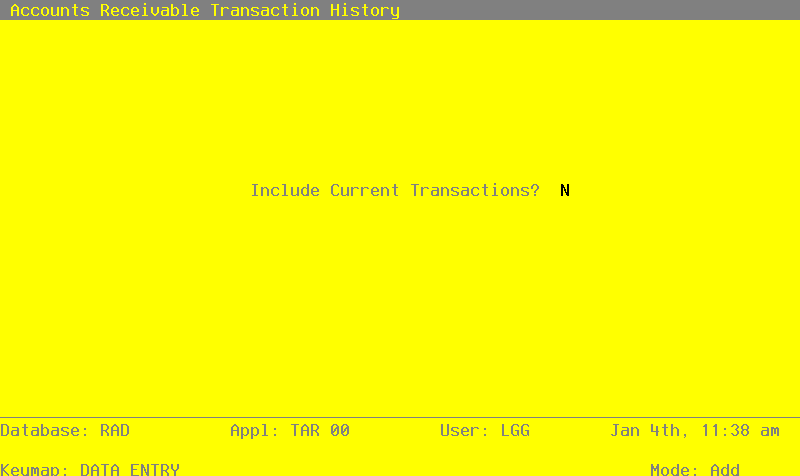
Data items for the preceding screen are described below:
- Include Current Transactions?
Y or N Default N Required
Indicate whether or not transactions for the current month should be included in this report.
- NOTE
- Even if you answer ‘Y’ to this question, if there are no historical records for a given customer, that customer’s current information will be bypassed.
Press ENTER to save the information on this screen.
- Step 3In preparation for performing a sort/selection process on the Transaction History information, this step provides you with a default sequencing of data records by Account Number, Customer, and Apply To, giving additional sort order choice by Post Month and Post Year, with the option to change modifiable parameters at run time. Selection of data records is provided by Account Number, Customer, Apply To, Operator ID, Post Month, and Post Year, with the option to enter user-specified comparisons at run time.
- Step 4This is the standard disposition used for all reports not printed on special forms.
- Step 5According to previously specified criteria, this step actually performs the desired selection and/or sorting process.
- Step 6In order to print the Transaction History report, this step formats the Transaction History information. The following data items are shown: Operator ID, Control No, Transaction No, Post Month, Post Year, Apply To, Invoice Number, Check Number, Transaction Type, Order Number, Transaction Date, Transaction Description, and Amount. As appropriate, group headings appear whenever a change occurs in Post Month, Account Number, or Customer. If requested, totals appear whenever a change occurs in Customer, Account Number, or Post Month. When totals are specified, the following items are accumulated: Total Amount. Grand totals print at the end, showing Total Amount.
A sample output is shown below.
                                                       Expert Computing, Inc.
11/08/94 15:02                                                                                                       LGG Page:  1
                                                        Transaction History


Op   Cntrl Trx    Post                                   Trx     Order   Trx
ID   No    No    Mo / Yr  Apply To  Inv No    Chck No    Type    No      Date      Description                          Amount
=================================================================================================================================

Account 1030001001WH  Accts Receiv, Sales/Wholesale

Customer  00000010  Alexander's, Inc.                  FAX

SRR     0     4  04 / 89  0040      0040              0  INV     0       04/01/89  Opening Entry                       545.22
SRR     0     1  05 / 89  0040      0040              0  SVC     0       05/31/89  Service Charge - Opening Entry        8.18
SRR     0     1  06 / 89  0040      0040              0  SVC     0       06/30/89  SERVICE CHARGES                       8.30
SRR     6     1  07 / 89  0040      0              6060  PAY     0       07/15/89  Opening Entry                       561.70-
SRR     1     7  06 / 89  1007      1007              0  INV     0       06/10/89  6/2/89 shipment                    1368.54
SRR     4     1  06 / 89  1007      0              5847  PAY     0       06/30/89  6/2/89 shipment                    1368.54-
SRR     1     1  06 / 89  101       1001              0  INV     101     06/10/89  6/6/89 Supply shipment             1250.00
SRR     0     2  05 / 89  202       202               0  INV     314     05/24/89  Opening Entry                       520.00
SRR     1     1  06 / 89  202       0              5796  PAY     0       06/05/89  Opening Entry                       520.00-
SRR     0     2  05 / 90  502       502               0  INV     0       05/05/89  Opening Entry                        12.50
SRR     0     3  06 / 89  502       502               0  SVC     0       06/30/89  SERVICE CHARGES                       1.00
SRR     6     1  07 / 89  502       0              6060  PAY     0       07/15/89  Opening Entry                        13.50-
SRR     0     1  05 / 89  601       601               0  INV     526     05/05/89  Opening Entry                      1235.68
SRR     3     1  06 / 89  601       0              5831  PAY     0       06/21/89  Opening Entry                      1235.68-
SRR     0     1  05 / 89  701       701               0  INV     0       05/26/89  Opening entry                      1236.90
SRR     3     1  06 / 89  701       0              5831  PAY     0       06/21/89  Opening entry                      1236.90-
SRR     5     2  06 / 89  89061000  89061000          0  INV     0       06/10/89  Monthly shipment                    600.00
SRR     7     2  07 / 89  89061000  0              6081  PAY     0       07/31/89  Monthly shipment                    600.00-
                                                                                                                       ——————
                                                                                       — Customer Total —>            1250.00
                                                                                                                 ============


Customer  00000020  Master Sellers Company  (516) 561-7654          FAX  (516) 555-7654

SRR     1     4  06 / 89  1004      1004              0  INV     104     06/10/89  6/3/89 shipment                    1568.92
SRR     4     4  06 / 89  1004      0              4097  PAY     0       06/30/89  6/3/89 shipment                    1568.92-
SRR     1     5  06 / 89  1005      1005              0  INV     0       06/10/89  6/6/89 shipment                     894.26
SRR     7     7  07 / 89  1005      0              1231  PAY     0       07/31/89  6/6/89 shipment                     894.26-
SRR     2     1  06 / 89  1011      1011              0  INV     0       06/21/89  6/16/89 shipment                   5632.90
SRR     7     7  07 / 89  1011      0              1231  PAY     0       07/31/89  6/16/89 shipment                   5632.90-
SRR     1     4  06 / 89  104       1004              0  INV     104     06/10/89  6/3/89 shipment                     700.00
SRR     0     7  05 / 89  306       306               0  INV     8523    05/03/89  Opening entry                      3400.00
SRR     2     1  06 / 89  306       0              3661  PAY     0       06/12/89  Opening entry                      3400.00-
SRR     0     6  05 / 89  613       613               0  INV     0       05/20/89  Opening entry                      3299.46
SRR     4     4  06 / 89  613       0              4097  PAY     0       06/30/89  Opening entry                      3299.46-
SRR     0     2  05 / 89  620       620               0  INV     55236   05/05/89  Opening entry                       514.63
SRR     0     5  06 / 89  620       620               0  SVC     0       06/30/89  SERVICE CHARGES                       5.15
SRR     6     4  07 / 89  620       0              1220  PAY     0       07/15/89  payment                             519.78-
SRR     5     3  06 / 89  89061001  89061001          0  INV     0       06/10/89  Monthly shipment per contract       200.16
SRR     6     4  07 / 89  89061001  0              1220  PAY     0       07/15/89  Monthly shipment per contract       200.16-
                                                                                                                       ——————
                                                                                       — Customer Total —>             700.00
                                                                                                                 ============