
2Monthly Processing
Option 5Subsidiary Code GL Distributions
Use this function to print the General Ledger distributions which were posted to General Subsidiary. The following processing steps accomplish this job.
- Step 1This function allows you to select the “summary only” option for the Subsidiary Code GL distributions report.
On the following pages, the screen displayed by this function is shown.
The screen shown below allows you to print only the summary Subsidiary Code GL Distributions report.
Summary Code Distributions screen
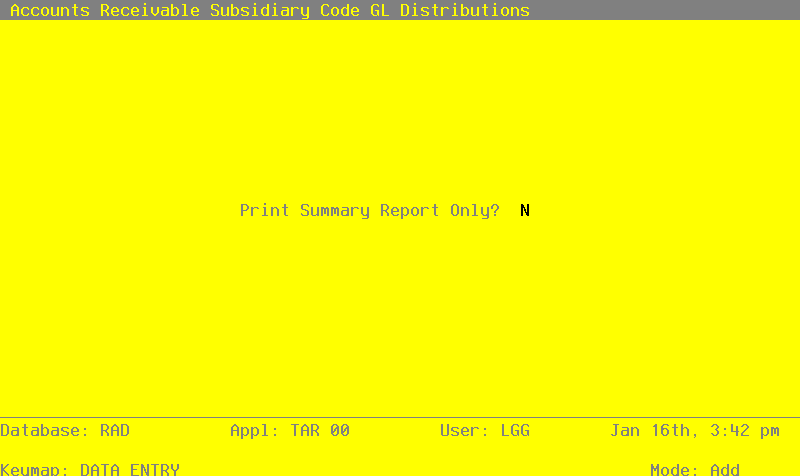
Data items for the preceding screen are described below:
- Print Summary Report Only?
Default N Required
Enter ‘Y’ (Yes) or ‘N’ (no).
You can choose to print just the summary report by entering ‘Y’. If you enter ‘N’, both the detail and the summary report will be printed.
Press ENTER to save the information on this screen.
- Step 2In preparation for performing a sort/selection process on the Month To Date Postings information, this step provides you with a default sequencing of data records by Subsidiary Type, Subsidiary Code, and Account Number, with the option to change modifiable parameters at run time. Selection of data records is provided by Subsidiary Type, Subsidiary Code, and account component, with the option to enter user-specified comparisons at run time.
- Step 3This is the standard disposition used for all reports not printed on special forms.
- Step 4According to previously specified criteria, this step actually performs the desired selection and/or sorting process.
- Step 5In order to print the Subsidiary Code Detail GL Distributions, this step formats the Month To Date Postings information. The following data items are shown: Transaction No, Customer, Name, Invoice/Check Number, Transaction Type, Transaction Date, Description, and Amount.
A sample output is shown below.
                                                       Expert Computing, Inc.
11/08/94 15:30                                                                                                       LGG Page:  1
                                              Subsidiary Code Detail GL Distributions


              Trx   Customer                             Invc/Chk   Trx     Date     Description                           Amount
=================================================================================================================================

Subsidiary Type GL


Subsidiary Code JONES 2 JONES Salesperson Sam Jones


              0001  00000010  Alexander's, Inc           3001       INV   08/11/89   special order desk                   900.00-
              0001  00000010  Alexander's, Inc.          3001       INV   08/11/89   special order chairs                 600.00-
                                                                                                                           —————
                                                                                  — Subsidiary Code Subtotals —>         1500.00-
                                                                                                                      ===========


Subsidiary Code PETERS 2 PETERS Salesperson George Peters


              0005  00000020  Master Sellers Company     3005       INV   08/11/89   special order table                2704.00-
                                                                                                                          —————
                                                                                  — Subsidiary Code Subtotals —>        2704.00-
                                                                                                                      ===========


Subsidiary Code WILLIAMS 2 WILLIAMS Salesperson Kris Williams


              0006  00000050  Deno’s Inc.                3006       INV   08/11/89   shelving unit                       5401.60-
              0006  00000050  Deno’s Inc.                3006       INV   08/11/89   shelving unit                        529.15-
                                                                                                                           —————
                                                                                  — Subsidiary Code Subtotals —>         5930.75-
                                                                                                                      ===========

                                                                                                                           —————
                                                                                  — Subsidiary Type Subtotals —>        10134.75-
                                                                                                                      ===========

                                                                                                                           —————
                                                                                               — Grand Totals —>        10134.75-
===========- Step 6In order to print the Subsidiary Code Summary GL Distributions, this step formats the Month To Date Postings information. As appropriate, group headings appear whenever a change occurs in Subsidiary Type or Subsidiary Code. If requested, totals appear whenever a change occurs in Subsidiary Code or Subsidiary Type. When totals are specified, the following items are accumulated: Debit Amount Total, Credit Amount Total, and Net Change Amount Total. Grand totals print at the end showing Debit Amount Total, Credit Amount Total, and Net Change Amount Total.
A sample output is shown below.
                                                       Expert Computing, Inc.
11/08/94 15:30                                                                                                       LGG Page:  1
                                              Subsidiary Code Summary GL Distributions


                        Subsidiary Code                      Debits                   Credits                Net Change
=================================================================================================================================
Sub Type GL
                        JONES                                   .00                   1500.00-                  1500.00-
                        PETERS                                  .00                   2704.00-                  2704.00-
                        WILLIAMS                                .00                   5930.75-                  5930.75-
                                                             ——————                    ——————                    ——————
                         — Sub Type GL Totals —>                .00                  10134.75-                 10134.75-
                                                       ============              ============              ============
                                                             ——————                    ——————                    ——————
                               — Grand Totals —>                .00                  10134.75-                 10134.75-
                                                       ============              ============              ============