
4Reports and Inquiry
Option 8Statements
Use this function to print customer statements. The following processing steps accomplish this job.
- Step 1This function allows you to enter the Closing Date and to indicate whether to use the invoice date or due date for ageing the Customer Statements.
On the following pages, the screen displayed by this function is shown.
The screen shown below allows you to enter parameters needed to print Statements.
Transaction Processing menu
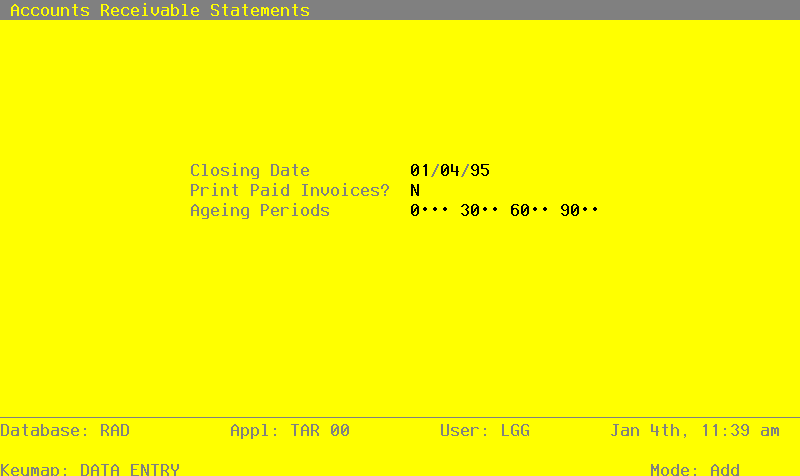
Data items for the preceding screen are described below:
- Closing Date
Date (YMD)
Specify the closing date for this function. Only invoices dated on or before this date are included. By default, the system displays today’s date. You can enter a new date to override the display.
- Print Paid Invoices?
Y or N Default N Required
Specify whether or not you want to have invoices that have been paid in full print on the statement, as well as outstanding invoices.
- Ageing Periods
Number, up to 3 digits
The system displays the ageing periods that were entered in the Parameters file for this report. You can override any ageing period.
Each ageing period refers to either the invoice date or the due date, depending on the entry in the Date To Age or Closing Date field. A positive entry indicates the number of days after the invoice or due date. A negative entry indicates the number of days before the invoice or due date.
The entered data is validated. During validation, including access to other files, conditions may be found which cause messages to be displayed. Errors (E), Warnings (W), and Messages (M) that may result are shown below:
Press ENTER to save the information on this screen.
- Step 2In preparation for performing a sort/selection process on the Transactions information, this step provides you with a default sequencing of data records by Statement Period, Customer Alpha, Customer, Apply To, and Transaction Date, with the option to change modifiable parameters at run time. Selection of data records is provided by Statement Type, Statement Period, Customer, and Customer Alpha, with the option to enter user-specified comparisons at run time.
- Step 3This disposition is used to select printer and output options for printing Statements.
- Step 4According to previously specified criteria, this step actually performs the desired selection and/or sorting process.
- Step 5This function checks the Parameters file to see if preprinted forms are to be used.
- Step 6In order to print Statements on plain 8-1/2 x 11 inch paper, this step formats the Transactions information. The following data items are shown: Invoice or Check Number, Transaction Type, Apply To, Description, Transaction Date, Invoice Due Date and Amount. One statement is printed for each customer.
A sample output is shown below.
 Expert Distributing, Inc.
 449 Maryland Pkwy.
 Suite 401
 Las Vegas, NV  89109


                                   S T A T E M E N T
                                 Closing Date: 11/30/89

             Master Sellers Company
             401 Texas Blvd.
             Bldg. 3-308
             Los Alamos,  NM  45213


 Inv/Chk   Trx Apply To  Description      Trx Date Due Date     Amount      Balance
 ===================================================================================
 1004      OEI 1004      P3050            08/15/89 09/14/89     344.27       344.27
 2006      INV 2006      7/2/89 shipment  07/10/89 07/10/89    1465.23      1465.23
 2021      INV 2021      7/26/89 shipment 07/31/89 07/31/89    1560.33      1560.33
 3005      INV 3005      special order sh 08/11/89 08/11/89    1685.63      1685.63
           DEP 333       Deposit Opening  05/15/89 05/15/89     100.00-
 6013      INV 333       Opening entry    05/20/89 05/20/89     200.00
 333       SVC 333       SERVICE CHARGES  06/30/89 06/30/89       2.00
 333       SVC 333       Svc Charge Write 06/30/89                2.00-
 333       SVC 333       SERVICE CHARGES  07/31/89 07/31/89       2.02
 333       SVC 333       Svc Charge Write 07/31/89                2.02-
 333       ADJ 333       write off servic 08/12/89 08/12/89       4.02-       95.98
 1252      DEP 7220      deposit          07/31/89 07/31/89    1300.00-
 3005      INV 7220      special order sh 08/11/89 08/11/89    1300.00          .00
 1279      DEP 8001      deposit          08/11/89 08/11/89    1500.00-     1500.00-
 89071001  INV 89071001  Monthly shipment 07/10/89 07/10/89     200.16
 1278      PAY 89071001  Monthly shipment 08/11/89 08/11/89     300.16-      100.00-
 89071002  INV 89071002  Co-op Advertisin 07/10/89 07/10/89     300.24
 1278      PAY 89071002  Co-op Advertisin 08/11/89 08/11/89     300.24-         .00
                                                                       ============
                                                                            3551.44

     0  & Under       1  To  30       31  To  60       61  To  90         Over  90
         ——————          ——————           ——————           ——————             ————
             0.               0.               0.           344.27          3207.17