
6Intercompany Processing
Option 4Combine General Ledgers
This function combines General Ledger accounts of Account Balances, Budgets, Unit Balances, and / or Foreign Balances for the purpose of printing consolidated financial statements. The following processing steps accomplish this job.
- Step 1You can use this function to enter up to 25 company ID’s to create Account Balances, Budgets, Unit Balances, and Foreign Balances records under a combined company ID. This “combined” company may be used to print consolidated financial statements. The receiving company must be specified; you have the option to initialize the receiving companies’ files.
The screen shown below allows you to enter parameters needed for the Combine General Ledgers utility.
Combine General Ledgers screen
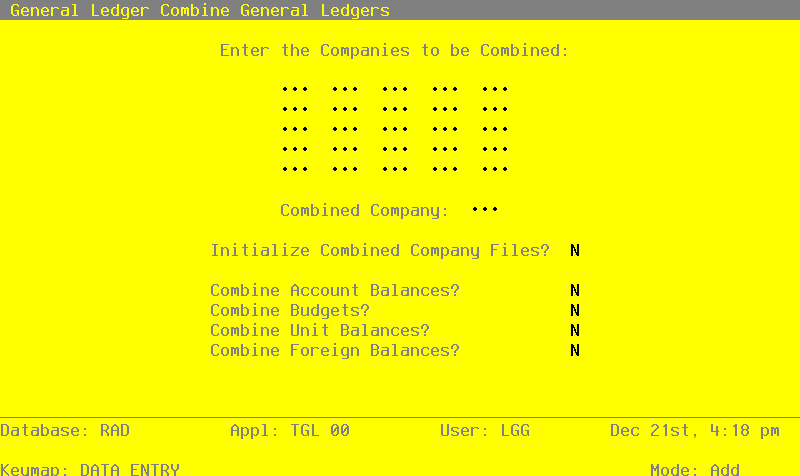
Data items for the preceding screen are described below:
- Companies to be Combined
Upper case, up to 3 characters Required
Supply the identifying codes for the companies to be included in the combined company.
- Combined Company
Upper case, up to 3 characters Required
Identify the company which should contain the combination. This can be one of the companies included in the combination. For example, Company A, Company B and Company C may all be combined into Company A. In this example, Company A’s data is affected, but that of Company B and C are not.
- Initialize Combined Company Files?
Y or N Default N Required
Enter ‘Y’ if you want the files in the receiving or combined company to be zeroed before the other companies are added into it.
- Combine Account Balances?
Y or N Default N Required
Indicate whether or not the Account Balances for these companies are to be combined.
- Combine Budgets?
Y or N Default N Required
Indicate whether or not the Budgets are to be combined.
- Combine Unit Balances?
Y or N Default N Required
Indicate whether or not balances kept in Units are to be combined.
- Combine Foreign Balances?
Y or N Default N Required
Indicate whether or not balances kept in foreign currencies are to be combined.
The entered data is validated. During validation, including access to other files, conditions may be found which cause messages to be displayed. Errors (E), Warnings (W), and Messages (M) that may result are shown below:
Press ENTER to save the information on this screen.
- Step 2This function creates temporary files in the combined company to hold the date from the companies being combined.
- Step 3This function selects the next company to combine.
- Step 4This step permits a job to change to a difference company.
- Step 5This step processes the information for Chart of Accounts and Account Balances. It will create temporary work files that can be used to combine the Account Balance records for the companies selected.
- Step 6This step processes the information for Budgets and Budget Balances. It creates temporary work files that can be used to combine Budget Balances for the companies selected.
- Step 7This step processes the information for Unit Accounts and Unit Balances. It creates temporary work files that can be used to combine Unit Balances for the companies selected.
- Step 8This step processes the information for Foreign Accounts and Foreign Balances. It creates temporary work fields that can be used to combine Foreign Balances for the companies selected.
- Step 9This step conditionally allows a job to branch forward or backward to any sequence number in the list of functions in the job.
- Step 10This step creates the combined Chart of Accounts and Account Balances files in the company selected.
- Step 11This step creates the combined Budgets and Budget Balances files in the company selected.
- Step 12This step creates the combined Unit Accounts and Unit Balances files in the company selected.
- Step 13This step creates the combined Foreign Accounts and Foreign Balances files in the company selected.