
2Monthly Processing
Option 11Delete History
You can use this function to selectively delete history records from the Account Balances, Budgets, Unit Balances, and/or Foreign Balances files. The following processing steps accomplish this job.
- Step 1You can use this function to enter ranges of fiscal years, budget types, unit types, and /or currency codes to define the set of Account Balances, Budget, Unit Balance, and/or Foreign Balance history records to delete.
The screen shown below allows you to enter parameters needed in order to delete history records.
Delete History screen
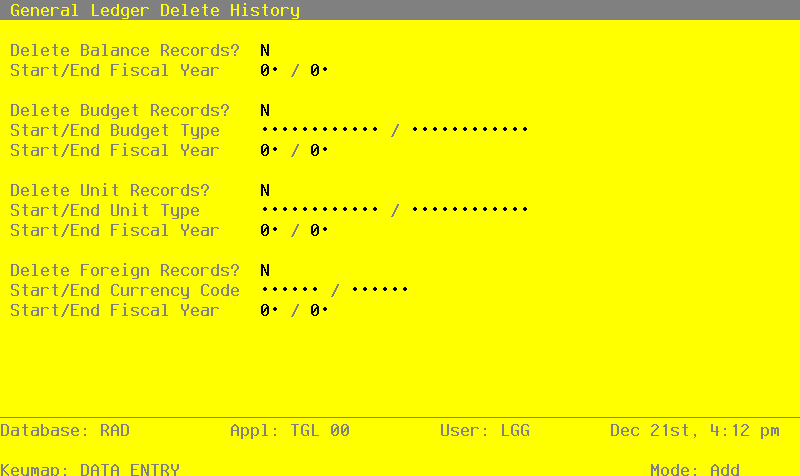
Data items for the preceding screen are described below:
- Delete Balance Records?
Y or N Default N Required
Enter ‘Y’ is you want Balances records to be deleted.
- Start Fiscal Year
Positive number, up to 2 digits
Supply the beginning year of the range to be deleted.
- End Fiscal Year
Positive number, up to 2 digits
Supply the ending year of the range to be deleted.
- Delete Budget Records?
Y or N Default N Required
Enter ‘Y’ if you want Budget records to be deleted.
- Start Budget Type
Alphanumeric, up to 12 characters Scan available
Supply a code from the Types file to identify the beginning of the range of budget types to be deleted.
- End Budget Type
Alphanumeric, up to 12 characters Scan available
Supply a code from the Types file to identify the end of the range of budget types to be deleted.
- Delete Unit Records
Y or N Default N Required
Enter ‘Y’ if you want Unit records to be deleted.
- Start Unit Type
Alphanumeric, up to 12 characters Scan available
Supply a code from the Types file to identify the beginning of the range of unit types to be deleted.
- End Unit Type
Alphanumeric, up to 12 characters Scan available
Supply a code from the Types file to identify the end of the range of unit types to be deleted.
- Delete Foreign Records?
Y or N Default N Required
Enter ‘Y’ if you want Foreign Balance records to be deleted.
- Start Currency Code
Alphanumeric, up to 6 characters Scan available
Supply a code from the Exchange Rates file to identify the beginning of the range of foreign currency records to be deleted.
- End Currency Code
Alphanumeric, up to 6 characters Scan available
Supply a code from the Exchange Rates file to identify the end of the range of foreign currency records to be deleted. The entered data is validated. During validation, including access to other files, conditions may be found which cause messages to be displayed. Errors (E), Warnings (W), and Messages (M) that may result are shown below:
Press ENTER to save the information on this screen.
- Step 2This disposition type is used for all standard processing functions within General ledger.
- Step 3This function sets the function code to delete whichever historical records have been selected.
- Step 4This step processes the information for Account Balances. Records in the Account Balances file will then be deleted.
- Step 5This step processes the information for Budget Balances. Records in the Budget Balances file will then be deleted.
- Step 6This step processes the information for Unit Balances. Records in the Unit Balances file will then be deleted.
- Step 7This step processes the information for Foreign Balances. Records in the Foreign Balances file will then be deleted.