
5Graphs and Spreadsheets
Option 2Account Balances by Month - Net
This function will build a print file of net monthly account balances for an account/fiscal year that can be read by graphic utility software. The following processing steps accomplish this job.
- Step 1You can use this function to enter an account number and fiscal year as parameters for the Account Balances - Net graph.
The screen shown below allows you to enter parameters needed for the Account Balances by Month - Net graph.
Graphs and Spreadsheets menu
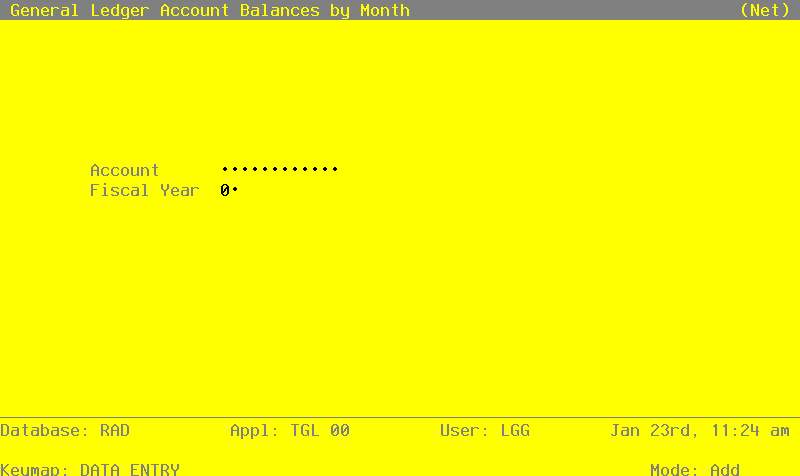
Data items for the preceding screen are described below:
- Account
Upper case, up to 12 characters Required Scan available
Identify the single account, summary account balance, or account number of the budget amount to be graphed. The account must be on file in the Chart of Accounts.
- Fiscal Year
Positive number, up to 2 digits
Supply the fiscal year of the account balance or budget amount to be graphed. The combination of account number and fiscal year must be in the Account Balances file, or the combination of Budget Type, account number, and fiscal year must be in the Budget Amounts file.
The entered data is validated. During validation, including access to other files, conditions may be found which cause messages to be displayed. Errors (E), Warnings (W), and Messages (M) that may result are shown below:
Press ENTER to display system-supplied information and then press ENTER again to save the information on this screen.
- Step 2This disposition type is used for all graphics output.
- Step 3In order to print the Account Balances by Month - Net graph, this step formats the Account Balances information. The following data items are shown: Account, Description, Fiscal Year, Month Descriptor, and Monthly Amount.
A sample output is shown below.
Account 1010001000
Cash, Corporate
Fiscal Year 89

             Net:

Jun   -183337.12
Jul   -136520.50
Aug   -179606.39
Sep    424684.51
Oct    247488.97
Nov   -308566.19
Dec    136512.28
Jan    244097.99
Feb   -419282.48
Mar     98376.46
Apr    107528.01
May   -331104.44

EOY         0.00