
1Transaction Processing
Option 20Edit Unposted Control Groups
You can use this function to edit the “Print Journal” and “Post Now?” questions on all transaction control groups.
The screen shown below presents information about transaction Control Groups.
Edit Unposted Control Groups screen
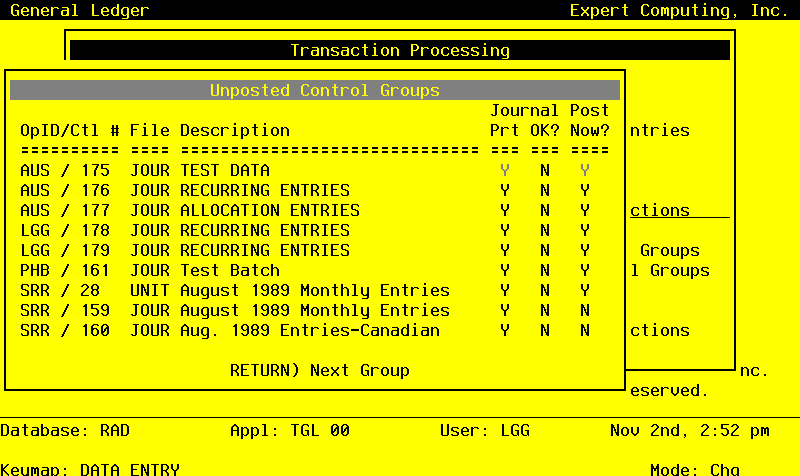
When the key value for a particular record is requested, you can review all the records in the file by selecting the Scan option. The records will be presented on an “Access” screen, and you will be allowed to scan the available data until you find the record you want. Then, position the cursor by that record and press ENTER; the record will be displayed for editing.
Data items for the preceding screen are described below:
- Operator ID
Upper case, up to 3 characters Display only Letters and numbers only
The operator ID of the operator who entered the control group is displayed.
- Control No
Positive number, up to 4 digits Display only
Supply the control number of the record you want to edit.
- File
Upper case, up to 4 characters Display only
The originating file is identified.
- Description
Alphanumeric, up to 30 characters Display only
The description of this group is displayed.
- Print Journal?
Y or N Default Y Required
Enter ‘N’ if you want to delay printing the journal for any reason.
- Post Now?
Y or N Default Y Required
Enter ‘N’ if you want to delay posting for any reason.
The entered data is validated. During validation, including access to other files, conditions may be found which cause messages to be displayed. Errors (E), Warnings (W), and Messages (M) that may result are shown below:
Press ENTER to save the information on this screen.
Select the Next Record option to go to the next Control Groups record.
At this screen, the use of the MODE keys - CHG, or INQ - pertain to those records in the Control Groups file.