
Chapter 2: System Administration
Users File Maintenance
You use Users File Maintenance from the Security menu to identify all of the people at your site who are allowed to enter and run APPX. All types of APPX users, including system administrators, database administrators, application designers, and end users, must be entered in this file. The Users File Maintenance screen is shown in Figure 2-41 below.
Users File Maintenance screen
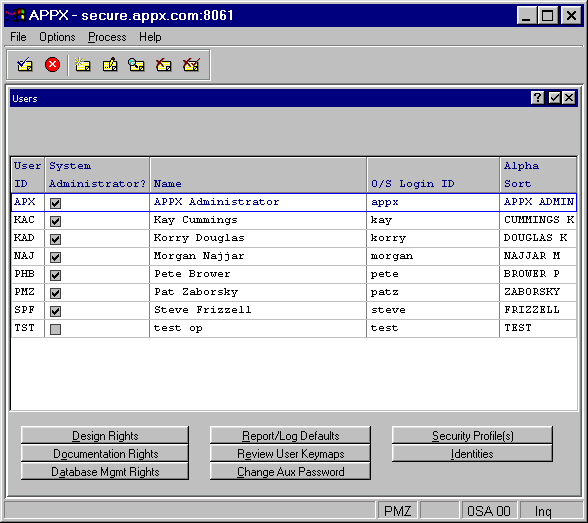
The Users File Maintenance screen contains the following fields:
- User ID
Specifies the unique identifier of each user. You can, for example, use end users’ initials.
- System Administrator?
Designates this user as an APPX system administrator if set to “yes”
 . The default value is “no”
  (the user is not an administrator).
- Name
Allows you to specify the name that is associated with this user ID.
- O/S Login ID
Specifies the internal system name that is assigned to the user. Depending on your computer system, this value may need to be all uppercase letters. Refer to your installation guide for specifics.
- Alpha Sort
Specifies a mechanism for sorting the Users file.
This screen also contains the following options (see the specific overlay section for details):
- Design Rights identifies the applications for which the user has design authority.
- Documentation Rights identifies the applications whose documentation the user may modify.
- Database Mgmt Rights identifies the databases/applications which the user may administer.
- Report/Log Defaults allows for specific defaults for this user.
- Review User Keymaps lists all keymaps defined within APPX for this user.
- Change Aux Password defines a password for the user for processes outside of APPX.
- Security Profiles accesses Security Profiles File Maintenance constrained to the user's profile.
- Identities
Are used to store login information (User ID, realm, and password) for various external interfaces such as an RDBMS. An identity record can exist for each FMS Group/User combination. See the Identities section for an explanation of how identities are used and the hierarchy in which they are employed. See the Identities Overlay for a selected user for field information. A similar Identities Overlay for a selected FMS group is available in File System Groups File Maintenance. Both overlays provide access to the same login information.
When you select a user and press ENTER, the Users File Maintenance overlay appears. This overlay is described in the next section.