
Chapter 2: System Administration
Applications File Maintenance
You use Applications File Maintenance from the Databases/Applications menu to identify and describe each application that is developed or run on your computer. The Applications File Maintenance screen is shown in Figure 2-27 below.
Applications File Maintenance screen
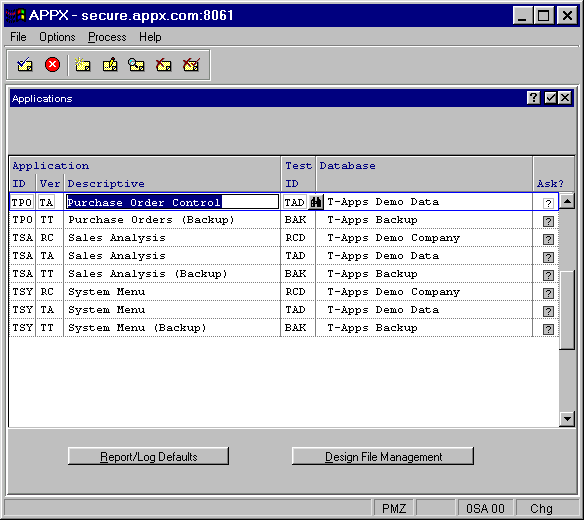
The Applications File Maintenance screen contains the following fields:
- Application ID/Ver
Specifies the unique identifier of the application, followed by a version number. APPX allows you to have multiple versions of each application so that you may associate customized versions with a single baseline application. Normally, the first (or only) version of each application is 00 (zero, zero).
- Descriptive
Is a description for the application/version combination.
- Test Database ID
Specifies the identifier that is associated with the test database you want to use while designing this application.
- Ask?
Select “yes”
 if you want APPX to prompt designers for a database ID when they invoke Run Test Database from the Application Design menu, or “no”
  if you want APPX to automatically choose the Test Database defined above.
When you press ENTER from this screen, the Applications File Maintenance overlay described in the next section appears.
If you select the Report/Log Defaults option, an overlay allows you to enter customized report/log values for this application. See the Applications Report/Log Defaults section for more information.
If you select the Design File Management option, the Design File Management menu appears for the designated application. See the Design File Management section for details.