
Chapter 2: System Administration
Forms File Maintenance
You use Forms File Maintenance from the Configuration menu to identify and specify the attributes of each standard or customized form that you use at your installation. The name you assign to a form here is the one you enter on other system administration screens when specifying a form. The Forms File Maintenance screen is shown in Figure 2-15:
Forms File Maintenance screen
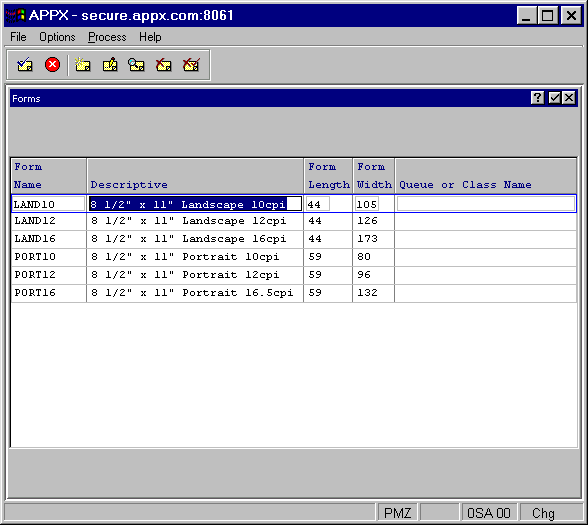
The Forms File Maintenance screen contains the following fields:
- Form Name
Is a unique identifier for each different form that you use at your installation. This is the key to the form file, so each name must be unique. You may choose to enter a form number, if that is the way you identify forms, or you can enter a more descriptive name, such as 132-COLUMN.
- Description
Allows you to enter a description of the form.
- Form Length
Specifies the number of lines that are available for printing on the form. For example, if the form contains 66 lines, but the printer automatically leaves a margin of three blank lines at the top and bottom of each page, enter 60. A value of zero causes continuous printing without page breaks.
- Form Width
Specifies the number of columns that are available for printing on the form. For example, if the form contains 85 columns, but the printer automatically leaves three blank columns on the left and two blank columns on the right, then 80 would be entered here.
- Queue or Class Name
Controls the print queue to which the report will be submitted on Unix systems. RS/6000s use print queues, so this field therefore may be filled in. HP/9000s do not use print queues, so this field therefore should not be filled in. For Windows or NT systems, this field is normally left blank.
When you press ENTER from this screen, the Forms File Maintenance overlay described in the next section appears.