
6Check Processing
Option 1Cash Requirements Report
Use this function to print the Cash Requirements Report. It provides a list of invoices due based on the date of the current check run, the date of the next check run, and the pay status. It lists all unpaid invoices and extends all invoices eligible for payment. This report may be reprinted to reflect any pay status changes. Warnings are issued to avoid duplicate payments. The following processing steps accomplish this job.
- Step 1This function is used to enter the Cash Requirements Report maximum check amount, check date, and following check printing date. The function uses this input as constraints in determining which unpaid invoices are eligible for payment. An invoice is eligible if the discount due date or invoice due date falls before the next check date, or if the discount due date falls before the current check date. In addition, the invoice must have a pay status of ‘N’ (Normal) or ‘T’ (Take discount), a non-blank pay date, and the current Vendor’s pay status is not ‘Hold’. Otherwise, the invoice will not be eligible for payment.
The system will not create a check for a vendor that already has a check in process in the check processing cycle.
On the following pages, the screen displayed by this function is shown.
The screen shown below allows you to enter information required to print the Cash requirements Report.
Cash Requirements Report screen
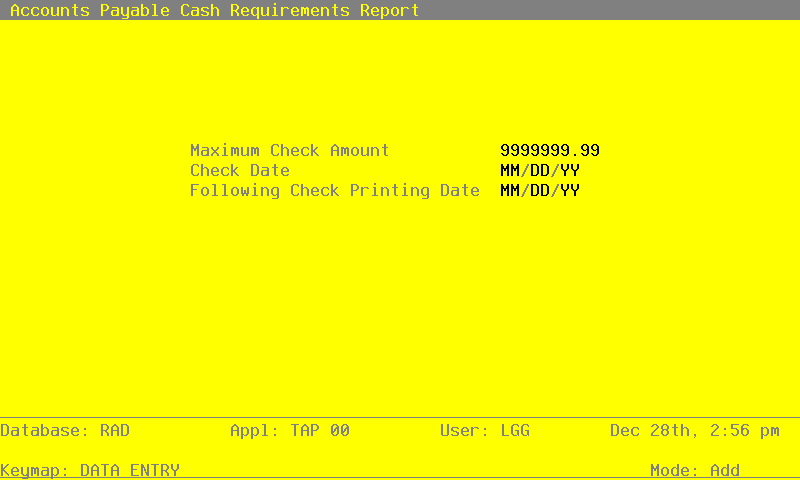
Data items for the preceding screen are described below:
- Maximum Check Amount
Positive number, up to 7 digits and 2 decimals
The Maximum Check Amount is displayed from the Parameters file; you may override the default. No check exceeding this amount is created during the Checks creation process or extended for payment on the Cash Requirements Report.
- Check Date
Date (YMD) Required
Enter the date of this check run. The Check Date entered for the last Cash Requirements Report printed is displayed for the Checks Creation function.
- Following Check Printing Date
Date (YMD) Required
Enter the date of the next check printing session. The system uses this date in determining which invoices need to be paid during the current check run and which can wait to be printed during the next check processing cycle. The Following Check Printing Date entered for the last Cash Requirements Report printed is displayed for the Checks Creation function.
The entered data is validated. During validation, including access to other files, conditions may be found which cause messages to be displayed. Errors (E), Warnings (W), and Messages (M) that may result are shown below:
Press ENTER to save the information on this screen.
- Step 2In preparation for performing a sort/selection process on the Unpaid Invoices information, this step provides you with a default sequencing of data records by Vendor Alpha, Vendor, Apply To and Invoice Type, giving additional sort order choice by Vendor Type, with the option to change modifiable parameters at run time. Selection of data records is provided by Vendor, Vendor Alpha and Vendor Type, with the option to enter user-specified comparisons at run time.
- Step 3This disposition type is used for all standard Accounts Payable reports.
- Step 4According to previously specified criteria, this step actually performs the desired selection and/or sorting process.
- Step 5This step processes the information for Unpaid Invoices. Updates to certain fields in the Unpaid Invoices and Vendors files will occur.
- Step 6In order to print the Cash Requirements Report, this step formats the Unpaid Invoices information. The following data items are shown: Apply To, Invoice Date, Invoice Due Date, Balance Due, Take Discount, Discount Due Date, Net Due amount, Name, Pay Date, Dr Liability, Calculated Discount, Take Retention, Cash Required and Pay Status Description. As appropriate, group headings appear whenever a change occurs in Vendor. If requested, totals appear whenever a change occurs in Vendor. When totals are specified, the following items are accumulated: Total Net Due, Total Dr. Liability, Total Take Discount, Total Take Retention and Total Cash Required. Grand totals print at the end.
A sample output is shown below.
                                                       Expert Computing, Inc.
11/07/94 14:26                                                                                                       LGG Page:  1
                                                      Cash Requirements Report


       Check Date: 01/01/89      Next Checks To Be Printed On: 12/31/89             Maximum Check Amount: 1000000.00
                                                                        Orig/Edit
Apply To Inv Date Date Due Amount Due  Take Dscnt  If Pd By    Net Due  Pay Date    Dr Liab    Discount   Retention  Cash Req’d
=================================================================================================================================

Vendor 00000040  Albert Materials, Inc.


1006     08/16/89               79.50         .00                79.50  Hold
103      07/10/89              441.60         .00               441.60  Hold
104      06/01/89              352.00         .00               352.00  Hold
105      07/10/89              200.00         .00               200.00  Hold
106      07/10/89               80.00         .00                80.00  Hold
204      06/01/89              100.42         .00               100.42  Hold
308      08/16/89              126.17         .00               126.17  Hold
311      08/16/89               76.25         .00                76.25  Hold
34576    08/15/89 08/15/89      36.00-        .00  01/01/0       36.00-
34576    06/01/89               36.00         .00                36.00  Hold
5521     07/10/89               26.82         .00                26.82  Hold
8090     07/10/89              222.31         .00               222.31  Hold
96215    08/14/89 09/10/89        .00       42.00  08/25/89        .00
96215    08/16/89               63.00         .00                63.00  Hold
                                                            __________           __________  __________  __________  __________
                                   — Vendor Totals —>        1768.07                   0.          0.          0.          0.
                                                            ==========           ==========  ==========  ==========  ==========

Vendor 00000080  Sam Jones


12345678 08/12/94 08/31/94    1000.00         .00              1000.00
ER1005   08/12/89 08/31/89    1216.90         .00              1216.90
                                                            __________           __________  __________  __________  __________
                                   — Vendor Totals —>        2216.90                   0.          0.          0.          0.
                                                            ==========           ==========  ==========  ==========  ==========

Vendor 00000010  Miscellaneous Supplier


221      08/14/90 08/31/90     305.00         .00               305.00
         Northwest Interiors
89071001 08/31/89 08/31/89     100.00         .00  08/31/89     100.00
         Master Sellers Company
DEP6/89  06/20/89 06/20/89    1200.00-        .00              1200.00-
         Westin Hotel
L9980    08/14/89 08/31/89     620.00         .00               620.00
         Evergreen Landscaping
P09844   08/14/89 08/31/89     250.00         .00               250.00
         Neighborhood Directory
                                                            __________           __________  __________  __________  __________
                                   — Vendor Totals —>          75.00                   0.          0.          0.          0.
                                                            ==========           ==========  ==========  ==========  ==========