
3File Maintenance
Option 2Terms
You can use this function to perform file maintenance on the Terms file. During invoice entry, the system computes and enters the discount amount, discount due date, and invoice due date for each invoice based on the terms code assigned to the vendor.
By specifying “discount days” and “net days”, you can set limits on when an invoice must be paid in order to receive a discount, and when the net invoice amount is actually due. The due date for discount and net invoice payment is defined by a payment code. The payment code is used to calculate the due dates based on the invoice date, the end of the month, or up to two specific dates during the month.
When you use this function, a record of all entries will be printed. For additions, all new field contents are printed; for deletions, the deleted record’s contents are shown; for changes, both old field contents and new field contents are shown; and in all cases, the User ID, date, and time are printed.
On the following pages, the screen displayed by this function is shown.
The screen shown below presents information about Vendor Terms.
Use this file to maintain codes, percentages, and number of days to be used when calculating discount and invoice due dates for Vendor invoices.
Terms screen
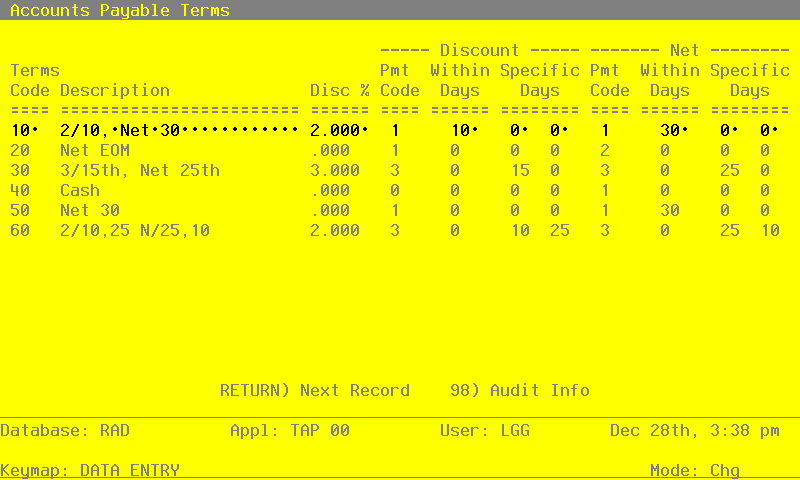
When the key value for a particular record is requested, you can review all the records in the file by selecting the Scan option. The records will be presented on an “Access” screen, and you will be allowed to scan the available data until you find the record you want. Then, position the cursor by that record and press ENTER; the record will be displayed for editing.
Note that the Audit Info option is available at the bottom of this screen. When this option is invoked, the Audit Information overlay appears and displays the date the record was created and who created it, as well as the date the record was last modified and who modified it. Press the END key or the RETURN key to clear the overlay from your screen. The information displayed in the Audit Information overlay is system-supplied and non-modifiable.
Data items for the preceding screen are described below:
- Terms Code
Positive number, up to 3 digits Scan by this field (access key)
Supply a code to identify this Terms record.
- Description
Alphanumeric, up to 16 characters Required
Describe this terms code. The description will generally appear next to the terms code field so that you can verify your entry. For example, ‘2/10, net 30’.
- Discount %
Positive number, up to 2 digits and 3 decimals
Give the percent discount for this Terms record. For example, enter 2 and 1/2 percent as ‘2.5’. If no discount is offered by a vendor, enter 0.
The system uses this percentage to calculate the Discount Amount during Invoice Entry.
- Discount - Payment Code
Positive number, 1 digit Default 1 Required
Supply a code that indicates the date from which the payment days are counted for a discount to apply to an invoice. If no discount applies, enter a ‘1’ in this field and a ‘0’ in the ‘Within Days - Discount’ field. Valid codes are:
- 1
- From the invoice date
- 2
- From the last day of the month
- 3
- From a specific date or dates of the month. For example, the 15th or 25th of the month
The system uses this code to calculate the Discount Due Date during Invoice Entry.
- Discount - Within Days
Positive number, up to 3 digits
Enter the number of days within which invoices must be paid in order to qualify for the discount. If no discount applies, enter a ‘0’ in this field.
The system uses this number of days to calculate the Discount Due Date during Invoice Entry.
- Discount - Specific Days
Positive number, up to 2 digits
Provide the day of the moth from which the payment days are to be counted. You may enter up to two dates for discount and two dates for net payment. This field is used if you entered a code of ‘3’ in the Payment Code field.
The system uses this date to calculate the Discount Due Date during Invoice Entry.
- Net - Payment Code
Positive number, 1 digit Default 1 Required
Supply a code that indicates the date from which the payment days are counted for full payment of the invoice. If payments are due upon receipt or are cash only, enter a ‘1’ in this field and a ‘0’ in the ‘Within Days - Net’ field. Valid codes are:
- 1
- From the invoice date
- 2
- Form the last day of the month
- 3
- From a specific date or dates of the month. For example, the 15th or 25th of the month
The system uses this code to calculate the Due Date during Invoice Entry.
- Net - Within Days
Positive number, up to 3 digits
Enter the number of days within which invoices must be paid in order to avoid service charges. If payments are due upon receipt or are net cash only, enter a ‘0’ in this field.
The system uses this number of days to calculate the Due Date during Invoice Entry.
- Net - Specific Days
Positive number, up to 2 digits
Supply the day of the month from which the payment days are to be countered. You may enter up to two dates for net payment. This field is used if you entered a code of ‘3’ in the Payment Code field.
The system uses this date to calculate the Due Date during Invoice Entry.
The entered data is validated. During validation, including access to other files, conditions may be found which cause messages to be displayed. Errors (E), Warnings (W), and Messages (M) that may result are shown below:
Press ENTER to save the information on this screen.
Select Next Record to go to the next Vendor Terms record.
At this screen, the use of the MODE keys - ADD, DEL, CHG, or INQ - pertain to those records in the Vendor Terms file.