
4Reports and Inquiry
Option 2Ageing Report
Use this function to print vendor balances broken down by ageing category. Detail on transactions can also be printed if you choose. The following processing steps accomplish this job.
- Step 1You can use this function to enter the ageing date, choose which date to use when ageing transactions, define the ageing periods, and choose whether or not to print the transaction detail.
On the following pages, the screen displayed by this function is shown.
The screen shown below allows you to enter information required to print the Ageing report.
Ageing screen
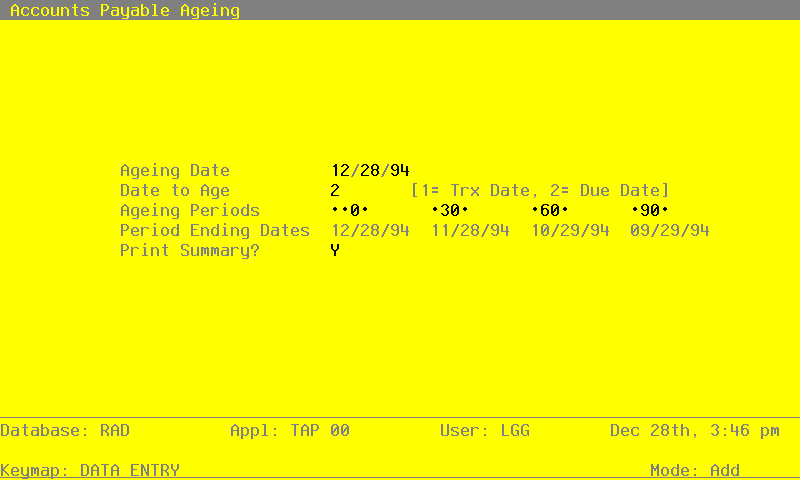
Data items for the preceding screen are described below:
- Ageing Date
Date (YMD)
You can specify the date from which the printed transactions are aged. By default, the system displays today’s date. You can enter a new date to override the display.
- Date to Age
Positive number, 1 digit
Indicate which date you would like to use for ageing the transactions. The Ageing Type is displayed from the Parameters file but may be changed. Valid options are:
- 1
- Transaction Date
- 2
- Due Date
- Ageing Periods
Number, up to 3 digits
The system displays the Transaction Register Periods that were entered in the Parameters file. You can override any ageing period.
Each ageing period refers to either the invoice date or the due date, depending on the entry in the Date To Age field. A positive entry indicates the number of days after the invoice or due date. A negative entry indicates the number of days before the invoice or due date.
For example, ageing entries of ‘0’ and ‘30’ would define the following three periods:
0 and before
1 to 30
31 and above
- Period Ending Dates
Date (YMD) Display only
This date shows you the actual ending date for each ageing period to be printed. This date is determined by subtracting the number of days in the corresponding Ageing Period from the Ageing Date. For example, if the Ageing Date is 6/30/90 and the ageing periods are 0, 30, 60, and 90, the Period Ending Dates are 6/30/90, 5/31/90, 5/1/90, and 4/1/90.
- Print Summary?
Y or N Default N Required
Enter ‘Y’ to print only the summary report. Enter ‘N’ to include the detail.
The entered data is validated. During validation, including access to other files, conditions may be found which cause messages to be displayed. Errors (E), Warnings (W), and Messages (M) that may result are shown below:
Press ENTER to save the information on this screen.
- Step 2In preparation for performing a sort/selection process on the Transactions information, this step provides you with a default sequencing of data records by Liability Account, Vendor Alpha, Vendor, Apply To, Invoice Type and Date/Time Stamp, giving additional sort order choice by Post Year and Post Month, with the option to change modifiable parameters at run time. Selection of data records is provided by Liability Account, Vendor, Post Month and Post Year, with the option to enter user-specified comparisons at run time.
- Step 3This disposition type is used for all standard Accounts Payable reports.
- Step 4According to previously specified criteria, this step actually performs the desired selection and/or sorting process.
- Step 5In order to print the Ageing Report (Summary), this step formats the Transactions information. As appropriate, group headings appear whenever a change occurs in Post Month, Liability Account or Vendor. If requested, totals appear whenever a change occurs in Apply To, Vendor, Liability Account or Post Month. When totals are specified, the following items are accumulated: Total Balance, Amount Total and Ageing Period Percent. Grand totals print at the end.
A sample output is shown below.
                                                       Expert Computing, Inc.
11/08/94 09:51                                                                                                       LGG Page:  1
                                                           Ageing Report

                                              Aged as of 11/08/94   Using Due Date

                                                      11/08/94        10/09/94        09/09/94        08/10/94
Vendor                                   Balance      0  & Under      1  To  30      31  To  60      61  To  90        Over  90
=================================================================================================================================

Account 1061001000  Prepaids & Deposits

00000010  Miscellaneous Supplier             .00              0.              0.              0.              0.             .00
00000020  Pool and Associates            1500.00-             0.              0.              0.              0.         1500.00-
                                    ___________     ____________    ____________    ____________    ___________     ____________
          — Account Totals —>          1500.00-             0.              0.              0.              0.         1500.00-
                                                           .0  %           .0  %           .0  %           .0  %       100.0  %
                                    ============    ============    ============    ============    ============    ============

Account 2010001001  Accounts Payable, Sales

00000040  Albert Materials, Inc.          124.00-             0.              0.              0.              0.          124.00-
00000070  Insurances Unlimited               .00              0.              0.              0.              0.             .00
00000080  Sam Jones                      2216.90              0.              0.              0.         1000.00         1216.90
00000010  Miscellaneous Supplier           75.00              0.              0.              0.              0.           75.00
00000030  Mountain Air Conditionin           .00              0.              0.              0.              0.             .00
00000090  George Peters                  1198.50              0.              0.              0.              0.         1198.50
00000020  Pool and Associates            2410.00              0.              0.              0.              0.         2410.00
00000060  Travel Planners                4528.80              0.              0.              0.              0.         4528.80
00000100  Kris Williams                  1156.33              0.              0.              0.              0.         1156.33
00000050  Hardware Services, Inc.         625.88              0.              0.              0.              0.          625.88

                                     ___________     ____________    ____________    ____________    ___________     ____________
          — Account Totals —>         12087.41              0.              0.              0.         1000.00        11087.41
                                                           .0  %           .0  %           .0  %           8.3  %        91.7  %
                                    ============    ============    ============    ============    ============    ============

Account 2030001001  Retention Payable, Sales

00000040  Albert Materials, Inc.         1892.07         1892.07              0.              0.              0.              0.

                                    ___________     ____________    ____________    ____________    ___________     ____________
          — Account Totals —>          1892.07         1892.07              0.              0.              0.              0.
                                                         100.0  %           .0  %           .0  %           .0  %          .0  %
                                    ============    ============    ============    ============    ============    ============

Account 4010000001WH  Cost of Goods Sold, Sales/Whls

00000040  Albert Materials, Inc.             .00             .00              0.              0.              0.              0.

                                    ___________     ____________    ____________    ____________    ___________     ____________
          — Account Totals —>              .00             .00              0.              0.              0.              0.
                                                           .0  %           .0  %           .0  %           .0  %          .0  %
                                    ============    ============    ============    ============    ============    ============


                                    ___________     ____________    ____________    ____________    ___________     ____________
            — Grand Totals —>         12479.48         1892.07              0.              0.         1000.00         9587.41
                                                           15.2  %           .0  %           .0  %          8.0  %        76.8  %
============ ============ ============ ============ ============ ============- Step 6In order to print the Ageing Report (Detail), this step formats the Transactions information. As appropriate, group headings appear whenever a change occurs in Post Month, Liability Account or Vendor. If requested, totals appear whenever a change occurs in Apply To, Vendor, Liability Account or Post Month. When totals are specified, the following items are accumulated: Total Balance, Amount Total and Ageing Period Percent. Grand totals print at the end.
A sample output is shown below.
                                                       Expert Computing, Inc.
11/08/94 09:52                                                                                                       LGG Page:  1
                                                           Ageing Report

                                              Aged as of 11/08/94   Using Due Date

Apply To  Description                         Balance     0  & Under     1  To  30     31  To  60     61  To  90       Over  90
=================================================================================================================================

Account 1061001000  Prepaids & Deposits


Vendor  00000010  Miscellaneous Supplier

                                         ____________   ____________   ____________   ___________    ____________   ____________
                — Vendor Totals —>              .00             0.             0.             0.             0.             0.
                                                               .0  %          .0  %          .0  %          .0  %          .0  %
                                         ============   ============   ============   ============   ============   ============


Vendor  00000020  Pool and Associates

9877DEP   deposit on mailer production      1500.00-                                                                    1500.00-
                                         ____________   ____________   ____________   ___________    ____________   ____________
                — Vendor Totals —>          1500.00-            0.             0.             0.             0.         1500.00-
                                                                 .0  %          .0  %          .0  %          .0  %      100.0  %
                                         ============   ============   ============   ============   ============   ============


                                         ____________   ____________   ____________   ___________    ____________   ____________
               — Account Totals —>          1500.00-            0.             0.             0.             0.        1500.00-
                                                                 .0  %          .0  %          .0  %          .0  %      100.0  %
                                         ============   ============   ============   ============   ============   ============

Account 2010001001  Accounts Payable, Sales


Vendor  00000040  Albert Materials, Inc.

34576     write off retention                   36.00-                                                                     36.00-
84700     write off retention                   88.00-                                                                     88.00-
                                         ____________   ____________   ____________   ___________    ____________   ____________
                — Vendor Totals —>             124.00-            0.             0.             0.             0.         124.00-
                                                                 .0  %          .0  %          .0  %          .0  %      100.0  %
                                         ============   ============   ============   ============   ============   ============


Vendor  00000010  Miscellaneous Supplier

221       New lobby plants                     305.00                                                                     305.00
          Northwest Interiors
89071001  CUSTOMER REFUNDS                     100.00                                                                     100.00
          Master Sellers Company
DEP6/89   convention room                     1200.00-                                                                   1200.00-
          Westin Hotel
L9980     Office landscaping                   620.00                                                                     620.00
          Evergreen Landscaping
P09844    Yellow page ad                       250.00                                                                     250.00
          Neighborhood Directory
                                         ____________   ____________   ____________   ___________    ____________   ____________
                — Vendor Totals —>              75.00             0.             0.             0.             0.          75.00
                                                                 .0  %          .0  %          .0  %          .0  %      100.0  %
                                         ============   ============   ============   ============   ============   ============