
1Transaction Processing
Option 10Consolidated Processing
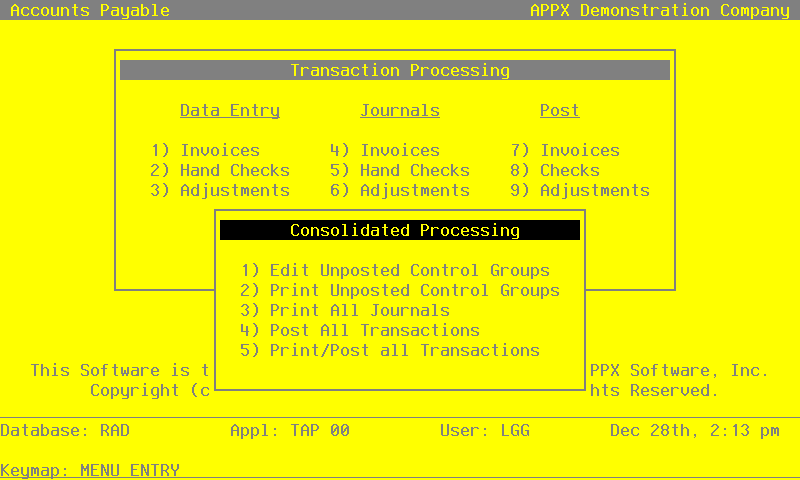
The following menu appears when you select the Consolidated Processing option from the Transaction Processing menu and allows you to select from four different options.
Consolidated Processing menu
Edit Unposted Control Groups
You can use this function to edit the “Print Journal?” and “Post Now?” questions on all control group records of outstanding transactions.
On the following pages, the screen displayed by this function is shown.
The screen shown below presents information about Control Groups.
Unposted Control Groups screen
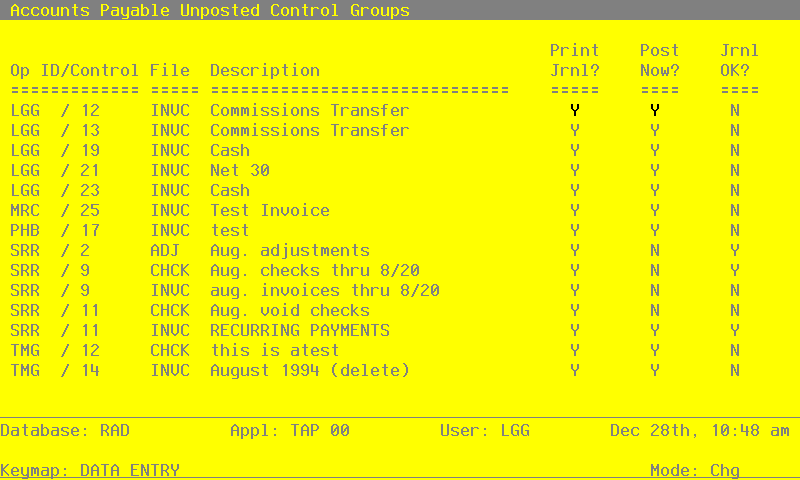
When the key value for a particular record is requested, you can review all the records in the file by selecting the Scan option. The records will be presented on an “Access” screen, and you will be allowed to scan the available data until you find the record you want. Then, position the cursor by that record and press ENTER; the record will be displayed for editing.
Data items for the preceding screen are described below:
- Operator ID
Upper case, up to 3 characters Display only Letters and numbers only
The operator ID of the operator who entered the control group is displayed.
- Control No
Positive number, up to 4 digits Display only
Supply the control number of the record you want to edit.
- File
Upper case, up to 4 characters Display only
The originating file is identified. The valid values and their meanings are:
- ADJ
- Adjustments
- INVC
- Invoices
- CHCK
- Hand/Void/Machine Checks
- Description
Alphanumeric, up to 30 characters Display only
The description of this group is displayed.
- Print Journal?
Y or N Default Y Required
Enter ‘N’ if you want to delay printing the journal for any reason.
- Post Now?
Y or N Default Y Required
Enter ‘N’ if you want to delay posting for any reason.
- Journal OK?
Y or N Display only Default N
The system displays ‘Y’ if the journal has been printed and has no errors; otherwise, an ‘N’ is displayed.
The entered data is validated. During validation, including access to other files, conditions may be found which cause messages to be displayed. Errors (E), Warnings (W), and Messages (M) that may result are shown below:
Press ENTER to save the information on this screen.
Select Next Record to go to the next Control Groups record.
At this screen, the use of the MODE keys - CHG or INQ pertain to those records in the Control Groups file.
Print Unposted Control Groups
This function lists any unposted control groups in the Invoices, Adjustments, and Checks files. The number of transactions will also be included. The following processing steps accomplish this job.
- Step 1This disposition type is used for all standard Accounts Payable reports.
- Step 2In order to print the Accounts Payable Unposted Transactions - Invoices, this step formats the Invoices Control Groups information. The following data items are shown: Operator ID, Control Number, Description, Line Number, Operator Exclusive?, Print Journal?, Journal OK?, Post Now?, Post Started?, Control Total and Vendor Hash Total.
A sample output is shown below.
                                                     APPX Demonstration Company
11/30/94 09:55                                                                                                       LGG Page:  1
                                                  Unposted Transactions - Invoices


                                                              No     Op   Prnt  Jour  Post  Post
Op/Cntrl      Description                                    Trx     Ex   Jour  OK    Now   Strt   Cntrl Total         Hash Total
=================================================================================================================================

LGG / 0012    Commissions Transfer                             0     N    Y     N     Y     N

LGG / 0013    Commissions Transfer                             0     N    Y     N     Y     N

LGG / 0019    Cash                                             0     N    Y     N     Y     N

LGG / 0021    Net 30                                           1     N    Y     N     Y     N

LGG / 0023    Cash                                             2     N    Y     N     Y     N

MRC / 0025    Test Invoice                                     1     N    Y     N     Y     N

PHB / 0017    test                                             0     N    Y     N     Y     N

SRR / 0009    aug. invoices thru 8/20                          5     N    Y     Y     N     N          8755.06               190

SRR / 0011    RECURRING PAYMENTS                               2     N    Y     Y     Y     N           754.80                90

TMG / 0014 August 1994 1 N Y N Y N- Step 3In order to print the Accounts Payable Unposted Transactions - Checks, this step formats the Disbursements Control Groups information. the following data items are shown: Operator ID, Control Number, Description, Auto Hand Flag, Line Number, Operator Exclusive?, Print Journal?, Journal OK?, Post Now?, Post Started?, Control Total and Vendor Hash Total.
A sample output is shown below.
                                                     APPX Demonstration Company
11/30/94 09:55                                                                                                       LGG Page:  1
                                                   Unposted Transactions - Checks


                                                              No     Op   Prnt  Jour  Post  Post
Op/Cntrl      Description                         Hand/Auto  Trx     Ex   Jour  OK    Now   Strt   Cntrl Total         Hash Total
=================================================================================================================================

SRR / 0009    Aug. checks thru 8/20                   H        3     N    Y     Y     N     N          2481.98               140

SRR / 0011    Aug. void checks                        H        2     N    Y     N     N     N          9323.31-               40

TMG / 0012 this is atest A 11 N Y N Y N- Step 4In order to print the Accounts Payable Unposted Transactions - Adjustments, this step formats the Adjustments Control Groups information. The following data items are shown: Operator ID, Control Number, Description, Line Number, Operator Exclusive?, Print Journal?, Journal OK?, Post Now?, Post Started?, Control Total and Hash Total.
A sample output is shown below.
                                                     APPX Demonstration Company
11/30/94 09:56                                                                                                       LGG Page:  1
                                                Unposted Transactions - Adjustments


                                                              No     Op   Prnt  Jour  Post  Post
Op/Cntrl      Description                                    Trx     Ex   Jour  OK    Now   Strt   Cntrl Total         Hash Total
=================================================================================================================================

SRR / 0002    Aug. adjustments                                 4     N    Y     Y     N     N
Print All Journals
This job prints the Invoices, Hand Checks, Checks, and Adjustments journals. The following processing steps accomplish this job.
- Step 1This disposition type is used for all transaction file journals.
- Step 2This function identifies the application that created the invoice control group.
- Step 3In preparation for performing a sort/selection process on the Invoices information, this step provides sequencing of data records by Post Now?, Operator ID, Control Number, Post Year and Post Month, with no option to change the sequence at run time. selection of data records is provided by Operator ID, Control Number, Print Journal? and Journal OK?, with the option to enter user-specified comparisons at run time.
- Step 4According to previously specified criteria, this step actually performs the desired selection and/or sorting process.
- Step 5In order to print the Accounts Payable Invoices Journal, this step formats the Invoices and Invoices Line Items information. The following data items are shown: Trx No, Vendor, Name, Pay Status, Invoice Date, Discount and Invoice Due Date, Description, PO No, Post Month/Year, Transaction Type, Warehouse No, Retention and Liability Account, Invoice No, Apply To, Invoice Amt, Prepayment, Retention, Subtotal, Discount, Freight, Tax, Other, Line No, Offset Account, Item, Warehouse No, Price, Quantity, Prorate?, Amount Prorated to Line Item, Amount, Subsidiary type and Code, Prorata and Line Items Total. As appropriate, group headings appear whenever a change occurs in Control No or Post Month. If requested, totals appear whenever a change occurs in Post Month or Control No. When totals are specified, the following amounts are accumulated: Invoice, Prepaid, Retention, Subtotal, Discount, Freight, Tax, and Other. Grand totals print at the end showing Journal Errors and Warnings.
                                                     APPX Demonstration Company
11/30/94 16:29                                                                                                       SRR Page:  1
                                                 Accounts Payable Invoices Journal


 Trx  Vendor                                  Pay Status    Inv Date Dsc Date Due Date Description                    PO No
Mo/Yr
      Liab Account                                         Trx Type               Wh  Retention Account
      Invoice   Apply To   Invc Amt  Prepayment   Retention    Subtotal    Discount  Disc Basis     Freight       Tax       Other
=================================================================================================================================

Control Group SRR / 0009  aug. invoices thru 8/20

Post Month/Year 08 / 89

0001  00000060 Travel Planners                Normal        08/18/89          09/17/89 Williams to Toronto                  08 89
      2010001001  Accounts Payable, Sales                  AP Invoice
      11985-0   11985-0      681.20         .00         .00      681.20         .00      681.20         .00        .00        .00

Line Account                                         Item Code        Wh      Price   Quantity  Prorate?   Prorata      Amount

0001 4110000001MA  Travel & Entertainment, Sales                            681.000       1.00     Y           .00      681.00
                   Williams to Toronto               GL WILLIAMS
0002 1010001000  Cash, Corporate                                              0.200       1.00     Y           .00         .20
                                                                                                             —————       —————
                                                                          — Line Item Totals —>                .00      681.20
————————————————————————————————————————————————————————————————————————————————————————————————————————————————————————————————

0002  00000060 Travel Planners                Normal        08/19/89          09/18/89 Peters to Baltimore                  08 89
      2010001001  Accounts Payable, Sales                  AP Invoice
      11994-1   11994-1      870.50         .00         .00      870.50         .00      870.50         .00       .00         .00

Line Account                                         Item Code        Wh      Price   Quantity  Prorate?   Prorata      Amount

0001 4110000001MA  Travel & Entertainment, Sales                            870.500       1.00     Y           .00      870.50
                   Peters to Baltimore               GL PETERS
                                                                                                             —————       —————
                                                                          — Line Item Totals —>                .00      870.50
—————————————————————————————————————————————————————————————————————————————————————————————————————————————————————————————————- Step 6In preparation for performing a sort/selection process on the Disbursements information, this step provides sequencing of data records by Post Now?, Operator ID, Control No, Post Year and Post Month, with no option to change the sequence at run time. Selection of data records is provided by Operator ID, Control No, Print Journal? and Journal OK?, with the option to enter user-specified comparisons at run time.
- Step 7According to previously specified criteria, this step actually performs the desired selection and/or sorting process.
- Step 8In order to print the report requested, this step formats the Disbursements and Disbursements Line Items information. The following data items are shown: Trx No, Vendor, Name, Check Amount, Check No, Check Date, Post Month/Year, Hand Check Status, Cash Account, Description, Check Line No, Apply To Apply Type, PO No, Dr Liability, Discount Amount, Cr Retention, Direct Amount, Account, Subsidiary Type and Code, Retention Account, Liability Total, CR Discount Total, CR Retention Total, Direct Total and Line Items Total. As appropriate, group headings appear whenever a change occurs in Control No or Post Month. If requested, totals appear whenever a change occurs in Post Month or Control No. When totals are specified, the following items are accumulated: Active Check Totals, Liability Total, CR Discount Total, CR Retention Total, Direct Total, Line Items Total, Check Total, Control Total, Current Control, Control Remaining, Vendor Hash Total, Current Hash and Hash Remaining. Grand totals print at the end, showing Journal Errors and Journal Warnings.
                                                     APPX Demonstration Company
11/30/94 09:59                                                                                                       LGG Page:  1


                                                        Hand Checks Journal

 Trx Vendor                                   Check Amt  Check No  Chk Date Mo/Yr Status Cash Account
=================================================================================================================================

Control Group SRR / 0011  Aug. void checks

Post Month/Year 08 / 89

0001 00000010 Rainbow Signs, Inc.                168.90- 00000303  08/13/89 08 89 Void  1010001001  Cash, Sales Outlets
Rainbow Signs-cancel payment
Item  Apply To Apl Type     PO No        DR Liab    Discount     CR Retn     Dir Amt   Account

0001  675-SS   Apply To Inv               168.90-       .00                           4090000001WH Repairs and Maintnc, Wholesale
      sign-cancel payment
                                           —————      —————        —————       —————        —————
          — Line Item Totals —>           168.90-       .00          .00         .00       168.90-
—————————————————————————————————————————————————————————————————————————————————————————————————————————————————————————————————

0002 00000030 Mountain Air Conditioning         9154.31- 00005105  06/01/89 08 89 Void  1010001001  Cash, Sales Outlets
Mountain AC-void lost check
Item  Apply To Apl Type     PO No        DR Liab    Discount     CR Retn     Dir Amt   Account


0001  102      Apply To Inv 97979798     8000.00-        .00                           2010001001  Accounts Payable, Sales
      Mountain Air Conditioning                                                        2030001001  Retention Payable, Sales
0002  109      Apply To Inv               634.68-      19.63-                          2010001001  Accounts Payable, Sales
      Mountain Air Conditioning                                                        2030001001  Retention Payable, Sales
0003  88071000 Apply To Inv               485.00-      15.00-                          2010001001  Accounts Payable, Sales
      Mountain Air Conditioning                                                        2030001001  Retention Payable, Sales
                                           —————      —————        —————       —————        —————
          — Line Item Totals —>          9119.68-     34.63-         .00         .00      9154.31-
—————————————————————————————————————————————————————————————————————————————————————————————————————————————————————————————————
                                      __________  __________  __________  __________   __________   Active Check Total:    0.
   — Post Mo/Yr 08 89 Totals —>        9288.58-      34.63-        .00         .00      9323.21-        Check Total:    9323.21-
                                      ==========  ==========  ==========  ==========   ==========                      ==========

                                      __________  __________  __________  __________   __________   Active Check Total:    0.
      — Control Group Totals —>        9288.58-      34.63-        .00         .00      9323.21-        Check Total:    9323.21-

                                                                                              Entered    Calculated    Difference
Control Group: SRR / 0011  Aug. void checks                            Control Totals:       9323.31-      9323.21-          .10-
Exclusive?     N                                                       Hash Totals:               40            40
Post Now?      N

Error - The Entered and Calculated Control Totals are Not Equal
Warning - This Control Group Contains Errors and Cannot Be Posted
=================================================================================================================================

=================================================================================================================================
                                         DR Liab    Discount     CR Retn     Dir Amt    Items Tot
                                         _______    ________     _______     _______    _________  Active Check Total:      0.
              — Grand Totals —>          9288.58-     34.63-        .00         .00      9323.21-         Check Total:   9323.21-

Number of Errors in This Journal: 1             Number of Warnings: 1
================================================================================================================================
================================================================================================================================- Step 9In preparation for performing a sort/selection process on the Disbursements information, this step provides sequencing of data records by Post Now?, Operator ID, Control No, Post Year and Post Month, with no option to change the sequence at run time. Selection of data records is provided by Operator ID, Control No, Print Journal? and Journal OK?, with the option to enter user-specified comparisons at run time.
- Step 10According to previously specified criteria, this step actually performs the desired selection and/or sorting process.
- Step 11In order to print the report requested, this step formats the Disbursements and Disbursements Line Items information. The following data items are shown: Trx No, Vendor, Name, check Amount, Check No, Check Date, Post Month/Year, Hand Check Status, Cash Account, Description, Check Line No, Apply To, Apply Type, PO No, Dr. Liability, Discount Amount, Cr Retention, Direct Amount, Account, Subsidiary Type and Code, Retention Account, Liability Total, CR Discount Total, CR Retention Total, Direct Total and Line Items Total. As appropriate, group headings appear whenever a change occurs in Control No or Post Month. If requested, totals appear whenever a change occurs in Post Month or Control No. When totals are specified, the following items are accumulated: Active Check Totals, Liability total, CR Discount Total, CR Retention Total, Direct Total, Line Items Total Check Total, Control Total, Current Control, Control Remaining, Vendor Hash Total, Current Hash and Hash Remaining. Grand totals print at the end, showing Journal Errors and Journal Warnings.
                                                     APPX Demonstration Company
11/30/94 09:53                                                                                                       LGG Page:  1


                                                           Checks Journal

 Trx Vendor                                   Check Amt  Check No  Chk Date Mo/Yr Status Cash Account
=================================================================================================================================

Control Group SRR / 0008  Aug. 1st check run

Post Month/Year 08 / 89

0001 00000040 Albert Materials, Inc.         11110.46   00005500   08/16/89  08 89  Check 1010001001  Cash, Sales Outlets

Item  Apply To Apl Type     PO No        DR Liab    Discount     CR Retn     Dir Amt   Account


0001  1006     Apply To Inv              2597.00       53.00       79.50                2010001001  Accounts Payable, Sales
      materials                                                                         2030001001  Retention Payable, Sales
0001  308      Apply To Inv              4128.15       77.53      126.17                2010001001  Accounts Payable, Sales
      stock                                                                             2030001001  Retention Payable, Sales
0001  311      Apply To Inv              2491.70       50.00       76.25                2010001001  Accounts Payable, Sales
      stock                                                                             2030001001  Retention Payable, Sales
0001  96215    Apply To Inv              2058.00        0.00       63.00                2010001001  Accounts Payable, Sales
      materials                                                                         2030001001  Retention Payable, Sales

                                        ________   _________   _________    ________    _________
          — Line Item Totals —>         11274.85      180.53      344.92        0.00     11110.46
_________________________________________________________________________________________________________________________________

0002 00000050 Hardware Services, Inc.         2028.31 00005501  08/16/89 08 89   Check  1010001001  Cash, Sales Outlets

Item  Apply To Apl Type     PO No        DR Liab    Discount     CR Retn     Dir Amt   Account


0001  05981    Apply To Inv               432.81        0.00                           2010001001  Accounts Payable, Sales
      belt repair
0002  98700    Apply To Inv               626.87       62.63                           2010001001  Accounts Payable, Sales
      Drive repair
0003  NEW963-1 Apply To Inv              2200.00       56.00                           2010001001  Accounts Payable, Sales
      new hardware installation
0004  NEW963-9 Apply To Inv              1500.00      150.00                           2010001001  Accounts Payable, Sales
      new hardware installation
                                        ________   _________   _________    ________    _________
          — Line Item Totals —>          1759.68     268.63        0.00         0.00      2028.31
_________________________________________________________________________________________________________________________________

0003 00000070 Insurances Unlimited         254.80   00005502  08/16/89 08 89   Check  1010001001  Cash, Sales Outlets

Item  Apply To Apl Type     PO No        DR Liab    Discount     CR Retn     Dir Amt   Account


0001  89071000  Apply To Inv              254.80        0.00                            2010001001  Accounts Payable, Sales
      Monthly Policy Payment
                                        ________   _________   _________    ________    _________
          — Line Item Totals —>           254.80        0.00        0.00        0.00       254.80
_________________________________________________________________________________________________________________________________- Step 12In preparation for performing a sort/selection process on the Adjustments information, this step provides sequencing of data records by Post Now?, Operator ID, Control Number, Post Year and Post Month, with no option to change the sequence at run time. Selection of data records is provided by Operator ID, Control Number, Print Journal? and Journal OK?, with the option to enter user-specified comparisons at run time.
- Step 13According to previously specified criteria, this step actually performs the desired selection and/or sorting process.
- Step 14In order to print the Accounts Payable Adjustments Journal, this step formats the Adjustments information. The following data items are shown: Transaction No, Vendor, Name, PO No, Apply To, Adjust Date, Description, Amount, Offset Account, Post Month/Year, Invoice Type, Invoice Type Description, Liability Account, Item Code, Warehouse Number, Subsidiary Type and Subsidiary Code, As appropriate, group headings appear whenever a change occurs in Control Number or Post Month. If requested, totals appear whenever a change occurs in Post Month or Control Number. When totals are specified, the following items are accumulated: Adjustment Total, Control Total, Current Total, Control Total Remaining, Hash Total, Current Hash Total and Hash Total Remaining. Grand totals print at the end, showing Journal Errors and Journal Warnings.
A sample output is shown below.
                                                     APPX Demonstration Company
11/30/94 16:31                                                                                                       SRR Page:  1
                                                Accounts Payable Adjustments Journal


 Trx   Vendor                              PO No                 Apply To  Adj Date  Description                     Adj Amount
              Offset Account                                     Mo/Yr     Invoice Type
              Liability Account                                  Item              Wh    Sub Type/Code
=================================================================================================================================

Control Group SRR / 0002  Aug. adjustments

Post Month/Year 08 / 89

 0001  00000020  Pool and Associates                             9852-6    08/20/89  correct invoice amount              300.00
              4100000001WH  Promotion/Advertising, Wholesl       08 89     1 Invoice
              2010001001  Accounts Payable, Sales                                   0

 0002  00000040  Albert Materials, Inc.                          8090      08/20/89  Write off retention                 222.31-
              2030001001  Retention Payable, Sales               08 89     2 Retention Invoice
              2010001001  Accounts Payable, Sales                                   0

 0003  00000060  Travel Planners                                 11596-1   08/20/89  correct vendor                      985.60-
              2010001001  Accounts Payable, Sales                08 89     1 Invoice
              2010001001  Accounts Payable, Sales                                   0

 0004  00000080  Sam Jones                                       11596-1   08/20/89  correct vendor                      985.60
              2010001001  Accounts Payable, Sales                08 89     1 Invoice
              2010001001  Accounts Payable, Sales                                   0
                                                                            — Post Month/Year 08 89 Total —>              77.69
                                                                                                                         ——————
                                                                                                                   ============

                                                                                                                         ——————
                                                                                    — Control Group Total —>              77.69

                                                                                              Entered    Calculated    Difference
Control Group: SRR / 0002  Aug. adjustments                             Control Totals:                       77.69
Exclusive?     N                                                        Hash Totals:                            200
Post Now?      N

=================================================================================================================================

                                                                                                                     Adj Amount
                                                                                                                          —————
                                                                                            — Grand Total —>              77.69
Number of Errors in This Journal: 0             Number of Warnings: 0
=================================================================================================================================
=================================================================================================================================- Step 15In order to print the Accounts Payable Journal Summary, this step formats the summarized Distributions information. The following data items are shown: Post Year, Post Month, GL Account, Description, Journal Code, Operator ID, Transaction Date, Debits and Credits.
A sample output is shown below.
                                                     APPX Demonstration Company
11/30/94 10:00                                                                                                       LGG Page:  1
                                                  Accounts Payable Journal Summary


Yr Mo  Account       Account Name                    Jrnl  ID   Trx Date        Debits        Credits
=================================================================================================================================
89 08  1010001001  Cash, Sales Outlets               APCD  SRR  08/13/89       9323.21
89 08  2010001001  Accounts Payable, Sales           APCD  SRR  08/13/89                      9119.68-
89 08  4070000000WH  Discounts Lost, Wholesale       APCD  SRR  08/13/89                        34.63-
89 08  4090000001WH  Repairs and Maintnc, Wholesale  APCD  SRR  08/13/89                       168.90-
                                                                                ——————         ——————
                                                  — Grand Totals —>            9323.21        9323.21-
                                                                          =============  =============
Post All Transactions
This job post invoices, checks, and adjustments. The following processing steps accomplish this job.
- Step 1This disposition type is used for all posting functions.
- Step 2This function identifies the application that created the invoice control group.
- Step 3In preparation for performing a sort/selection process on the Invoices Control groups information, this step provides sequencing of data records by key, with no option to change the sequence at run time. Selection of data records is provided by Operator ID, Control Number, Journal OK? and Post Now?, with the option to enter user-specified comparisons at run time.
- Step 4This step prevents CANCEL from canceling the current job.
- Step 5Accounting to previously specified criteria, this step actually performs the desired selection and/or sorting process.
- Step 6This step process the information for Invoices Control Groups, Invoices and Invoices Line Items. Under certain conditions, records in the Transaction Control file will be added. Updates to certain fields in the Invoices Control Groups, Invoices, Invoices Line Items and Transaction Control files will occur. Generalized routines are performed to do Prorata Set Up in Account Payable, do Month to Date Postings in Accounts Payable, Post GL Transactions in General Ledger, Convert Calendar To Fiscal in General Ledger, Compute Prorata Line Amount in Accounts Payable and Calculate Estimated Freight in Accounts Payable.
- Step 7This step processes the information for Invoices Control Groups, Invoices and Invoices Line Items. Under certain conditions, records in the Transaction Control and Miscellaneous Vendor Name/Address files will be added. Updates to certain fields in the Parameters, Invoices Control Groups, Miscellaneous Vendor Name/Address and Transaction Control files will occur. Generalized routines are performed to do Prorata Set Up in Accounts Payable, Post AP Transactions in Accounts Payable, Compute Prorata Line Amount in Accounts Payable, Calculate Estimated Freight in Account Payable, Post Inventory Costs in Inventory Control, do Month to Date Postings in accounts Payable, Post GL Transactions in General Ledger and Convert Calendar To Fiscal in General Ledger. Records in the Invoices Line Items, Invoices and Invoices Control Groups files will then be deleted.
- Step 8In preparation for performing a sort/selection process on the Disbursements Control Groups information, this step provides sequencing of Data records by key, with no option to change the sequence at run time. Selection of data records is provided by Operator ID, Control Number, Journal OK? and Post Now?, with the option to enter user-specified comparisons at run time.
- Step 9This step prevents CANCEL from canceling the current job.
- Step 10According to previously specified criteria, this step actually performs the desired selection and/or sorting process.
- Step 11This step processes the information for disbursements Control Groups, Disbursements and Disbursements Line Items. Under certain conditions, records in the Transaction Control file will be added. Updates to certain fields in the Disbursements Control Groups, Disbursements, Disbursements Line Items and Transaction Control files will occur. Generalized routines are performed to do Month to Date Postings in Accounts Payable, Post GL Transactions in General Ledger and Convert Calendar To Fiscal in General Ledger.
- Step 12This step processes the information for Disbursements Control Groups, Disbursements and Disbursements Line Items. Under certain conditions, records in the Transaction Control and Outstanding Checks files will be added. Updates to certain fields in the Parameters, Disbursements Control groups, Vendors and Transaction Control files will occur. Generalized routines are performed to Post AP Transactions in Accounts Payable. Records in the Disbursements line Items, Disbursements and Disbursements Control Groups files will then be deleted.
- Step 13In preparation for performing a sort/selection process on the Adjustments Control Groups information, this step provides sequencing of data records by key, with no option to change the sequence at run time. Selection of data records is provided by Operator ID, Control Number, Journal OK? and Post Now?, with the option to enter user-specified comparisons at run time.
- Step 14This step prevents Cancel from canceling the current job.
- Step 15According to previously specified criteria, this step actually performs the desired selection and/or sorting process.
- Step 16This step processes the information for Adjustments Control Groups and Adjustments. Under certain conditions, records in the Transaction Control file will be added. Updates to certain fields in the Adjustments Control Groups, Transaction Control and Adjustments files will occur. Generalized routines are performed to do Month to Date Postings in Accounts Payable, Post GL Transactions in General Ledger and Convert Calendar To Fiscal in General Ledger.
- Step 17This step processes the information for Adjustments Control Groups and Adjustments. Under certain conditions, records in the Transaction Control file will be added. Updates to certain fields in the Parameters, Adjustments Control Groups and Transaction Control files will occur. Generalized routines are performed to Post AP Transactions in Accounts Payable and Post Inventory Costs in Inventory Control. Records in the Adjustments and Adjustments Control Groups files will then be deleted.
- Step 18This function displays a warning to the operator if any errors were encountered during posting or processing.
Print/Post All Transactions
This job prints the Invoices, Adjustments, and Checks journals and then posts the transactions. The following processing steps accomplish this job.
- Step 1This disposition type is used for all transaction file journals.
- Step 2This function identifies the application that created the invoice control group.
- Step 3In preparation for performing a sort/selection process on the Invoices information, this step provides sequencing of data records by Post Now?, Operator ID, Control Number, Post Year and Post Month, with no option to change the sequence at run time. Selection of data records is provided by Operator ID, Control Number, Print Journal? and Journal OK?, with the option to enter user-specified comparisons at run time.
- Step 4According to previously specified criteria, this step actually performs the desired selection and/or sorting process.
- Step 5In order to print the Accounts Payable Invoices Journal, this step formats the Invoices and Invoices Line Items information. The following data items are shown: Trx No, Vendor, Name, Pay Status, Invoice Date Discount and Invoice Due Date, Description, PO No, Post Month/Year, Transaction Type, Warehouse No, Retention and Liability Account, Invoice, No, Apply To, Invoice Amt, Prepayment Retention, Subtotal, Discount, Freight, Tax Other, Line No, Offset Account, Item, Warehouse No, Price, Quantity, Prorate?, Amount Prorated to Line Item, Amount, Subsidiary Type and Code, Prorata and Line Items Total. As appropriate, group headings appear whenever a change occurs in Post Month or Control No. When totals are specified, the following amounts are accumulated: Invoice, Prepaid, Retention, Subtotal, Discount, Freight, Tax, and Other. Grand totals print at the end Showing Journal Errors and Warnings.
- Step 6In preparation for performing a sort/selection process on the Disbursements information, this step provides sequencing of data records by Post Now?, Operator ID, Control No, Post Year and Post Month, with no option to change the sequence at run time. Selection of data records is provided by Operator ID, Control No, Print Journal? and Journal OK?, with the option to enter user-specified comparisons at run time.
- Step 7According to previously specified criteria, this step actually performs the desired selection and/or sorting process.
- Step 8In order to print the report requested, this step formats the Disbursements and Disbursements line Items information. The following data items are shown: Trx No, Vendor, Name, Check Amount, Check No, Check Date, Post Month/Year, Hand Check Status, Cash Account, Description, Check Line No, Apply To, Apply Type, PO No, Dr Liability, Discount Amount, Cr Retention, Direct Amount, Account, Subsidiary Type and Code, Retention Account, Liability Total, CR Discount Total, CR Retention Total, Direct Total and Line Items Total. As appropriate, group headings appear whenever a change occurs in Control No or Post Month. If requested, totals appear whenever a change occurs in Post Month or Control No. When totals are specified, the following items are accumulated: Active Check Totals, Liability Total, CR Discount Total, CR Retention Total, Direct Total, Line Items Total, Check Total, Control Total, Current Control, Control Remaining, Vendor Hash Total, Current Hash and Hash Remaining. Grand totals print at the end, showing Journal Errors and Journal Warnings.
- Step 9In preparation for performing a sort/selection process on the Disbursements information, this step provides sequencing of data records by Post Now?, Operator ID, Control No, Post Year and Post Month, with no option to change the sequence at run time. Selection of data records is provided by Operator ID, Control No, Print Journal? and Journal OK?, with the option to enter user-specified comparisons at run time.
- Step 10According to previously specified criteria, this step actually performs the desired selection and/or sorting process.
- Step 11In order to print the report requested, this step formats the Disbursements and Disbursements Line Items information. The following data items are shown: Trx No, Vendor, Name, Check Amount, Check No, Check Date, Post Month/Year, Hand Check Status, Cash Account, Description, Check Line No, Apply To, Apply type, PO No, Dr. Liability, Discount Amount, Cr Retention, Direct Amount, Account, Subsidiary Type and Code, Retention Account, Liability appropriate, group headings appear whenever a change occurs in Control No or Post Month. If requested, totals appear whenever a change occurs in Post Month or Control No. When totals are specified, the following items are accumulated: Active Check Totals, Liability Total, CR Discount Total, CR Retention Total, Direct Total, Line Items Total, Check Total, Control Total, Current Control, Control Remaining, Vendor Hash Total, Current Hash and Hash Remaining. Grand totals print a the end, showing Journal Errors and Journal Warnings.
- Step 12In preparation for performing a sort/selection process on the Adjustments information, this step provides sequencing of data records by Post Now?, Operator ID, Control Number, Post Year and Post Month, with no option to change the sequence at run time. Selection of data records is provided by Operator ID, Control Number, Print Journal? and Journal OK?, with the option to enter user-specified comparisons at run time.
- Step 13According to previously specified criteria, this step actually performs the desired selection and/or sorting process.
- Step 14In order to print the Accounts Payable Adjustments Journal, this step formats the Adjustments information. The following data items are shown: Transaction No, Vendor, Name, PO No, Apply To, Adjust Date, Description, Amount, Offset Account, Post Month/Year, Invoice Type, Invoice Type Description, Liability Account, Item Code, Warehouse Number, Subsidiary Type and Subsidiary Code. As appropriate, group headings appear whenever a change occurs in Control Number or Post Month. If requested, totals appear whenever a change occurs in Post Month or Control Number. When totals are specified, the following items are accumulated: Adjustment Total, Control total, Current Total, Control total Remaining, Hash Total, Current Hash Total and Hash Total Remaining. Grand totals print at the end, showing Journal Errors and Journal Warnings.
A sample output is shown below.
                                                     APPX Demonstration Company
11/30/94 10:58                                                                                                       LGG Page:  1
                                                Accounts Payable Adjustments Journal


 Trx   Vendor                              PO No                 Apply To  Adj Date  Description                     Adj Amount
              Offset Account                                     Mo/Yr     Invoice Type
              Liability Account                                  Item              Wh    Sub Type/Code
=================================================================================================================================

Control Group SRR / 0002  Aug. adjustments

Post Month/Year 08 / 89

 0001  00000020  Pool and Associates                             9852-6    08/20/89  correct invoice amount              300.00
              4100000001WH  Promotion/Advertising, Wholesl       08 89     1 Invoice
              2010001001  Accounts Payable, Sales                                   0

 0002  00000040  Albert Materials, Inc.                          8090      08/20/89  Write off retention                 222.31-
              2030001001  Retention Payable, Sales               08 89     2 Retention Invoice
              2010001001  Accounts Payable, Sales                                   0

 0003  00000060  Travel Planners                                 11596-1   08/20/89  correct vendor                      985.60-
              2010001001  Accounts Payable, Sales                08 89     1 Invoice
              2010001001  Accounts Payable, Sales                                   0

 0004  00000080  Sam Jones                                       11596-1   08/20/89  correct vendor                      985.60
              2010001001  Accounts Payable, Sales                08 89     1 Invoice
              2010001001  Accounts Payable, Sales                                   0
                                                                            — Post Month/Year 08 89 Total —>              77.69
                                                                                                                         ——————
                                                                                                                   ============

                                                                                                                         ——————
                                                                                    — Control Group Total —>              77.69

                                                                                              Entered    Calculated    Difference
Control Group: SRR / 0002  Aug. adjustments                             Control Totals:                       77.69
Exclusive?     N                                                        Hash Totals:                            200
Post Now?      N

=================================================================================================================================

                                                                                                                     Adj Amount
                                                                                                                          —————
                                                                                            — Grand Total —>              77.69
Number of Errors in This Journal: 0             Number of Warnings: 0
=================================================================================================================================
=================================================================================================================================- Step 15In order to print the Accounts Payable Journal Summary, this step formats the Summarized Distributions information. The following data items are shown: Post Year, Post Month, GL Account, Description, Journal Code, Operator ID, Transaction Date, Debits and Credits.
A sample output is shown below.
                                                     APPX Demonstration Company
11/30/94 10:59                                                                                                       LGG Page:  1
                                                  Accounts Payable Journal Summary


Yr Mo  Account       Account Name                    Jrnl  ID   Trx Date        Debits        Credits
=================================================================================================================================
89 08  2010001001  Accounts Payable, Sales           APAJ  SRR  08/20/89                        77.69-
89 08  2030001001  Retention Payable, Sales          APAJ  SRR  08/20/89                       222.31-
89 08  4100000001WH  Promotion/Advertising, Wholesl  APAJ  SRR  08/20/89        300.00
                                                                                ——————         ——————
                                                  — Grand Totals —>             300.00         300.00-
============= =============- Step 16This function identifies the application that created the invoice control group.
- Step 17In preparation for performing a sort/selection process on the Invoices Control Groups information, this step provides sequencing of data records by key, with no option to change the sequence at run time. Selection of data records is provided by Operator ID, Control Number, Journal OK? and Post Now?, with the option to enter user-specified comparisons at run time.
- Step 18This step prevents CANCEL from canceling the current job.
- Step 19According to previously specified criteria, this step actually performs the desired selection and/or sorting process.
- Step 20This step processes the information for Invoices Control Groups, Invoices and Invoices Line Items. Under certain conditions, records in the Transaction Control file will be added. Updates to certain fields in the Invoices Control Groups, Invoices, Invoices Line Items and Transaction Control files will occur. Generalized routines are performed to do Prorata Set Up in Accounts Payable, do Month to Date Postings in Accounts Payable, Post GL Transactions in General Ledger, Convert Calendar To Fiscal in General Ledger, Compute Prorata Line Amount in Accounts Payable and Calculate Estimated Freight in Accounts Payable.
- Step 21This step processes the information for Invoices Control Groups, Invoices and Invoices Line Items. Under certain conditions, records in the Transaction Control and Miscellaneous Vendor Name/Address files will be added. Updates to certain fields in the parameters, Invoices Control Groups, Miscellaneous Vendor Name/Address and Transaction Control files will occur. Generalized routines are performed to do Prorata Set Up in Accounts Payable, Post AP Transactions in Accounts Payable, Compute Prorata Line Amount in Accounts Payable, Calculate Estimated Freight in Accounts Payable, Post Inventory Costs in Inventory Control, do Month to Date Postings in Accounts Payable, Post GL Transactions in General Ledger and Convert Calendar To Fiscal In General Ledger. Records in the Invoices Line Items, Invoices and Invoices Control Groups files will then be deleted.
- Step 22In preparation for performing a sort/selection process on the Disbursements Control Groups information, this step provides sequencing of data records by key, with no option to change the sequence at run time. Selection of data records is provided by Operator ID, Control Number, Journal OK? and Post Now?, with the option to enter user-specified comparisons at run time.
- Step 23This step prevents CANCEL from canceling the current job.
- Step 24According to previously specified criteria, this step actually performs the desired selection and/or sorting process.
- Step 25This step processes the information for Disbursements Control Groups, Disbursements and Disbursements Line Items. Under certain conditions, records in the Transaction Control file will be added. Updates to certain fields in the Disbursements Control Groups, Disbursements, Disbursements Line Items and Transaction Control files will occur. Generalized routines are performed to do Month to Date Postings in Accounts Payable, Post GL Transactions in General Ledger and Convert Calendar To Fiscal in General Ledger.
- Step 26This step processes the information for Disbursements Control Groups, Disbursements and Disbursements Line Items. Under certain conditions, records in the Transaction Control and Outstanding Checks files will be added. Updates to certain fields in the Parameters, Disbursements Control Groups, Vendors and Transaction Control files will occur. Generalized routines are performed to Post AP Transactions in Accounts Payable. Records in The Disbursements Line Items, Disbursements and Disbursements Control Groups files will then be deleted.
- Step 27In preparation for performing a sort/selection process on the Adjustments Control Groups information, this step provides sequencing of data records by key, with no option to change the sequence at run time.
Selection of data records is provided by Operator ID, Control Number, Journal OK?, and Post Now?, with the option to enter user-specified comparisons at run time.
- Step 28This step prevents CANCEL from canceling the current job.
- Step 29According to previously specified criteria, this step actually performs the desired selection and/or sorting process.
- Step 30This step processes the information for Adjustments Control Groups and Adjustments. Under certain conditions, records in the Transaction Control file will be added. Updates to certain fields in the Adjustments Control Groups, Transaction Control and Adjustments files will occur. Generalized routines are performed to do Month to Date Postings in Accounts Payable, Post GL Transaction sin General Ledger and Convert Calendar To Fiscal in General Ledger.
- Step 31This step processes the information for Adjustments Control Groups and Adjustments. Under certain conditions, records in the Transaction Control file will be added. Updates to certain fields in the Parameters, Adjustments Control Groups and Transaction Control files will occur. Generalized routines are performed to Post AP Transactions in Accounts Payable and Post Inventory Costs in Inventory Control. Records in the Adjustments and Adjustments Control Groups files will then be deleted.
- Step 32This function displays a warning to the operator if any errors were encountered during posting or processing.