
7Utilities and Special Edits
Option 4Change/Delete Product Numbers
This function is used to change product numbers on all records that include a product number. Because a product number is a part of records in most Inventory Control files, this function enables you to change product numbers on all the records automatically. Specifically, this function changes the product number in the following files:
- Products
- Product Purchases
- Products By Warehouse
- Products By Vendor
- Product Discounts By Customer
This function can also delete all records that contain a specified product number.
A product number cannot be changed or deleted if:
- Any Products By Warehouse record has nonzero values for on order, committed, or open requisition quantities for the product.
- There are open purchase orders (in Purchase Orders); sales orders (in Order Entry); or material requisitions or reorder records (in Inventory Control) for the product.
A product number can be changed, but not deleted, if:
- Any sales history for the product exists in the Products By Warehouse file.
- Any purchase history for the product exists in the Products By Vendor file.
At any time you can select the Direct Process 1 option to momentarily suspend this function to exit to the “installation-wide” direct menu, or the Direct Process 2 option to exit to the “application” direct menu. In addition, you can review on-line documentation for any field at any time by positioning the cursor at that field and selecting the Help option.
Below is the Change/Delete Product Numbers screen.
Change/Delete Product Numbers screen
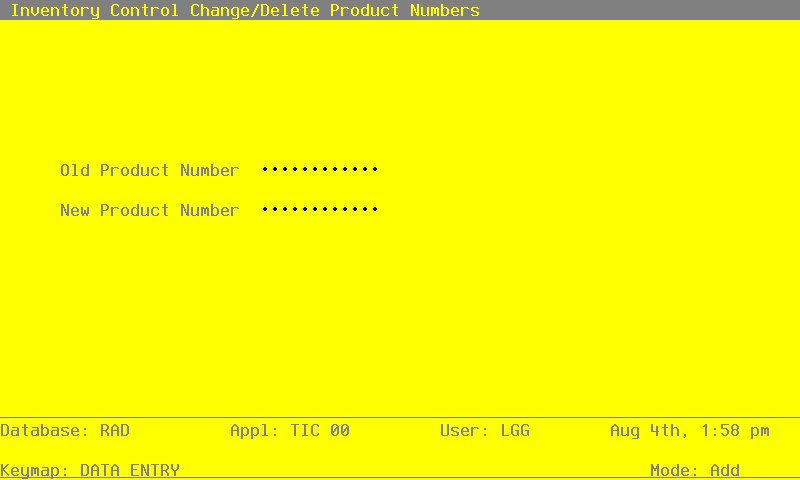
Data items for the preceding screen are described below.
- Old Product Number
Enter the number of the current product number that is to be changed or deleted. You can use the Scan option to find an appropriate entry. This product number must be on file in the Products file; the system displays the corresponding description so that you can verify your entry.
- New Product Number
If the product number is being changed, enter the number of the new product. If the product number is to be deleted, leave this field blank.
The entered data is validated. Press RETURN to save the information on this screen and update the affected Inventory Control files.
Below is a sample Change/Delete Product Numbers report from this function.
                                                    Expert Distributing, Inc.
06/06/91 05:16 pm                                                                                                  KAY Page:    1
                                                   Product Number Changes List

                            Old Prod                           New Prod
                            Number                             Number        Name
=================================================================================================================================

                            30                                 32            #56 10" Red Cylinder