
1Transaction Processing
Option 20Edit Unposted Control Groups
You can use this function to edit the “Print Journal?” and “Post Now?” questions on all control group records of outstanding transactions.
The screen shown below presents information about Unposted Control Groups.
Unposted Control Groups screen
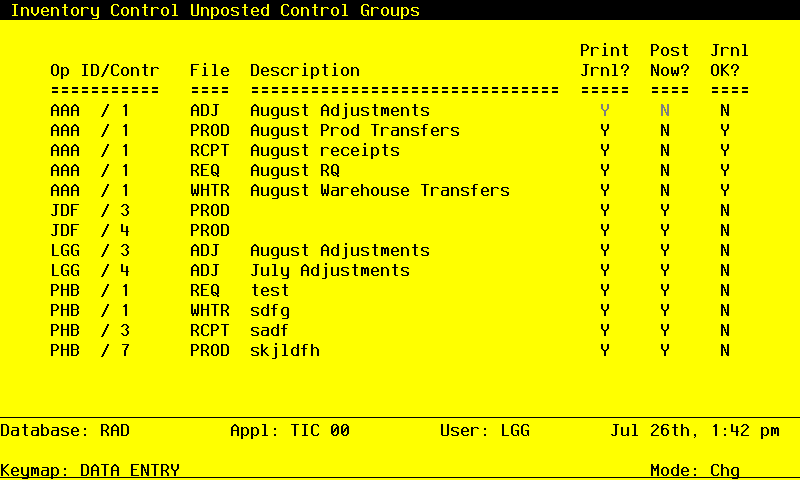
Data items for the preceding screen are described below:
- Operator ID
Upper case, up to 3 characters Display only Letters and numbers only
The operator ID of the operator who entered the control group is displayed.
- Control No
Positive number, up to 4 digits Display only
Supply the control number of the record you want to edit.
- File
Upper case, up to 4 characters Display only
The originating file is identified. The valid values and their meanings are:
REQ — Material Requisitions
WHTR — Warehouse Transfers
PROD — Product Transfers
ADJ — Adjustments
RCPT — Receipts
- Description
Alphanumeric, up to 30 characters Display only
The description of this group is displayed.
- Print Journal?
Y or N Default Y Required
Enter ‘N’ if you want to delay printing the journal for any reason.
- Post Now?
Y or N Default Y Required
Enter ‘N’ if you want to delay posting for any reason.
- Journal OK?
Y or N Display only Default N
The system displays ‘Y’ if the journal has been printed and has no errors; otherwise, ‘N’ is displayed.
The entered data is validated. Press RETURN to save the information on this screen. Select Next Record to go to the next Control Groups record.
At this screen, the use of the MODE keys—CHG or INQ—pertain to those records in the Control Groups file.