
6Physical Inventory
Option 3Tags Entry
Tags count functions provide an alternative to the Physical Count functions for entering physical inventory. They allow you to enter, edit, list, and process physical inventory data using numbered tags. The use of tags can simplify the physical inventory process and provide a more accurate count in a large warehouse environment.
This function is used to enter the physical inventory count for specific tags in specific product/warehouse/bin locations. Comments about the tag can be entered.
Select “Tags Entry” from the Physical Inventory menu. Here is the Tags Entry screen:
Tags screen
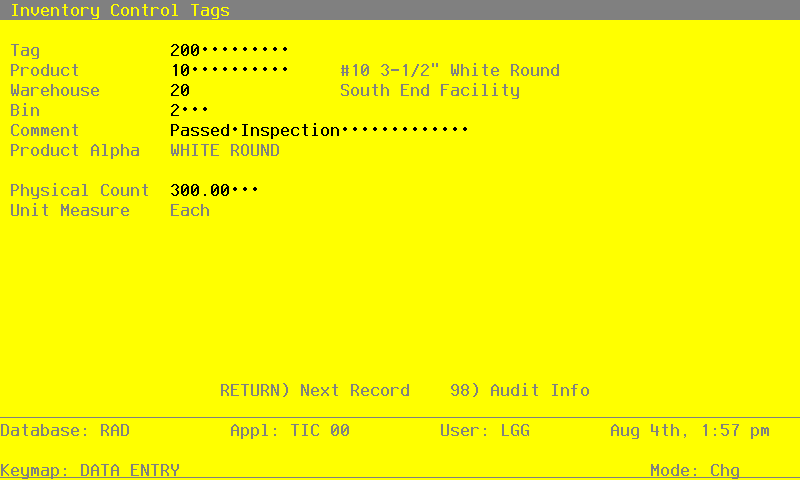
Certain entries on this screen will be automatically displayed. In most cases, the displayed entry can be changed. If an asterisk (*) appears next to one of the fields listed, it indicates a “display-only” field, which cannot be changed.
When the key value for a particular record is requested, you can review all the records in the file by selecting the Scan option. The records will be presented on an “Access” screen, and you will be allowed to scan the available data until you find the record you want. Then, position the cursor by that record and press RETURN; the record will be displayed for editing.
Data items for the preceding screen are described below.
- Tag
Enter up to 12 digits to identify the inventory tag from which data is being entered.
- Product
Enter the number of the product counted with this tag. You can use the Scan option to find an appropriate entry. This product number must be on file in the Products file.
The system displays the corresponding description so that you can verify your entry.
- Warehouse
Enter the number of the warehouse where the product counted with this tag is located. You can use the Scan option to find an appropriate entry. This warehouse number must be on file in the Warehouses file. The system displays the corresponding description so that you can verify your entry.
- Bin
Enter up to 4 characters to identify the warehouse bin where the product counted with this tag is located.
- Comment
Enter a comment of up to 30 characters which relates to this tag.
- Product Alpha*
The system displays the product alpha from the Products By Warehouse file.
- Physical Count
Enter up to 5 digits and 2 decimals for the number of stockkeeping units tagged for this product in this warehouse and bin.
This entry does not update the Physical field in the Products By Warehouse record until the Tags Process function is run.
- Unit Measure*
The system displays the stockkeeping unit of measure for the product from the Products file.
The entered data is validated. Press RETURN to save the information on this screen.
Select Next Record to go to the next Tags record.
At this screen, use of the MODE keys — ADD, DEL, CHG, or INQ — pertain to those records in the Tags file.