
2Initial Setup Opening Entries
Option 3Enter Opening Balances
You can use this function to enter initial account balances for a given fiscal month and year. You can also enter start-of-year, end-of-year, YTD Source, and YTD Use amounts. The following processing steps accomplish this job.
- Step 1You may also choose whether the values entered or edited are to be in year-to-date (CUM) or monthto-date (NET) terms. Press the Cancel option to return to the menu.
The screen shown below allows you to enter parameters needed for the Enter Opening Balances utility.
Initial Setup Enter Opening Balances screen
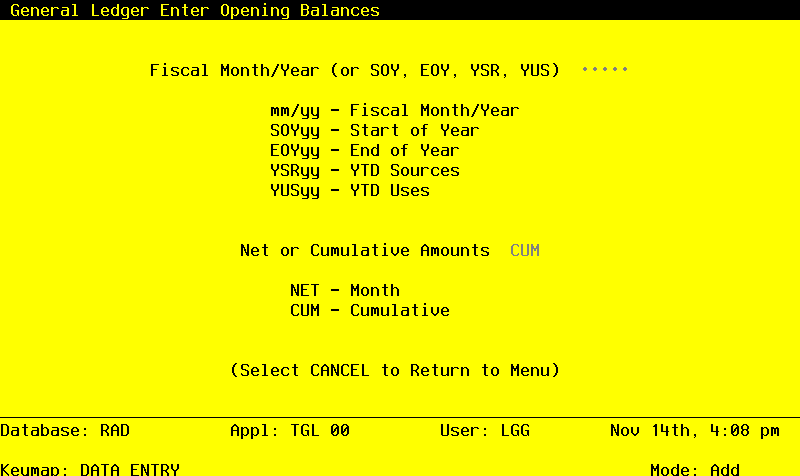
Data items for the preceding screen are described below:
- Fiscal Month/Year
Upper case, up to 5 characters Required
Define the accounting period to which these parameters apply. Valid entries and their meanings are:
mm/yy: 2 digits each for the fiscal month and year for these entries (months can be 01 - 13; the slash must be included)
EOYyy: End-of-Year, followed by 2 digits for the fiscal year
SOYyy: Start-of-Year, following by 2 digits for the fiscal year
YSRyy: Year-to-Date Sources, followed by 2 digits for the fiscal year (for Account Balances only)
YUSyy: Year-to-Date Uses, followed by 2 digits for the fiscal year (for Account Balances only)
- Net or Cumulative Amounts
Upper case, up to 3 characters Letters only Valid: NET, CUM Required
Define the code that identifies the terms in which the balances are to be entered. If you enter a net amount, the cumulative figure will be calculated by the system.
- NET
- Month-to-date net activity
- CUM
- Year-to-date cumulative amounts
The entered data is validated. During validation, including access to other files, conditions may be found which cause messages to be displayed. Errors (E), Warnings (W), and Messages (M) that may result are shown below:
Press ENTER to save the information on this screen.
- Step 2The screen shown below presents information about Account Balances.
This file contains monthly summaries of postings for each account by fiscal year. It also contains startof-year (SOY), end-of-year (EOY), and year-to-date Sources (normally credits) and Uses (normally debits) amounts.
Initial Setup Enter Opening Balances screen
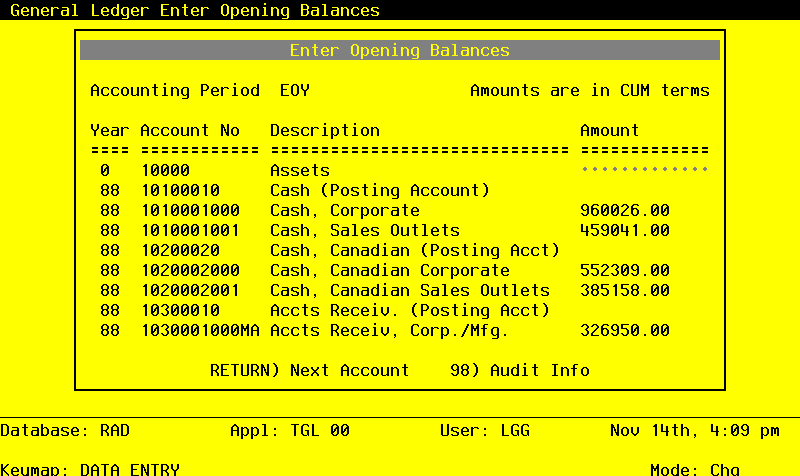
When the key value for a particular record is requested, you can review all the records in the file by selecting the Scan option. The records will be presented on an “Access” screen, and you will be allowed to scan the available data until you find the record you want. Then, position the cursor by that record and press ENTER; the record will be displayed for editing.
Data items for the preceding screen are described below:
- Fiscal Year
Positive number, up to 2 digits Display only
Identify the fiscal year for which balances are to be entered.
- Account
Upper case, up to 12 characters Display only
This is the number which is used in all accounting applications to identify this account.
The entered data is validated. During validation, including access to other files, conditions may be found which cause messages to be displayed. Errors (E), Warnings (W), and Messages (M) that may result are shown below:
W Heading and Summary Accounts Should Be Set to Zero Press ENTER to display system-supplied information and then press ENTER again to save the information on this screen.
Select the Next Record option to go to the next Account Balances record.
At this screen, the use of the MODE keys - CHG, or INQ - pertain to those records in the Account Balances file.
- Step 3This step conditionally allows a job to branch forward or backward to any sequence number in the list of functions in the job.