
2Initial Setup Opening Entries
Option 2Edit Account Descriptions
You can us this function to edit the account description during Initial Setup. This may be necessary if you use the Create Balance records utility to generate additional Chart of Accounts records.
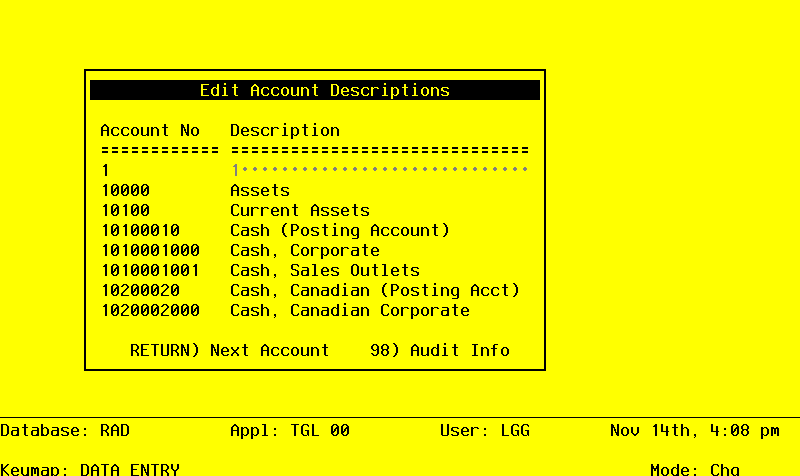
The screen shown below presents information about the Chart of Accounts.
This file contains basic information about each account, such as its description, subsidiary type, currency code, and the level of detail to keep.
Initial Setup Edit Account Descriptions screen
When the key value for a particular record is requested, you can review all the records in the file by selecting the Scan option. The records will be presented on an “Access” screen, and you will be allowed to scan the available data until you find the record you want. Then, position the cursor by that record and press ENTER; the record will be displayed for editing.
Data items for the preceding screen are described below:
- Account Number
Upper case, up to 12 characters Display only
This number will be used in all accounting applications to identify this account.
- Description
Alphanumeric, up to 30 characters Required
Describe this account. This description will generally appear next to the account number field whenever it is displayed on other screens and reports.
The entered data is validated. During validation, including access to other files, conditions may be found which cause messages to be displayed. Errors (E), Warnings (W), and Messages (M) that may result are shown below:
Press ENTER to save the information on this screen.
Select the Next Record option to go to the next Chart of Accounts record.
At this screen, the use of the MODE keys - ADD, DEL, CHG, or INQ - pertain to those records in the Chart of Accounts file.