
2Initial Setup Opening Entries
Option 1Create Balance Records
This function creates Account Balance records based upon the parameters selected. This function can be repeated if appropriate for each range of accounts. The following processing steps accomplish this job.
- Step 1You can use this function to enter parameters to define a range of Account Balances records to be created. Criteria for creation include the option of appending additional account segments to a “main” account number.
Every account within the range specified will have Account Balances records created for it, for the fiscal years defined. In addition, if account segments are being appended, new Chart of Accounts records will be added and Account Balances records will be created for the new accounts as well.
The screen shown below allows you to enter parameters needed for the Create Balance Records utility.
Initial Setup Create Balance Records screen
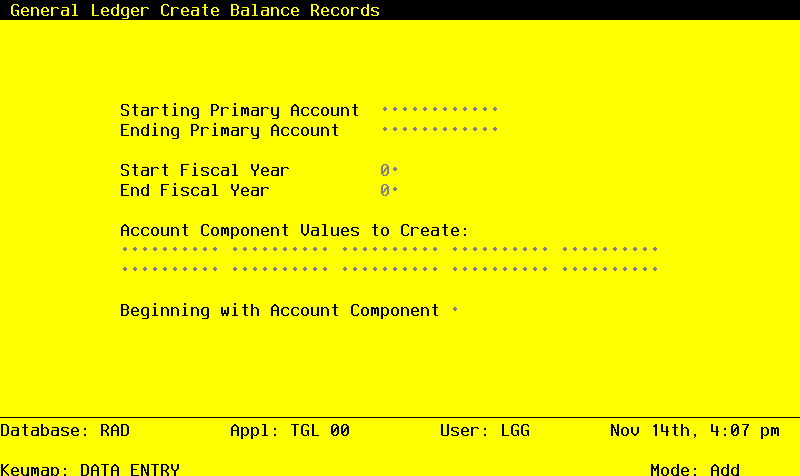
Date items for the preceding screen are described below:
- Starting Primary Account
Upper case, up to 12 characters Required
Define the starting value of the range of primary account numbers. Each account within this range will have appended to it, the subsequent entered values for the lower level account components.
For example, assume your account number has four components: Main Account, Sub Account, Division, and Branch. You decide to enter only the Main/Sub Account combinations during file maintenance, and you want to use this function to automatically create the rest of the account records, appending the division and Branch. In this circumstance, you would enter the lowest Main/Sub Account combination in this field, to which you want Division/ Branch combinations appended.
In a similar fashion you could use just Main accounts, appending Sub/Division/Branch combinations; or you could use Main/Sub/Division combinations, appending just the Branch.
- Ending Primary Account
Upper case, up to 12 characters Required
Define the ending value of the range of primary account numbers. Each account within this range will have appended to it, the subsequent entered values for the lower level account components.
For example, assume your account number has four components: Main Account, Sub Account, Division, and Branch. You decide to enter only the Main/Sub Account combinations during file maintenance, and you want to use this function to automatically create the rest of the account records, appending the Division and Branch. In this circumstance, you would enter the highest Main/Sub Account combination in this field, to which you want Division/ Branch combinations appended.
In a similar fashion you could use just Main accounts, appending Sub/Division/Branch combinations; or you could use Main/Sub/Division combinations, appending just the Branch.
- Start Fiscal Year
Positive number, up to 2 digits
Supply the first fiscal year for the selected range of accounts.
- End Fiscal Year
Positive number, up to 2 digits
Supply the last fiscal year for the selected range of accounts.
- Account Component Values to Create
Upper case, up to 10 characters
Enter the values for the lower level account components which are to be appended to each primary account in the selected range. Define each combination that you want to have appended to each primary account selected.
For example, assume your account number has four components: Main Account, Sub Account, Division, and Branch. You decide to enter only the Main/Sub Account combinations during file maintenance, and you want to use this function to automatically create the rest of the account records, appending the Division and Branch. In this circumstance, you would enter every combination of Division and Branch in these fields, that you want to have appended to each primary account you have selected.
In a similar fashion you could use just Main accounts, appending Sub/Division/Branch combinations; or you could use Main/Sub/Division combinations, appending just the Branch.
- Beginning with Account Component
Upper case, 1 character Valid: 2, 3, 4
Enter the number of the account component, which represents the first of the list of account components to be appended to the selected primary accounts.
For example, assume your account number has four components: Main Account, Sub Account, Division, and Branch. You decide to enter only the Main/Sub Account combinations during file maintenance, and you want to use this function to automatically create the rest of the account records, appending the Division and Branch. In this circumstance, you would enter ‘3’ in this field, indicating you want to append Division/Branch combinations (Division is the third account component in this example).
In a similar fashion you would enter ‘2’ if you were using just Main accounts, appending Sub/ Division/Branch combinations; or you would enter ‘4’ if you were using Main/Sub/Division combinations and appending just the Branch.
The entered data is validated. During validation, including access to other files, conditions may be found which cause messages to be displayed. Errors (E), Warnings (W), and Messages (M) that may result are shown below:
Press ENTER to save the information on this screen.
- Step 2This disposition type is used for all standard processing functions within General Ledger.
- Step 3This step processes the information for Chart of Accounts. Under certain conditions, records in the Account Balances and Chart of Accounts files will be added. Generalized routines are performed to separate the account number in General Ledger.