
Chapter 3: Initial Setup Opening Entries
Option 2Transaction Register
Use this function to print a detail listing of customer transactions, printing the balance in the appropriate ageing column. Zero balance invoices are not included for months prior to the current month; this information is located on the Transaction History file. The following processing steps accomplish this job.
Step 1 this function allows you to enter the ageing date, choose which date to age from, enter the ageing periods, and choose whether or not to print the transaction description.
The screen shown below allows you to enter parameters needed to print the Transaction Register report.
Initial Setup Transaction Register screen
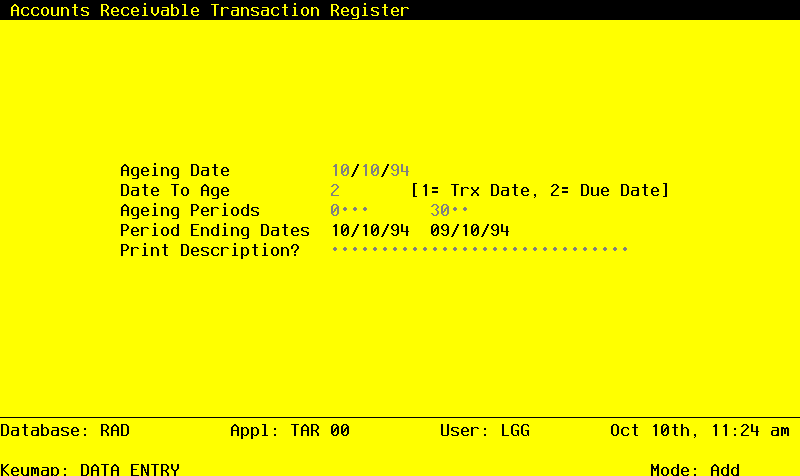
Data items for the preceding screen are described below:
- Ageing Date
Date (YMD) Required
You can specify the date from which the transactions to be printed will be aged. By defauly, the system displays today’s date. You can enter a new date to override the display.
- Date to Age
Positive number, 1 digit
The system displays the Ageing Type entry from the parameters file. If you wish, you can change it. Valid options are:
- 1
- Invoice date
- 2
- Due date
- Ageing Periods
Number, up to 3 digits
The system displays the ageing periods that were entered in the Parameters file for this report. You can override any ageing period.
Each ageing period refers to either the invoice date or the due date, depneding on the the entry in the Date To Age or Closing Date field. A positive entry indicates the number of days after the invoice or due date. A negative entry indicates the number of days before the invoice or due date.
- Period Ending Dates
Date (YMD) Display only
These dates show you the actual ending date for each ageing period that is to be printed. This date is determined by subtracting the number of days in the corresponding Ageing Period to the Ageing Date. For example, if the Ageing Date is 6/30/90 and the ageing periods are 0, 30, 60, and 90, the Period Ending Dates will 6/30/90, 5/31/90, 5/01/90, and 4/01/90.
- Print Description?
Y or N Default N
You can choose to print the descripton of each transaction on the Transaction Register. Printing this information requires an extra line. By default, the system displays ‘N’. The display can be changed:
- Y
- Print the customer’s purchase order numbe/description for each transaction on the Transaction Register.
- N
- Do not print customer purchase order numbers/descriptions for each transaction on the Transaction Register.
The entered data is validated. During validation, including access to other fiels, conditions may be found which cause messages to be displayed. Errors (E), Warnings (W), and Messages (M) that may result are shown below:
Press ENTER to save the information on this screen.
- Step 2In preparation for performing a sort/selection process on the Transactions information, this step provides you with a de3fault sequencing of data records by Account Number, Customer Alpha, Customer, Apply To, and Date/Time, giving additional sort order choice by Post Year and Post Month, with the option to change modifiable parameters at run time. Selection of data records is provided by Account Number, Customer, Post Year, and Post Month, with the option to enter user-specified comparisons at run time.
- Step 3This is the standard disposition used for all reports not printed on special forms.
- Step 4According to previously specified criteria, this step actually performs the desired selection and/or sorting process.
- Step 5In order to print the Transaction Register, this step formats the Transactions information. The following data items are shown: Operator ID, Control No, Transaction No, Invoice or Check Number, Transaction Type, Apply To, Order Number, Transaction Date, Invoice Due Date, Amount, and optionally Transaction Description. As appropriate, group headings appear whenever a change occurs in Post Month, Account Number, or Customer. If requested, totals appear whenever a change occurs in Customer, Account Number, or Post Month. When totals are specified, the following items are accumulated: Total Balance, total Amount,a nd Ageing Period Percent. Grand totals print at the end, showing total Balance, Total Amount, and Ageing Period Percent.
A sample output is shown below.
                                                       Expert Computing, Inc.
10/10/94 13:05                                                                                                       LGG Page:  1
                                              Accounts Receivable Transaction Register

                                               Aged as of 10/10/94 Using Due Date

                                                                                              10/10/94       09/10/94
ID  Cont Trx  Invc/Chk Type Apply To Ord No Trx Date Due Date     Amount        Balance     0  & Under     1  To  30       Over  30
Description
====================================================================================================================================

Account Number 1 N 1


Customer 00000080  Dominion Business Machines  (   )    -

MRC 0017 0001 1006      OEI 1006     001000 08/09/94 08/09/94   14675.00   14675.00                                      14675.00
                                                                          ------------   ------------   ------------   ------------
Credit Limit   9999999                         — Customer Totals —>         14675.00             0.             0.       14675.00
Available      9985324                                                                           .0  %          .0  %       100.0  %
====================================================================================================================================

                                                                          ------------   ------------   ------------   ------------
                                                — Account Totals —>         14675.00             0.             0.       14675.00
                                                                                                 .0  %          .0  %       100.0  %
                                                                          ============   ============   ============   ============

Account Number 1030001000MA N Accts Receiv, Corp./Mfg.


Customer 00000080  Dominion Business Machines  (   )    -

MRC 0010 0001 9988765   PAY 1006     000001 08/09/94 08/09/94   14675.00-     14675.00-                                    14675.00-
payment
                                                                             ------------   ------------   ------------   ------------
Credit Limit   9999999                         — Customer Totals —>            14675.00-           0.             0.       14675.00-
Available     10014674                                                                           .0  %          .0  %       100.0  %
====================================================================================================================================

Customer 00000444  Fiberlux  (914) 855-1738

MRC 0018 0001 1007      OEI 1007     008888 09/20/94 10/20/94  152569.88     152569.88      152569.88
MRC 0019 0001 1008      OEI 1008     009999 09/20/94 10/20/94   32640.80      32640.80       32640.80
                                                                            ------------   ------------   ------------   ------------
Credit Limit   9999999                         — Customer Totals —>          185210.68      185210.68             0.             0.
Available      9814788                                                                        100.0  %          .0  %          .0  %
====================================================================================================================================

                                                                          ------------   ------------   ------------   ------------
                                                — Account Totals —>        170535.68      185210.68             0.       14675.00-
                                                                                              108.6  %          .0  %         8.6- %
                                                                          ============   ============   ============   ============

Account Number 1030001001MA N Accts Receiv, Sales/Mfg.