
Chapter 4: Recovery Processing
Option 7Processed Invoices
This function allows changes and additions to be made to Vendor Invoice records which cannot be accessed during Live Operations.
Normally, Processed Invoices records are created during the “Process Initial Setup” function for all paid and unpaid invoices entered through “Opening Transaction”. therefore, this function should be used only to add Processed Invoice records that are fully paid and not included in the Opening Transactions, if this historical information is required.
The screen shown below presents information about Processed Invoices.
This file holds Processed Invoice records, for each vendor, for the number of months indicated on the Parameters file. Based on the later of invoice date and date paid, obsolete records are deleted when appropriate at end-of-month.
Recovery Processing Processed Invoices screen
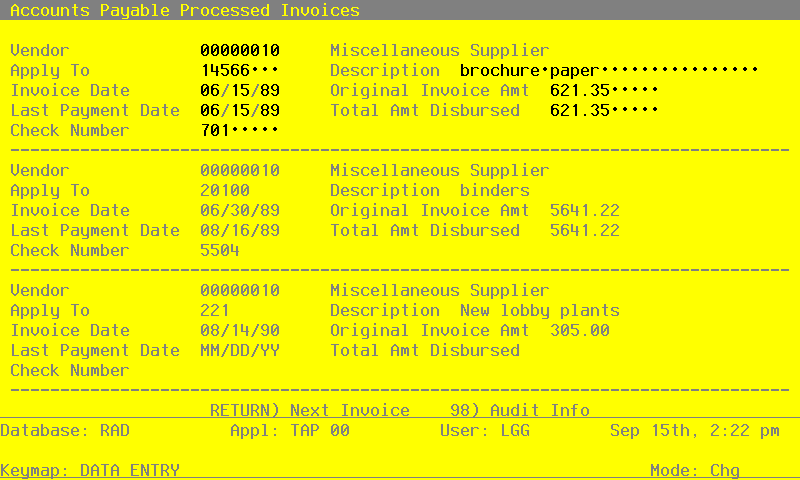
When the key value for a particular record is requested, you can review all the records in the file by selecting the Scan option. The records will be presented on an “Access” screen, and you will be allowed to scan the available data until you find the record you want. Then, position the cursor by that record and press ENTER; the record will be displayed for editing.
Data items for the preceding screen are described below:
- Vendor
Upper case, up to 8 characters Numbers only Scan available
Enter a valid vendor number from the Vendors file. The system automatically displays the corresponding vendor name so you may verify your entry. If you are entering a miscellaneous vendor, be sure to enter the name and address information through the Miscellaneous Vendors selection.
- Apply To
Upper case, up to 8 characters Required
Give the number of the invoice, credit memo, or debit memo affected by this transaction. The Apply To is generally the invoice number, except for invoices which affect an earlier invoice. In this instance, the Apply To refers to the original invoice number.
- Description
Alphanumeric, up to 30 characters
Describe this invoice.
- Invoice Date
Date (YMD)
Supply the date the invoice was generated.
- Original Invoice Amount
Number, up to 7 digits and 2 decimals
Provide the original invoice amount.
- Last Payment Date
Date (YMD)
Designate the last date when a payment was made toward this invoice.
- Total Amt Disbursed
Number, up to 7 digits and 2 decimals
Supply the amount of the invoice that was paid. If the invoice has been paid in full with no discount, this amount is equal to the invoice amount. The invoice amount and the amount paid are also the same if you are using the discounts lost method and the invoice has been paid net of the discount. If a partial payment has been made to the invoice or if your discount method is earned and the discount was taken for this invoice, the amount paid is less than the invoice amount.
- Check Number
Positive number, up to 8 digits Scan by this field (access key)
Give the number of the check stock which paid the invoice.
Press ENTER to display system-supplied information and then press ENTER again to save the information on this screen.
Select Next Record to go to the next Processed Invoices record.