
Chapter 2: File Maintenance
Option 2Descriptions
Use this function to edit the standard descriptions used throughout the Accounts Payable application.
When you use this function, a record of all entries will be printed. For additions, all new field contents are printed; for deletions, the deleted record’s contents are shown; for changes, both old field contents and new field contents are shown; and in all cases, the User ID, date, and time are printed.
The screen shown below presents information about Descriptions.
The Accounts Payable application uses transaction types, invoice types, pay status, currency values, and state abbreviations to define transactions. Each of these types has an associated description, which is displayed on various entry screens and reports. The description can be changed; however, the meanings associated with each type cannot be changed.
For example, the first transaction type on the screen is designated as an Accounts Payable invoice transaction. You can enter any description you like in this first field, but when you assign a transaction type of’ ‘1’ to an entry, the system assumes it to be an invoice that was entered through the Accounts Payable application.
Initial Setup Descriptions screen, part 1 of 3

Note that the Audit Info option is available at the bottom of this screen. When this option is invoked, the Audit Information overlay appears and displays the date the record was created and who created it, as well as the date the record was last modified and who modified it. Press the END key or the RETURN key to clear the overlay from your screen. The information displayed in the Audit Information overlay is system-supplied and non-modifiable.
Data items for the preceding screen are described below:
- Transaction Type
Alphanumeric, up to 21 characters
A description of this transaction type is displayed. Listed below are standard descriptions for each transaction type.
- 1
- AP Invoice
- 2
- Debit/Credit Memo
- 3
- AP Adjustment
- 4
- Payment
- 5
- PO Invoice
- 6
- Prepayment
- 7
- Retention Invoice
- 8
- Direct Payment
- Transaction Type Abbreviation
Upper case, up to 3 characters
Each transaction type has a corresponding abbreviation. Standard transaction type abbreviations are:
- 1
- INV
- 2
- MEM
- 3
- ADJ
- 4
- PAY
- 5
- POI
- 6
- PRE
- 7
- RTI
- 8
- DIR
- Apply To Type
Alphanumeric, up to 18 characters
Enter a description of how payments are to be applied to invoices. Listed below are descriptions for each apply type. You may use these descriptions or enter your own.
- 1
- Not Used
- 2
- Prepayment
- 3
- Apply to Invoice
- 4
- Apply to Retention
- Pay Status Code
Upper case, 1 character
Define the manner in which you want to pay vendors. Listed below are codes, descriptions, and explanations for each pay status.
Code Description
- N
- Normal
- T
- Take Discount
- H
- Hold
- D
- Disputed
Normal: Use the payment terms as defined in the Terms file. Take Discount: Take the discount regardless of the payment terms. Hold: Place a hold on the invoice. To pay, the invoice must be released using Edit Pay Status. Disputed: Keep the payment on hold until the problem is resolved. To pay, the invoice must be released using Edit Pay Status.
- Pay Status Description
Alphanumeric, up to 13 characters
These are the descriptions for the pay status codes. Each status has a code previously defined by the system. You may either use these descriptions or enter your own.
Standard values are:
- N
- Normal
- T
- Take Discount
- H
- Hold
- D
- Disputed
- Invoice Type Description
Alphanumeric, up to 18 characters Required
Describe this invoice type. Listed below are descriptions of each type. You may use these descriptions or enter your own.
- 1
- Invoice - The invoice is a standard Accounts Payable invoice.
- 2
- Retention Invoice - The invoice reflects the retention payable portion of an invoice.
Press ENTER to continue to the next screen.
The screen below presents additional information about Descriptions.
Initial Setup Descriptions screen, part 2 of 3
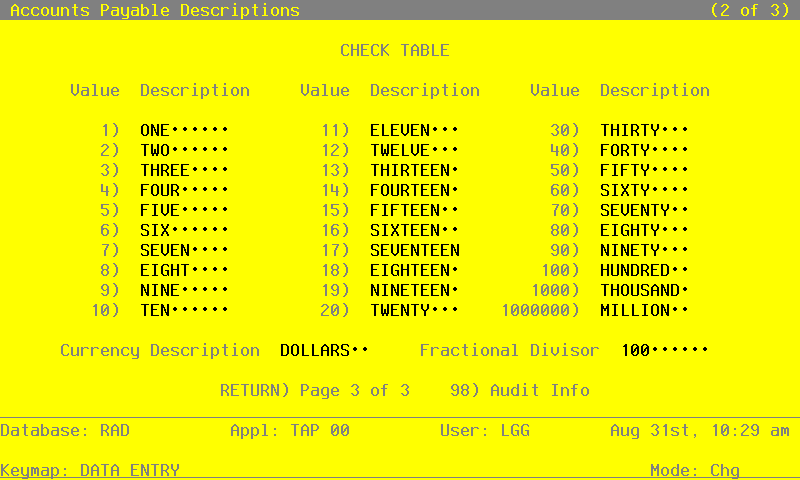
Data items for the preceding screen are described below:
- Check Descriptions Table
Upper case, up to 9 characters Required
Value - These values represent the standard monetary amounts which you need to define for the system.
Description - Enter a description for each dollar value. (e.g. In English, the value ‘30’ would have ‘THIRTY’ as its description.)
Currency Description - Describe the basic currency unit. (e.g. In the U.S., the Currency Description is ‘DOLLAR.’)
Fractional Divisor - Enter the standard number by which the unit is divisible. (e.g. the Divisor for the U.S. is ‘100.’)
Press ENTER to continue to the next screen.
The screen below presents additional information about Descriptions.
Initial Setup Descriptions screen, part 3 of 3

Data items for the preceding screen are described below:
- FIPS State Abbreviation
Upper case, up to 2 characters Letters only Required
Supply the FIPS (Federal Information Processing Standard) state abbreviations for all 50 states, the District of Columbia, American Samoa, Guam, the Mariana Islands, Puerto Rico, and the Virgin Islands.
Press ENTER to save the information on this screen.