
Chapter 4: Recovery Processing
Option 13Reset Post in Progress - Adjustments
You can use this function to change the value of the “Post in Progress” field on the adjustments Control Group record. This may be necessary in the event that a post fails to complete.
This function allows you to update and review information about Adjustments Control Groups.
The screen shown below presents information about Adjustments Control Groups.
When you enter adjustments, you see only one of the two possible screens for Adjustments Control Groups. Which screen you see depends on how you answered two questions on you Parameters file. These are the “Ask Operator ID?” question, and the “Use Transaction Control?” question.
If you answered ‘Y’ to both questions, you see the screen below and can enter control and hash totals for your adjustments. In addition, a record is written to the Transaction Control file for each control group posted.
If you answered ‘Y’ to “Ask Operator ID?”, and ‘N’ to “Use Transaction Control?”, you see the second screen, which displays only the Operator ID and the Control Number.
If you answered ‘N’ to both questions, you see the second screen, but you are not allowed to edit the Operator ID.
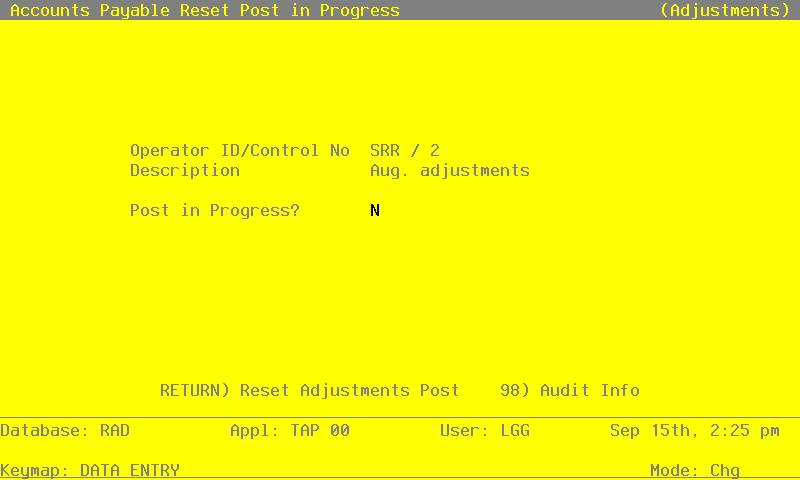
When the key value for a particular record is requested, you can review all the records in the file by selecting the Scan option. The records will be presented on an “Access” screen, and you will be allowed to scan the available data until you find the record you want. Then, position the cursor by that record and press ENTER; the record will be displayed for editing.
Data items for the preceding screen are described below:
- Operator ID
Upper case, up to 3 characters Display only Letters and numbers only
The operator ID you entered at log-on is displayed. The default may be changed in order to edit transactions for another operator. All control groups are separated by operator.
- Control Number
Positive number, up to 4 digits Display only
A sequential number is supplied to identify this group of adjustments. This number is printed on the journal, tracked on the Transaction control file, and if General Ledger is part of your system it is posted to General Ledger for detail accounts. Although this number need not be exactly sequential, the number itself is important as a part of your audit trail.
- Description
Alphanumeric, up to 30 characters Display only
Describe this group of adjustments. This description will appear on the Transaction Control report and inquiry.
- Post in Progress?
Y or N Default N Required
Enter ‘N’ to allow the post to be restarted for this group of adjustments.
Press ENTER to save the information on this screen.
Select Next Record to go to the next Adjustments Control Groups record.
At this screen, the use of the MODE keys - CHG, or INQ - pertain to those records in the Adjustments Control Groups file.