
Chapter 4: Recovery Processing
Option 1Miscellaneous Vendors
This function allows changes and additions to be made to Miscellaneous Vendor records which cannot be accessed during Live Operations.
Use this function to access the Miscellaneous Vendor Name and Address file.
When you use this function, a record of all entries will be printed. For additions, all new field contents are printed; for deletions, the deleted record’s contents are shown; for changes, both old field contents and new field contents are shown; and in all cases, the User ID, date, and time are printed.
The screen shown below presents information about Miscellaneous Vendor Names and Addresses.
This file contains records created during invoice entry for miscellaneous vendors. Name and address information are used for check printing, then deleted when the corresponding processed invoice is deleted during close month.
Recovery Processing Miscellaneous Vendors screen
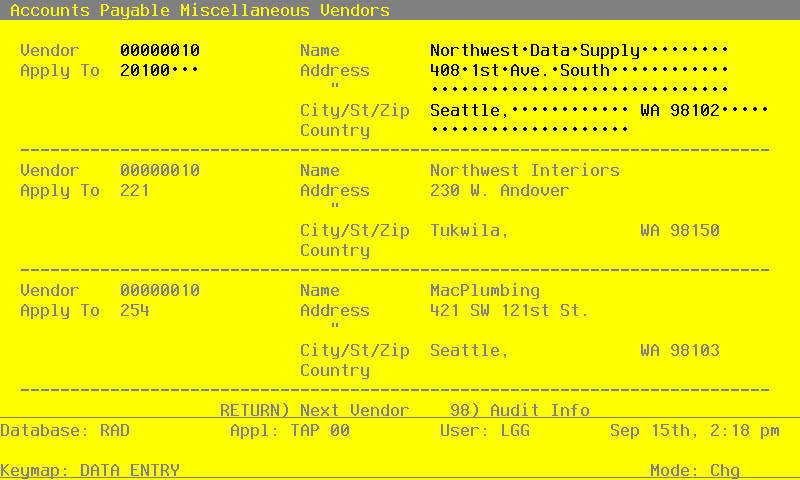
When the key value for a particular record is requested, you can review all the records in the file by selecting the Scan option. The records will be presented on an “Access” screen, and you will be allowed to scan the available data until you find the record you want. Then, position the cursor by that record and press ENTER; the record will be displayed for editing.
Data items for the preceding screen are described below:
- Vendor
Upper case, up to 8 characters Numbers only Scan available
Provide the miscellaneous vendor number from the Vendors file.
- Apply To
Enter an upper case alphanumeric filed, up to 8 characters in length. This filed is required.
Enter the apply to of the invoice associated with the vendor.
- Name
Alphanumeric, up to 30 characters Required Scan by this field (access key)
Supply the vendor name.
- Address - Line 1
Alphanumeric, up to 30 characters
Provide the first line of the vendor address. You may want to enter the shipping address in this line and the mailing address in the second line (see next field).
- Address - Line 2
Enter an alphanumeric filed, up to 30 characters in length.
Supply the second line of the vendor address. You may want to enter the mailing address in this line and the shipping address in the first line.
- City
Alphanumeric, up to 20 characters
Provide the city in the vendor’s address.
- State
Upper case, up to 2 characters Letters only
Enter the standard 2-letter state abbreviation for vendor’s address.
- Zip Code
Upper case, up to 10 characters
Provide the vendor’s postal zip code.
- Country
Alphanumeric, up to 20 characters
Identify the country where the vendor is located.
The entered data is validated. During validation, including access to other files, conditions may be found which cause messages to be displayed. Errors (E), Warnings (W), and Messages (M) that may result are shown below:
Press ENTER to save the information on this screen.
Select Next Record to go to the next Miscellaneous Vendor Name and Address record.
At this screen, the use of the MODE keys - ADD, DEL, CHG, or INQ - pertain to those records in the Miscellaneous Vendor Name and Address file.