
Chapter 4: Recovery Processing
Option 14Rearrange Account Number
You can use this process to alter the location and length of the components of your General Ledger account number. Caution should be used here! If the account number is rearranged in Accounts Payable and not in Genre Ledger, the two applications will no longer be compatible! The following processing steps accomplish this job.
- Step 1Use this function to enter parameters which allow you to reorganize your existing account structure. The size of any account component can be changed; and the sequence of the account components can also be changed.
NOTE: If you rearrange the account numbers in General Ledger, your subsidiary applications will not be compatible unless and until you rearrange your account numbers in the subsidiary applications.
NOTE: Please make sure your existing data is BACKED UP before running this utility!
The screen below allows you to enter a new account number arrangement.
Recovery Processing Rearrange Account Number screen
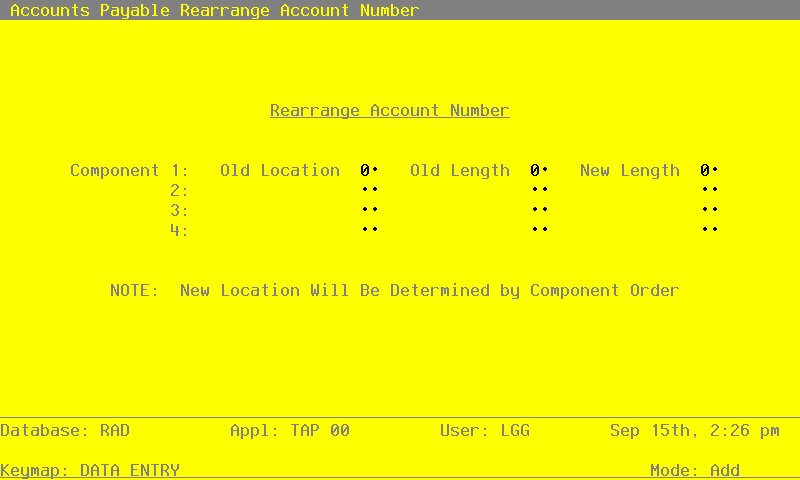
Data items for the preceding screen are described below:
- Old Location
Positive number, up to 2 digits
Supply the starting location for each of your original account components. Enter them in the order that you want them to appear in the new account number.
As an example, if you were using Corporate Accounts Payable, your Main Account had 5 characters, your Sub Account had 3, your Division had 2, and your Branch had 2. If you are not using the Sub Account, and you want your finished account number to be Branch, Main, and Division, and you want your Division incremented to three characters, your entries on this screen would be:
Component 1: Old Location 11 Old Length 2 New Length 2
Component 2: Old Location 1 Old Length 5 New Length 5
Component 3: Old Location 9 Old Length 2 New Length 3
Component 4: blank
- Old Account Length
Positive number, up to 2 digits
Supply the starting location for each of your original account components. Enter them in the order that you want them to appear in the new account number.
As an example, if you were using Corporate Accounts Payable, your Main Account had 5 characters, your Sub Account had 3, your Division had 2, and your branch had 2. If you are not using the Sub Account, and you want your finished account number to be Branch, Main, and division, and you want your Division incremented to three characters, your entries on this screen would be:
Component 1: Old Location 11 Old Length 2 New Length 2
Component 2: Old Location 1 Old Length 5 New Length 5
Component 3: Old Location 9 Old Length 2 New Length 3
Component 4: blank
- New Account Length
Positive number, up to 2 digits
Supply the starting location for each of your original account components. Enter them in the order that you want them to appear in the new account number.
As an example, if you were using Corporate Accounts Payable, your Main Account had 5 characters, your Sub Account had 3, your Division had 2, and your Branch had 2. If you are not using the Sub account, and you want your finished account number to be Branch, Main, and Division, and you want your Division incremented to three characters, your entries on this screen would be:
Component 1: Old Location 11 Old Length 2 New Length 2
Component 2: Old Location 1 Old Length 5 New Length 5
Component 3: Old Location 9 Old Length 2 New Length 3
Component 4: blank The entered data is validated. During validation, including access to other files, conditions may be found which cause messages to be displayed. Errors (E), Warnings (W), and Messages (M) that may result are shown below:
E In Location 10, Length Cannot Be Greater Than 3 E In Location 11, Length Cannot Be Greater Than 2 E In Location 12, Length Cannot Be Greater Than 1 E In Location 2, Length Cannot Be Greater Than 11 E In Location 3, Length Cannot Be Greater Than 10 E In Location 4, Length Cannot Be Greater Than 9 E In Location 5, Length Cannot Be Greater Than 8 E In Location 6, Length Cannot Be Greater Than 7 E In Location 7, Length Cannot Be Greater Than 6 E In Location 8, Length Cannot Be Greater Than 5 E In Location 9, Length Cannot Be Greater Than 4 E Must Specify New Account Component Length E Must Specify Original Account Component Length E Must Specify Original Account Component Starting Location E New Component Length Invalid E Old Component Length Invalid E Sum of Account Component Lengths Cannot Exceed 12 W Any Existing Data For This Component Will Be Erased
Press ENTER to save the information on this screen.
- Step 2This step allows you to change your mind and return to the menu instead of rearranging all of your account numbers. It points out to you that you should have a backup copy of your data before running this utility, and recommends you that this process will cause Accounts Payable to be incompatible with General Ledger and other subsidiary accounting applications.
- Step 3This disposition type is used for all standard processing functions within Accounts Payable.
- Step 4This step processes the information for vendors. Updates to certain fields in the Vendors file will occur. Generalized routines are performed to Rearrange Account Number in General Ledger and Assemble Account Number in General Ledger.
- Step 5This step processes the information for MTD Postings. Under certain conditions, records in the MTD Postings and Rearrange files will be added. Generalized routines are performed to Rearrange Account Number in General Ledger and Assemble Account Number in General Ledger. Records in the MTD Postings file will then be deleted.
- Step 6This step processes the information for Parameters. Updates to certain fields in the Parameters file will occur. Generalized routines are performed to Rearrange Account Number in General Ledger and Assemble Account Number in General Ledger.
- Step 7This step processes the information for Recurring Payments and Recurring Entries Line Items. Updates to certain fields in the Recurring Payments and Recurring Entries Line Items files will occur. Generalized routines are performed to Rearrange Account Number in General Ledger and Assemble Account Number in General Ledger.
- Step 8This step processes the information for Unpaid Invoices. Up dates to certain fields in the Unpaid Invoices file will occur. Generalized routines are performed to Rearrange Account Number in General Ledger and Assemble Account Number in General Ledger.
- Step 9This step processes the information for Transactions. Updates to certain fields in the Transactions file will occur. Generalized routines are performed to Rearrange Account Number in General Ledger and Assemble Account Number in General Ledger.
- Step 10This step processes the information for Transaction History. Updates to certain fields in the Transaction History file will occur. Generalized routines are performed to Rearrange Account Number in General Ledger and Assemble Account Number in General Ledger.
- Step 11This step processes the information for Outstanding Checks. Under certain conditions, records in the Outstanding Checks and Rearrange files will be added. Generalized routines are performed to Rearrange Account Number in General Ledger and Assemble Account Number in General Ledger. Records in the Outstanding Checks file will then be deleted.
- Step 12This function displays a warning to the operator if any errors were encountered during the rearrangement of account numbers.