
Chapter 2: Menu Overview
Maintenance Pulldown Menus
The Maintenance Pulldown Menu, shown in Figure 2-2 below and described in Chapter 4, appears when the user selects Maintenance from the menu bar on the General Ledger Initial Setup Screen.
Maintenance Pulldown menu

Items on this menu serve to display further pulldown menus as shown in Figures 2-3 and 2-4 below.
File Maintenance Pulldown menu
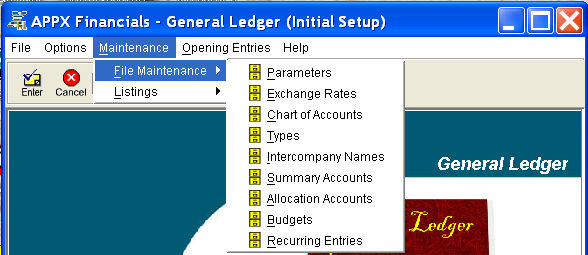
The File Maintenance Pulldown Menu provides access to the following file maintenance functions described in Chapter 4:
- Parameters File Maintenance
- Exchange Rates File Maintenance
- Chart of Accounts File Maintenance
- Types File Maintenance
- Intercompany Names File Maintenance
- Summary Accounts File Maintenance
- Allocation Accounts File Maintenance
- Budgets File Maintenance
- Recurring Entries File Maintenance
Listings Pulldown menu

The Listings Pulldown Menu provides access to the following file lists described in Chapter 4: