Chapter 7: Analysis and recovery
Decide whether to rebuild a missing or damaged index
Rebuild key Files reads an existing datafile and constructs its indexes. It does not repair damaged record contents or supply missing encryption settings. Use this sequence to decide whether a rebuild is sufficient.
- Stop access. Preserve the original
.dat, any remaining.key, matching structure, and administration configuration. Do not pair a current.datwith an index from a different backup. - Confirm the test database's structure, native FMS, storage path, passphrase, and effective key. Resolve encryption mismatches first; see Check an encrypted file through APPX.
- Put a copy of the datafile under its expected name in the test database; preserve the damaged index separately. Select only that file in Data File Management and choose Rebuild key Files. A missing index alone warrants trying this on a copy before physical recovery.
- Read the complete rebuild log. Retain any unreadable-record, damaged-record, duplicate-key, or other error. If any appears, follow Physical recovery; do not accept the new index merely because it exists.
- After a successful rebuild, run Verify Integrity of APPXIO Files and Analyze a working copy on the matched pair. Compare counts and complete exported values with a trusted export or backup. Check recognizable records, business totals, and application relationships.
A successful rebuild and these checks support treating the problem as index damage. If checks fail or required records are missing, keep the result separate and restore a verified backup or follow the recovery procedure. Rebuilding alone does not establish that every expected record is present.
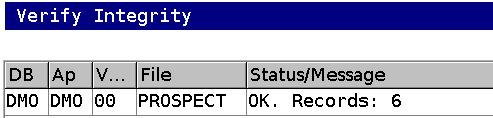
The GUI example below shows an encrypted PROSPECT copy with six active records and one record deleted through APPX. Rebuilding the missing index restored access to the six active records. Rebuilding an index does not restore a deleted record.