
Chapter 3: Encrypt PROSPECT
Set the file key and replace the file
Create PROSPECT's file key here. The earlier setup established the system passphrase; it did not create a file key. Use a separate generated value for PROSPECT.
- Return to Data File Management and choose File Specifications. Keep only PROSPECT selected.
- Switch to Change mode if necessary. Record the existing FMS type, group, and optional path. The independent PROSPECT exercise uses no encryption group.
- Choose File Attributes. For this exercise, click Random Key to have APPX generate a new value in Encryption Key. Save that exact value in the restricted vault described in Keep the keys safe, identifying database DMO, application DMO, version 00, and file PROSPECT. Confirm that the saved value matches the field before accepting the screen.
If the site's key procedure requires a password-manager-generated key instead, generate a new value in that manager, save it with the same file identification, and enter that exact value in Encryption Key. In that case, leave Random Key alone: clicking it would replace the value just entered. Do not enter the system passphrase in this field. Both choices supply the file key; they do not select different encryption methods.
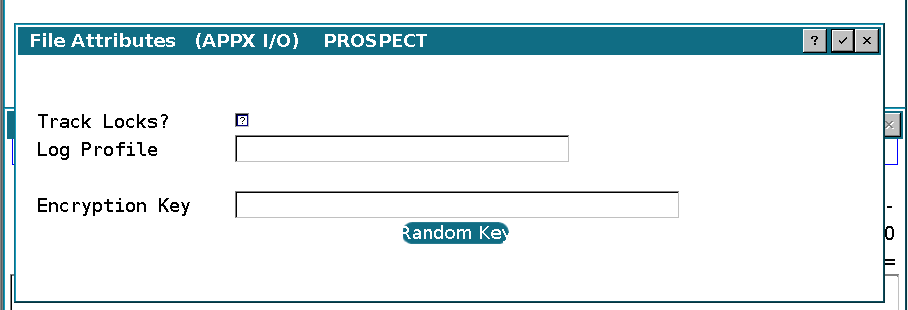
- Accept File Attributes and save the PROSPECT specification. Do not change the FMS type or optional path as part of enabling encryption.
- Return to Data File Management. Confirm the one-file selection again.
- Choose Import Files (CSV). Set Disposition of Native File to 2 = Replace and click Proceed.
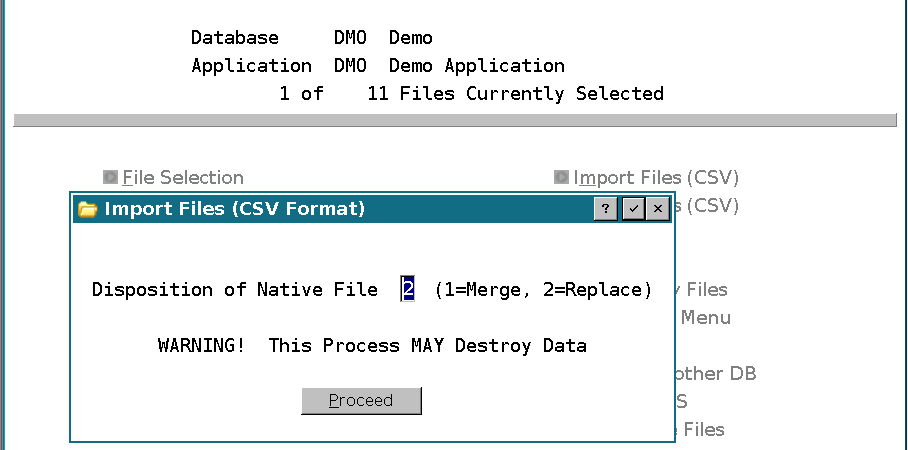
- Confirm that every exported PROSPECT record was imported and that no error appears in the log.
- Run Verify Files Menu, Verify Integrity of APPXIO Files. Compare the record count with the export count.
- Open PROSPECT in the DMO application and compare the sample records recorded before conversion.
The File Specifications Records column is not the result count to use for this check. Compare the export, import, and verification results.
In this exercise, APPX imported all 7 records and the recreated physical datafile was confirmed encrypted. Other DMO files were left under their previous settings.