
3File Maintenance
Option 8Delete Subsidiary Code
This function allows you to delete all records which are identified by the selected subsidiary code. The following processing steps accomplish this job.
- Step 1This function allows you to enter parameters that define the subsidiary code to be deleted. For example, if you stop manufacturing the product “Wicker Chairs”, or no longer need to track costs on that product, you can use this utility to delete all records associated with that subsidiary code.
The screen shown below allows you to enter parameters needed by the Delete Subsidiary Code utility.
Delete Subsidiary Code screen
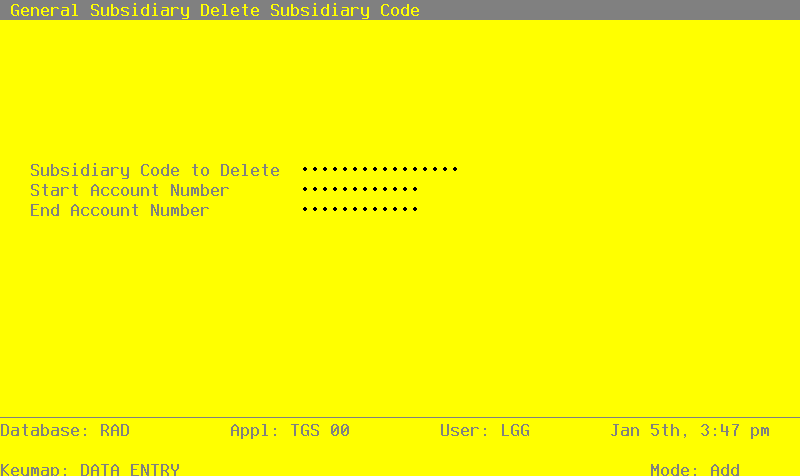
Data items for the preceding screen are described below:
- Subsidiary Code
Upper case, up to 16 characters Required Scan available
Select a subsidiary code for this utility. This must be a valid subsidiary code; the system displays the description so that you can verify your entry.
- Start Account Number
Upper case, up to 12 characters Scan available
Define the account number that is the first account of the range of accounts you want to select for this utility. For example, if you want to select a range of accounts beginning with account number 40000, enter ‘40000’ in this field. The utility will only include valid subsidiary code and account combinations within the defined range.
If you leave the account range blank, the utility will include all accounts for the entered subsidiary code.
- End Account Number
Upper case, up to 12 characters Scan available
Define the account number that is the first account of the range of accounts you want to select for this utility. For example, if you want to select the range of accounts beginning with 40000 and ending with ‘49999’, enter ‘49999’ in this field. The utility will only include valid subsidiary code and account combinations within the defined range.
If you leave the account range blank the utility will include all accounts for the entered subsidiary code.
The entered data is validated. During validation, including access to other files, conditions may be found which cause messages to be displayed. Errors (E), Warnings (W), and Messages (M) that may result are shown below:
Press ENTER to display system-supplied information and then press ENTER again to save the information on this screen.
- Step 2This disposition type is used for all standard processing functions within General Subsidiary.
- Step 3This step processes the information for Subsidiary Codes by Account and Subsidiary Code Postings. Records in the Subsidiary Codes by Account and Subsidiary Code Postings files will then be deleted.