
3File Maintenance
Option 3Parameters
This function allows you to enter or edit Parameters for General Subsidiary. In this manner you can “customize” General Subsidiary for your particular needs.
When you use this function, a record of all entries will be printed. For additions, all new field contents are printed; for deletions, the deleted record’s contents are shown; for changes, both old field contents and new field contents are shown; and in all cases, the User ID, date, and time are printed.
The screen shown below presents information about Parameters.
Parameters screen
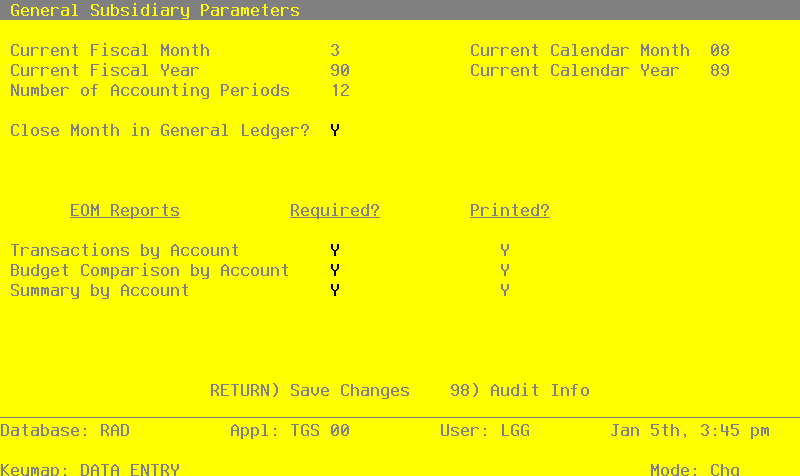
Note that the Audit Info option is available at the bottom of this screen. When this option is invoked, the Audit Information overlay appears and displays the date the record was created and who created it, as well as the date the record was last modified and who modified it. Press the END key or the RETURN key to clear the overlay from your screen. The information displayed in the Audit Information overlay is system-supplied and non-modifiable.
Data items for the preceding screen are described below:
- Current Fiscal Month
Positive number, up to 2 digits Display only
The current fiscal accounting period is supplied from General Ledger; do not change it. General Subsidiary is assumed to be in the same accounting month and year as General Ledger.
- Current Fiscal Year
Positive number, up to 2 digits Display only
The current fiscal year is supplied from General Ledger; do not change it. General Subsidiary is assumed to be in the same accounting month and year as General Ledger.
- Number of Accounting Periods
Positive number, up to 2 digits Display only
The number of accounting periods upon which your accounting system is based is supplied from General Ledger; do not change it. This will either be 12, which represents calendar period accounting; or 13, which represents 13-period accounting.
- Close Month In General Ledger?
Y or N Default N Required
Enter ‘Y’ if you want the “Close Month” procedure in General Ledger to also close the General Subsidiary month. If you enter ‘Y’ you will not be able to close the month in General Subsidiary; the procedure will be run automatically by General Ledger.
- Transactions Report Required?
Y or N Default N Required
Enter ‘Y’ is you want to be sure that the Transactions by Account report is printed before the month is closed.
- Transactions Report Printed?
Y or N Default N
The system displays a ‘Y’ if the Transactions by Account report has been printed for the current month.
- Budget Comparison Required?
Y or N Default N Required
Enter ‘Y’ is you want to be sure that the Budget Comparison by Account report is printed before the month is closed.
- Budget Comparison Printed?
Y or N Default N
The system displays a ‘Y’ if the Budget Comparison by Account report has been printed for the current month.
- Summary Report Required?
Y or N Default N Required
Enter ‘Y’ is you want to be sure that the Summary by Account report has been printed for the month.
The entered data is validated. During validation, including access to other files, conditions may be found which cause messages to be displayed. Errors (E), Warnings (W), and Messages (M) that may result are shown below:
Press ENTER to display system-supplied information and then press ENTER again to save the information on this screen.