
3File Maintenance
Option 1Subsidiary Codes
This function allows you to enter or edit Subsidiary Codes.
Each Subsidiary Code may define a particular project, classification, cost center, or other item on which you want to keep additional detail. Initially, you can select whether to enter (ADD), update (CHG), delete (DEL), or (INQ).
When you use this function, a record of all entries will be printed. For additions, all new field contents are printed; for deletions, the deleted record’s contents are shown; for changes, both old field contents and new field contents are shown; and in all cases, the User ID, date, and time are printed.
The screen shown below presents information about Subsidiary Codes.
Subsidiary Codes screen
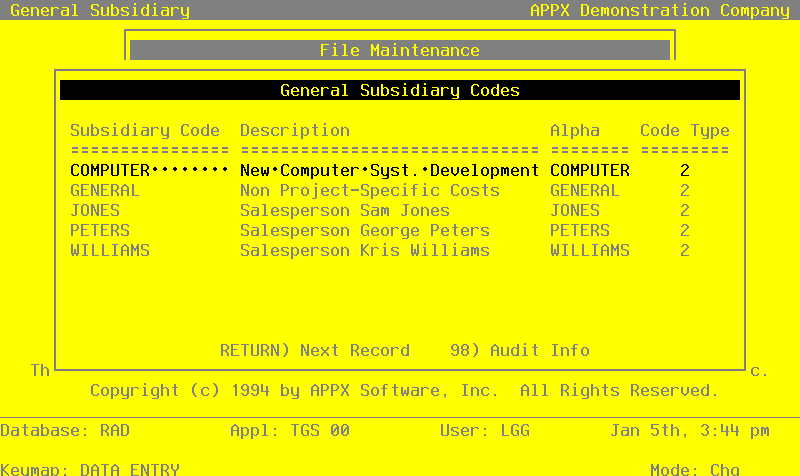
When the key value for a particular record is requested, you can review all the records in the file by selecting the Scan option. The records will be presented on an “Access” screen, and you will be allowed to scan the available data until you find the record you want.
Note that the Audit Info option is available at the bottom of this screen. When this option is invoked, the Audit Information overlay appears and displays the date the record was created and who created it, as well as the date the record was last modified and who modified it. Press the END key or the RETURN key to clear the overlay from your screen. The information displayed in the Audit Information overlay is system-supplied and non-modifiable.
Data items for the preceding screen are described below:
- Subsidiary Code
Upper case, up to 16 characters Required Scan by this field (access key)
Supply a code for this subsidiary. This code will be used to identify the subsidiary when entering transactions in other applications, and when printing reports.
- Description
Alphanumeric, up to 30 characters Required
Describe this subsidiary.
- Alpha Sort
Alphanumeric, up to 8 characters Required Scan by this field (access key)
Define a combination of characters to represent where this record should be placed in a sorted report, in relation to other subsidiary codes.
- Subsidiary Code Type
Positive number, 1 digit
Indicate whether or not detail should be summarized for this subsidiary code. Valid entries and their meanings are:
- 1
- Keep Detail only according to the Chart of Accounts file
- 2
- Create a Balance Forward record at End of Month
This field is used in conjunction with the “Delete Sub Code Postings” field on the General Ledger Chart of Accounts and the Subsidiary Codes by Account files. “Balance Forward” subsidiary codes are summed at the end of each month, for delete type ‘N’ and ‘T’; and at the end of the fiscal year for delete type ‘Y’; and that sum is placed into a Balance Forward record. The detail is then deleted.
Press ENTER to save the information on this screen
Select the Next Record option to go to the next Subsidiary Codes record.
At this screen, the use of the MODE keys - ADD, DEL, CHG, or INQ - pertain to those records in the Subsidiary Codes file.