
Chapter 4: Recovery Processing
Option 3Product Purchases
The Product Purchases file is used only if the LIFO or FIFO costing method is used. This function allows you to enter records in this file, which maintains detailed information for all purchases.
Select “Product Purchases” from the Recovery Processing menu. Here is the Product Purchases entry screen:
Product Purchases screen
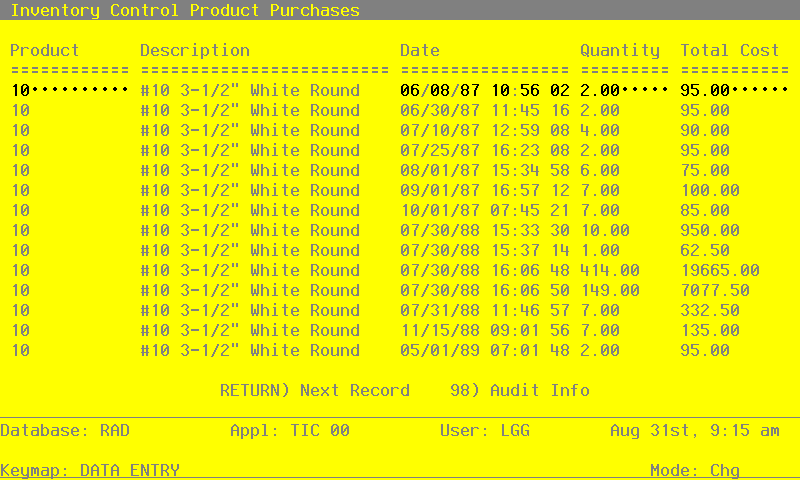
When the key value for a particular record is requested, you can review all the records in the file by selecting the Scan option. The records will be presented on an “Access” screen, and you will be allowed to scan the available data until you find the record you want. Then, position the cursor by that record and press RETURN; the record will be displayed for editing.
Data items for the preceding screen are described below:
- Product
Enter a code to identify the purchased product. You can use the Scan option to find an appropriate entry; the product number that you enter must be on file in the Products file. The system displays the corresponding description so that you can verify your entry.
- Date
Enter the date and time at which the product was purchased. This date and time must be unique.
- Quantity
Enter up to 5 digits and 2 decimals for the number of stockkeeping units of the product that were purchased on this date.
- Total Cost
Enter up to 7 digits and 2 decimals for the total cost of the purchase.
The entered data is validated. Press RETURN to save the information on this screen.
Select Next Record to go to the next Product Purchases record.
At this screen, use of the MODE keys — ADD, DEL, CHG, or INQ — pertain to those records in the Product Purchases file.