
1Initial Setup File Maintenance
Option 19Create Products By Warehouse Records
The Create Products By Warehouse Records utility allows you to create records in the Products By Warehouse file using data from existing Products and Warehouses records.
Records are created for a specified range of warehouses. Products that will be included in these warehouses can be selected by product number, product alpha, product class, product ABC, or physical type. A sort selection screen is used to select products for the new records. (See the instructions for printing reports in the “User’s Guide to APPX Applications” for a description of sort selection screens.)
The function uses default data from the Products file for the new Products By Warehouse records. You can edit the records that you create using the standard Products By Warehouse file maintenance function.
Select “Create Products By Warehouse Records” from the Utilities option on the File Maintenance menu. The Create Product/Warehouse Records entry screen is shown below:
Create Products/Warehouse Records screen
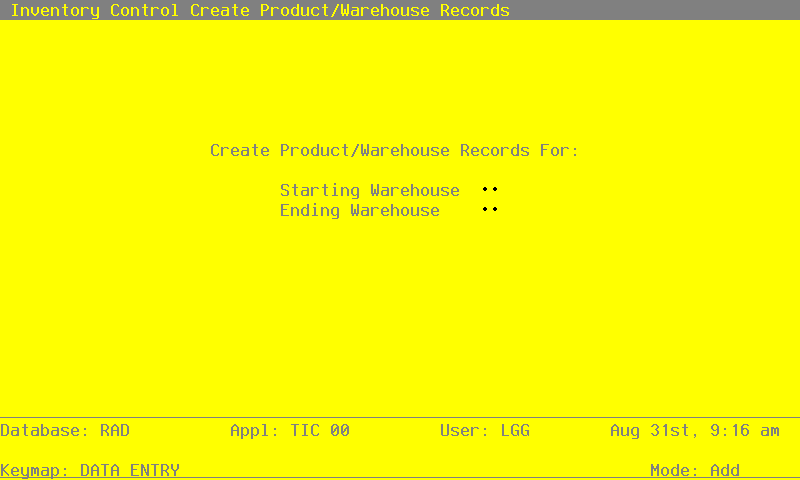
Data items for the preceding screen are described below:
- Starting Warehouse
Enter the first warehouse number in the range of warehouses to be set up on Products By Warehouse records. If you leave this field blank, the starting warehouse is assumed to be the warehouse with the lowest warehouse number.
- Ending Warehouse
Enter the last warehouse number in the range of warehouses to be set up on Products By Warehouse records. If you leave this field blank, the ending warehouse is assumed to be the warehouse with the highest warehouse number.
The entered data is validated. Press RETURN to save the information on this screen and create the designated Products By Warehouse records.