
3File Maintenance
Option 4Special Instructions
This file contains special instructions, such as greetings, product sale announcements, and reminder notices, that are printed on sales order forms, shipping papers, and invoices.
Each instruction in this file is identified by a code. To include a special instruction on an order, enter the code on the sales order or shipping confirmation during data entry.
Special instructions can apply either to an entire order (printed 1 inch below the last line item printed on the sales order form and invoice) or to a specific line item on an order (printed directly below the line item on the sales order form and invoice).
When you use this option, a record of all entries will be printed. For additions, all new field contents are printed; for deletions, the deleted record’s contents are shown; for changes, both old field contents and new field contents are shown; and, in all cases, the User ID, date, and time are printed.
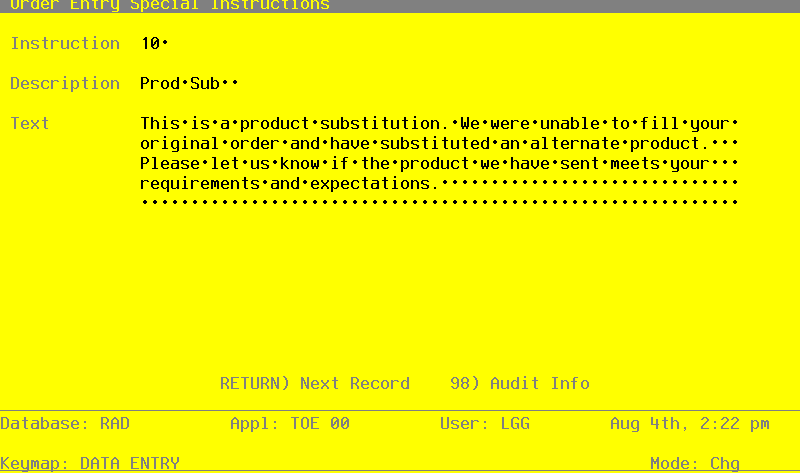
Select “Special Instructions” from the File Maintenance menu. Here is the Special Instructions entry screen:
Special Instructions screen
When the key value for a particular record is requested, you can review all the records in the file by selecting the Scan option. The records will be presented on an “Access” screen, and you will be allowed to scan the available data until you find the record you want. Then, position the cursor by that record and press RETURN; the record will be displayed for editing.
Data items for the preceding screen are described below:
- Instruction
Enter a code of up to 3 digits to provide a unique number for each special instruction.
- Description
Enter up to l0 characters to describe the instruction.
- Text
Five lines of 60 characters each are provided to enter this instruction exactly as it is to be printed on sales order forms, shipping papers, and invoices.
Press RETURN to save the information on this screen. Select Next Record to go to the next Special Instructions record.
At this screen the use of the MODE keys—ADD, DEL, CHG, or INQ—pertain to those records in the Special Instructions file.