
3File Maintenance
Option 3Shippers
This program is used to establish and maintain an identification of each shipper used to ship orders. A Ship Via number is entered on each sales order and is used for printing the freight company name on sales order forms, invoices, bills of lading, and shipping papers.
When you use this option, a record of all entries will be printed. For additions, all new field contents are printed; for deletions, the deleted record’s contents are shown; for changes, both old field contents and new field contents are shown; and, in all cases, the User ID, date, and time are printed.
Select “Shippers” from the File Maintenance menu. Here is the Shippers entry screen:
Shippers screen
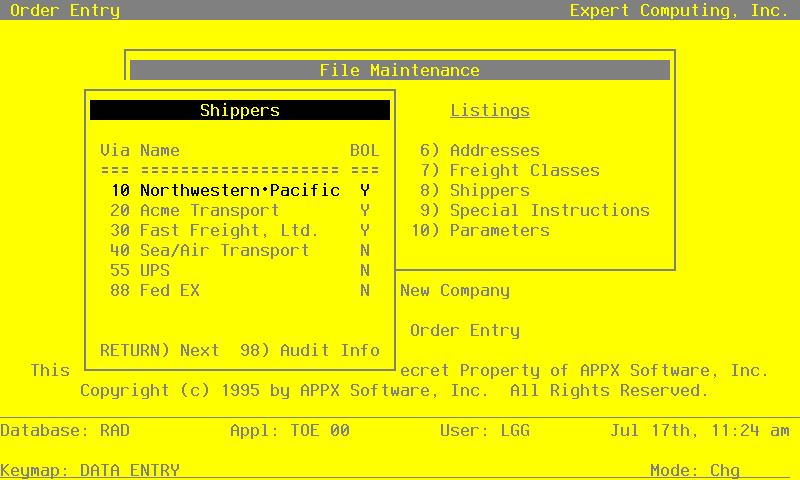
When the key value for a particular record is requested, you can review all the records in the file by selecting the Scan option. The records will be presented on an “Access” screen, and you will be allowed to scan the available data until you find the record you want. Then, position the cursor by that record and press RETURN; the record will be displayed for editing.
Data items for the preceding screen are described below:
- Ship Via
Enter up to 2 digits to provide a unique number for each freight company.
- Ship Via Name
Enter up to 20 characters for the name of the shipper.
- Bill of Lading?
This field indicates whether or not this shipper requires a bill of lading. The entry you make here serves as the default for Sales Orders entry. The system displays ‘N’. You may override the display.
- Y
- This shipper requires a bill of lading.
- N
- This shipper does not require a bill of lading.
Press RETURN to save the information on this screen. Select Next Record to go to the next Shippers record.
At this screen the use of the MODE keys—ADD, DEL, CHG, or INQ—pertain to those records in the Shippers file.