Chapter 8: Selecting the Presentation Language
Selecting the Presentation Language
During runtime, the application is presented to users in one of the Presentation Languages. Much of the translation occurs when the Executable Module is built for a process, although some translation may also occur during actual runtime. The Design Language and default Presentation Language for users is specified at the system level, within System Administration. The Presentation Language, however, can be overridden at several different levels.
These Presentation Language overrides are assigned a specific hierarchy with each successive level superceding the previous level. See Figure 20 for details.
| Level | Language ID Field Location |
|---|---|
| 1. System Related Applications | System Administration, System Setup, System Parameters |
| 2. Database | System Administration, Database/Applications |
| 3. Database/Application | System Administration, Database/Applications, Databases/ Applications, System Related Applications |
| 4. User | System Administration, Security, Users |
| 5. Dynamically at runtime | Predefined Field: --- NEXT LANGUAGE ID |
- For example, the Triple Z company’s two APPX applications are designed in English but most corporate employees speak Latin American Spanish. Therefore, in the System Parameter File, the default Language ID should be defined as
SPL. - Both applications are written in English. Therefore, in each of the Applications’ Parameter File, the default Language ID should be
ENG. - The Triple Z company is based in Columbia where most users have a native language of Latin American Spanish. Their single database (ZZZ) should be assigned a default Language ID of
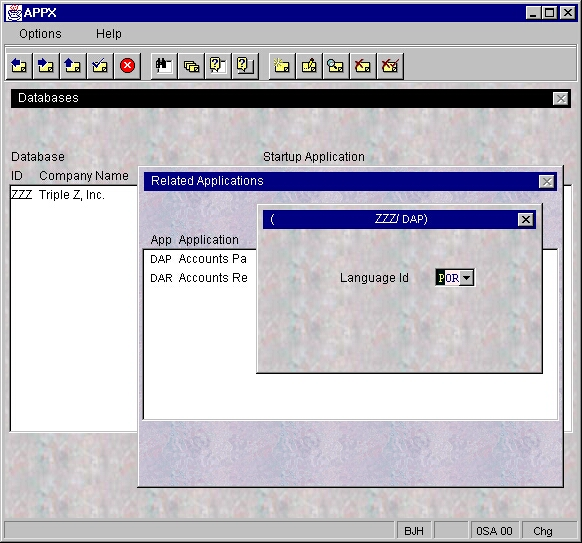
SPLor, can be left blank as the System Language is already defined as Spanish. - Triple Z’s accounts payable department, however, is located in Brazil where all its employees speak Portuguese. The accounts payable application (DAP) within the ZZZ database should be assigned a default Language ID of
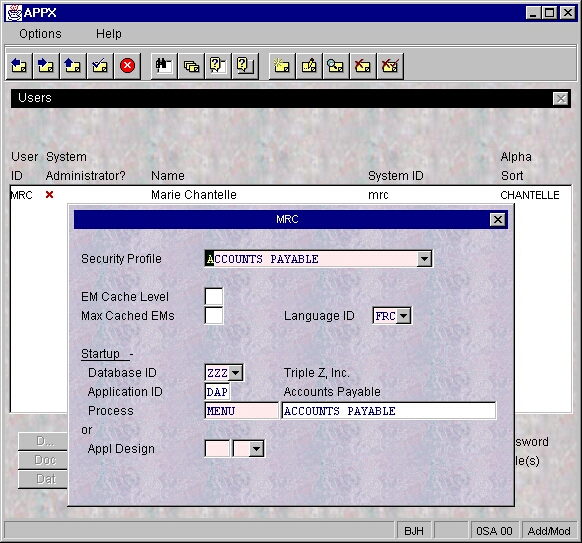
POR. See Figure 21. - Marie is a new accounts payable clerk from Martinique who speaks fluent Portuguese but has difficulty reading it. Therefore, she has requested that all of her screens be presented in her native French. In the User File, Marie’s default Language ID should be defined as
FRC. See Figure 22. - Then there is user OTL. With three distinct personalities each fluent in a different language, this user needs to be able to change their display from one language to another with a second’s notice. One minute the user is Oriel, a French mother of two young children. Then minutes later there’s Tresa, a German college student. She takes over and can only read German. And sometimes Luis, a Latin dance instructor by night, is sitting in front of the workstation. He must have everything in Spanish. Of course.
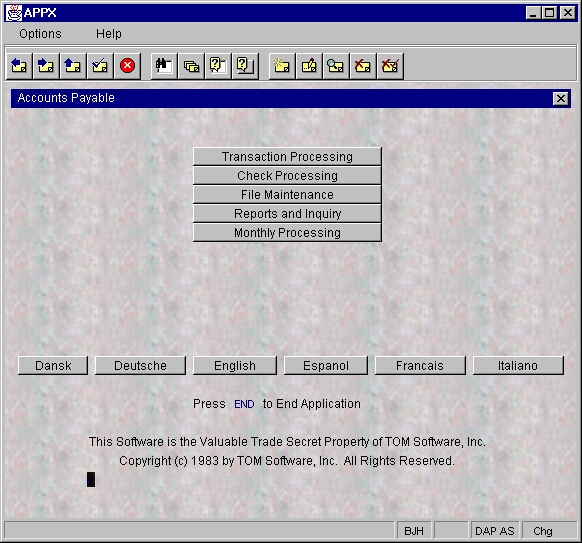
A nightmare for OTL’s mental health professional, maybe. But not for you, the APPX designer. By using the predefined field NEXT LANGUAGE ID, menus can be designed with built-in optional processes that automatically change the Presentation Language to a selected language (see Figures 23 and 24). Click the Español button to run a single statement Subprocess that changes the NEXT LANGUAGE ID to SPL via the SET command. Click the Duetsch button to run the Subprocess that changes the language to GER and click English to change back to English.
SET --- NEXT LANGUAGE ID = SPL
Warning: When creating/loading an Executable Module or when performing a runtime translation, a translation will occur only if the designated Design Language (in the application’s Parameter File) and the designated Presentation Language (one of five settings in the five-level Presentation Language hierarchy) are both non-blank and not equal to each other. If either is blank or if they are both the same Language ID, no translation occurs.
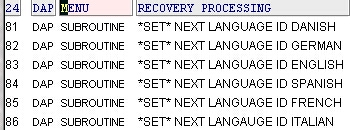
Note: Each of the above Subroutine Processes consists of a single statement
SET --- NEXT LANGUAGE ID = LLL
Corrected: the printed manual shows NEXT LANGAUGE ID here. The predefined field is NEXT LANGUAGE ID, as in the SET statement on the page before.
Where LLL equals the corresponding Language ID