
Chapter 5: The Dictionary File
The Dictionary File Input Process
A Dictionary File is maintained at the System Administration level. Dictionary Files are also found in all applications using the Language Translator feature with each application having its own file. The Dictionary Files are populated with Design Language entries by Language Translator update processes at both the System Administration and the Application level. Entries in other languages (the Presentation Languages) are added to the files by use of the Enter/Edit Translations input process, or by the Dictionary File Input Process. The Dictionary File Input Process is shown in Figure 9 and an explanation of the Dictionary File fields is shown in Figure 10.
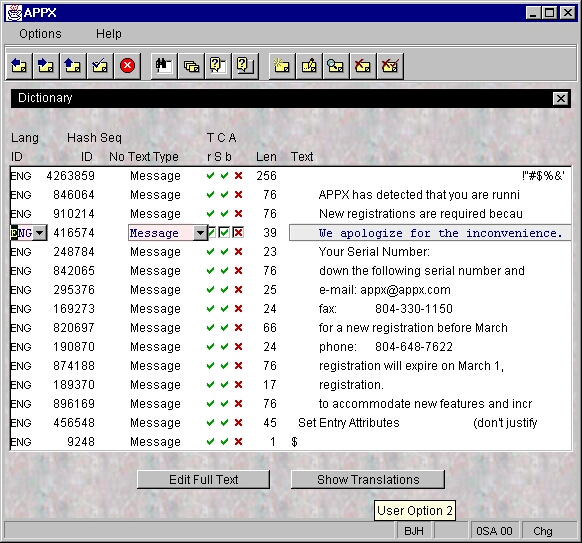
| FIELD | DESCRIPTION |
|---|---|
| Language ID | Corresponds to Language Codes and their descriptions in the System Administration Language File. |
| Hash ID | A hash number calculated from numeric values assigned to each character in the dictionary entry text. This, along with the Language ID and Sequence Number, creates a unique key for the entry. |
| Sequence No | Usually zero unless more than one dictionary entry produces the same Hash ID. This is the case with identical entries using different capitalization. For example, the entries “ERROR” and “error” will produce the same HASH ID but the second entry will be assigned a Sequence Number of 01 to give the entry a unique primary key. |
| Text Type | Indicates the level of dictionary entry as the translation process looks first for matches in the largest to smallest portions of the text being translated. See Figure 12 for a list of Text Types. |
| Translatable? | Checkbox indicating whether the entry can be translated or not. For example, “APPX” has no equivalent in most languages and therefore, no attempt should be made to translate it. This box is automatically checked when a translation is made for an item. |
| Case Sensitive? | Checkbox indicating if an exact case match must be made between this entry and the text to be translated in order for this entry’s translation to be used. For example, if the translator is attempting to translate “An Error Has Occurred” and finds the dictionary entry “AN ERROR HAS OCCURRED” it will use the entry’s translation if it is not Case Sensitive. If it is, the translator will attempt to find an exact match and if it fails, it will not provide a translation for the text. In most cases, entries should not be marked as Case Sensitive unless an extract entry with different capitalization exists. |
| Abbreviation? | Checkbox indicating if the entry is an abbreviation or not. |
| Length | The number of characters contained in the entry (embedded spaces included). |
| Text | The dictionary entry. |