
Chapter 6: The Translations File
The Translations File
The Translations File is used by the translator as a kind of cross-reference. Its primary index is the Design Language ID, the dictionary entry’s Hash ID, and the dictionary entry’s Sequence Number. After parsing screens into paragraphs, sentences, clauses, and words, the Translator finds these components in the Dictionary File using the Design Language ID and the component’s Hash ID. Then, it looks to the Translations File to find the record for the current entry in conjunction with the Presentation Language ID. After locating this record, the translator has the primary index of the dictionary’s corresponding entry in the Presentation Language. The Dictionary File is read again using that index and the text for the Presentation Language is captured by the translator.
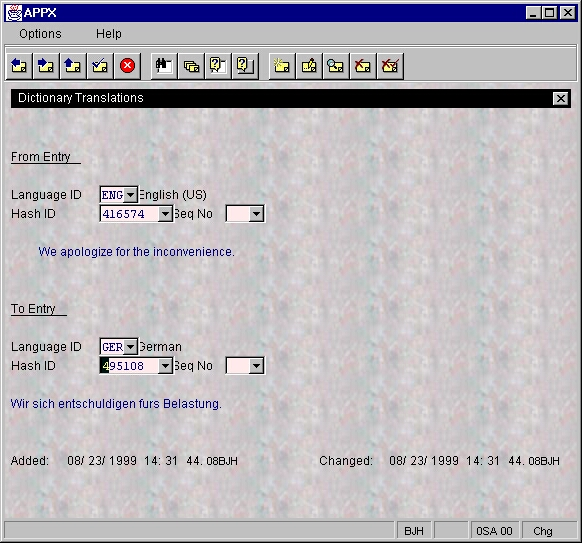
The Translations File can be edited by selecting Translations under File Maintenance on either the System Administration or Application Language Translator Menu.
Note: The addition, modification, or deletion of translations is best performed via the Enter/Edit Translations Input Process found on the Language Translator Menu on either the System Administration or Application level. The Enter/Edit Translations process provides the most comprehensive and concise method of performing translation maintenance.
As shown in Figure 13, the Translations Input Process is very basic. The “from” and “to” entries are shown along with the respective primary keys in the Dictionary File. You can change the translation “to” or “from” entry by selecting a different Hash ID/Sequence Number combination. Use the ▼ button to the right of the appropriate Hash ID field to scan the Dictionary File for other available entries.
The Translator locates the appropriate translation by searching for the text in the application’s Exception File. If no match is found, the Translator then searches for various components of the text in this order:
- Full screen text
- Paragraphs
- Sentences
- Clauses
- Words
At each of these five levels, the translator looks for matches in these files in the order shown:
- The current application’s Exception File
- The current application’s Dictionary and Translations Files
- The system level Dictionary and Translations Files
If no match is found, the text is presented in its original format with no translation occurring.