Chapter 9: Increasing Application Stack Sizes
Increasing Application Stack Sizes
When using APPX/ODBC to access APPX® files, some applications may generate “stack overflow” errors or you may receive other errors when attempting to connect to your APPX® database. This is most likely due to the insufficient stack size pre-configured in the application. Because APPX/ODBC requires a much larger stack size than most applications are configured for, a utility has been included in the APPX/ODBC installation to address this issue. The utility stackfix.exe can be found in C:\Program Files\APPXODBC, or can be downloaded from the APPX® web site at www.appx.com.
Follow these instructions to increase the application’s stack size:
- From a DOS Prompt or Windows® Explorer, run stackfix.exe
c:\> cd “c:\Program Files\appxodbc”
c:\> stackfix
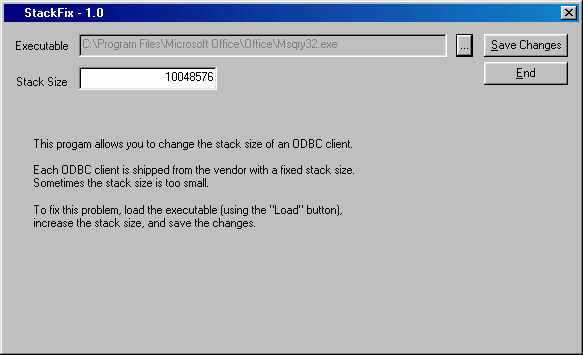
- In the stackfix window, click the find button …. and select the application generating the stacksize overflow.
- Once you have located the file (MS QUERY in this example), select it and click the
OPENbutton. See Figure 27.

- Change the stack size (see Figure 28) and make it approximately 10,000,000 bytes larger than it was. Adding a zero to the size is usually sufficient.
- Click the
SAVE CHANGESbutton to permanently change the application’s stack size. - A window displays confirming the increased stack size. Click
OK. - Click
ENDto exit the stackfix utility.
Note: If your network automatically updates client versions of software when the master server version is upgraded, you should “stackfix” the master server version following an upgrade so it does not update client machines with a version containing an insufficient stack size.