
Chapter 7: Running APPX Queries with WinSQL
Running APPX Queries with WinSQL
Using APPX/ODBC as an interface, it is possible to--from the client PC--query APPX® files residing on the server. For purposes of this demonstration, a product called WinSQL is used. WinSQL adds a Windows® look and functionality to standard DOS-based SQL scripting. It also provides additional and helpful features such as database, table, and field name cataloging.
Note: WinSQL can be downloaded from http://www.indus-soft.com/.
To query an APPX® file using WinSQL, follow these steps:
- Download WinSQL and run it.
- On WinSQL’s taskbar, select
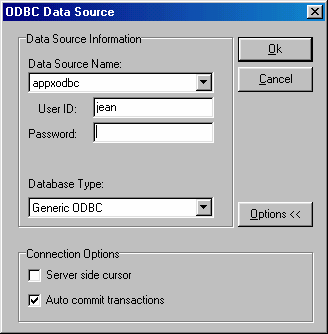
FilethenNew. - When prompted for the ODBC data source (see Figure 21), select
appxodbc. Enter your usual user id and password. ClickOK.
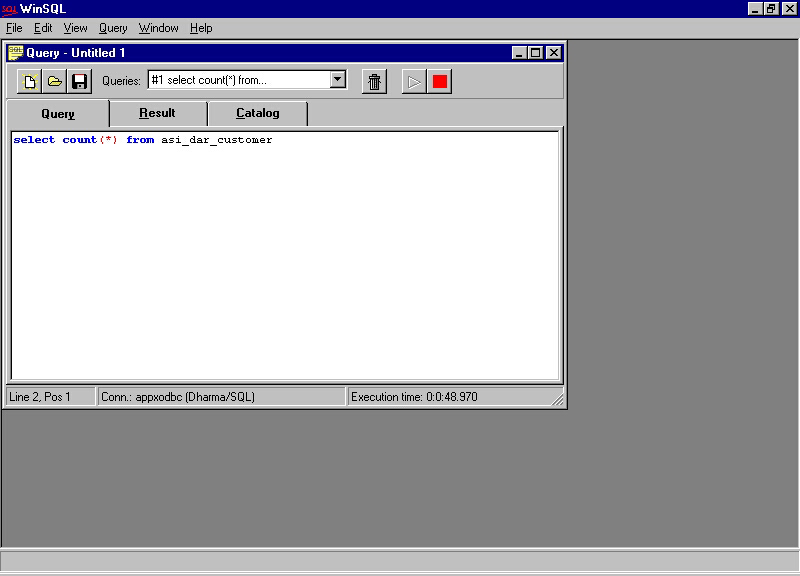
When the main WinSQL window is displayed (see Figure 22), note the three tabs: Query, Result, and Catalog. A query is typed under the Query tab, the result of the query is shown under the Result tab, and the catalog of databases, tables, and field names can be viewed under the Catalog tab.
- Under the Query tab, type the contents of your query using standard SQL commands. On the taskbar, click the green arrow to run the query. The red square to the right lights up during query execution to show that the query is running. While the query is running it can be cancelled by clicking the red square. See Figure 22.
The results of your query are automatically displayed under the Results tab upon completion of the query. You can review the query script by clicking on the Query tab, then review the results again by clicking on the Results tab. If the query requires modification, make your changes then simply run the query again for new results.
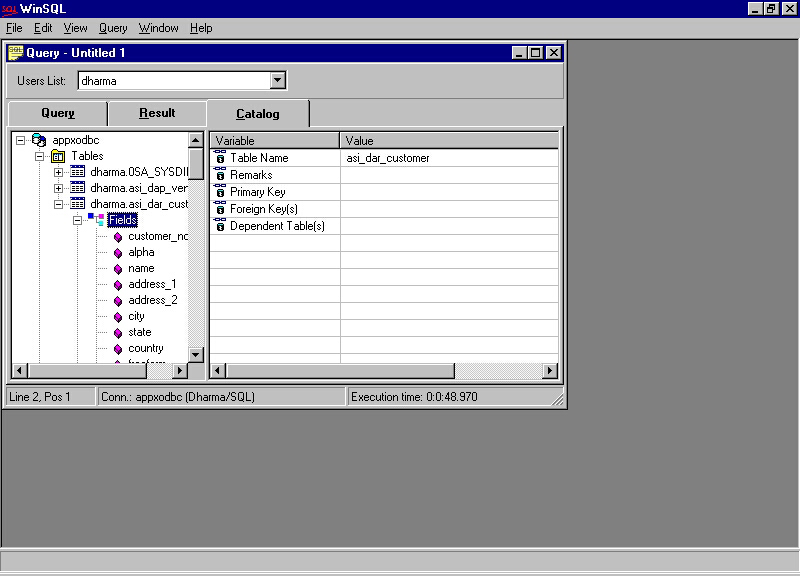
The contents of the Catalog tab are shown in Figure 23. The WinSQL catalog is especially helpful in designing queries because it provides a complete list of available tables, fields, indices, etc.
Note: Please check your preferred SQL reference guide for more information regarding the design of SQL scripts including functions, proper syntax, and script layout. A complete list of SQL functions supported by APPX/ODBC is shown in Figure 24.
- ABS
- ACOS
- ADD_MONTHS
- ASCII
- ASIN
- ATAN
- ATAN2
- AVG
- CASE
- CAST
- CEILING
- CHAR
- CHARTOROWID
- CHR
- COALESCE
- CONCAT
- CONVERT
- COS
- COUNT
- CURDATE
- CURTIME
- DATABASE
- DAYNAME
- DAYOFMONTH
- DAYOFWEEK
- DAYOFYEAR
- DB_NAME
- DECODE
- DEGREES
- DIFFERENCE
- EXP
- FLOOR
- GREATEST
- HOUR
- IFNULL
- INITCAP
- INSERT
- INSTR
- LAST_DAY
- LCASE
- LEAST
- LEFT
- LENGTH
- LOCATE
- LOG10
- LOWER
- LPAD
- LTRIM
- MAX
- MIN
- MINUTE
- MONTHNAME
- MONTH
- MONTHS_BETWEEN
- NEXT_DAY
- NOW
- NULLIF
- NVL
- OBJECT_ID
- PI
- POWER
- PREFIX
- QUARTER
- RADIANS
- RAND
- REPLACE
- RIGHT
- REPEAT
- ROWIDTOCHAR
- RPAD
- RTRIM
- SECOND
- SIGN
- SIN
- SOUNDEX
- SPACE
- SQRT
- SUBSTR
- SUBSTRING
- SUFFIX
- SUM
- SUFFIX
- SUSER_NAME
- SYSDATE
- SYSTIME
- SYSTIMESTAMP
- TAN
- TIMESTAMPADD
- TIMESTAMPDIFF
- TO_CHAR
- TO_DATE
- TO_NUMBER
- TO_TIME
- TO_TIMESTAMP
- TRANSLATE
- UCASE
- UPPER
- USER
- USER_NAME
- WEEK
- YEAR