Chapter 8: Creating New Views with SQL
Creating New Views with SQL
SQL can be used to create new views (tables) to be accessed with APPX/ODBC. If users frequently need to access the Customer File but only use a limited number of fields, a new view can be created that contains specific fields so users do not have to search through all fields to find those they use regularly. Views are also very useful in joining two or more tables together to function like Data Lookups in APPX®.
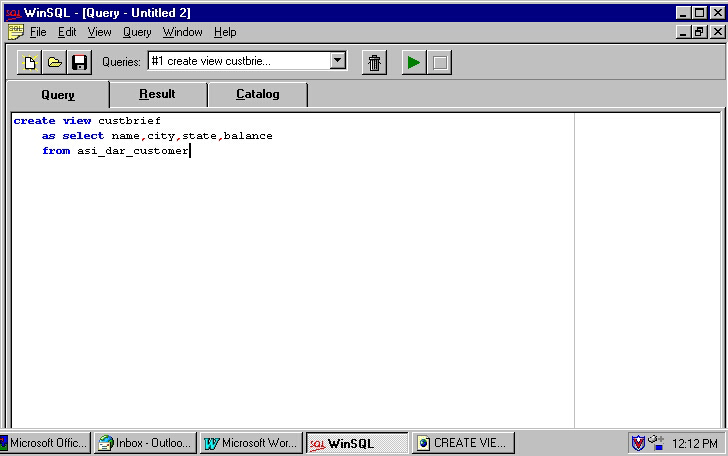
In this example, WinSQL is used to create a new view of the Customer File (called custbrief) with just the customer name, city, state, and current balance:
- Click the
QUERYtab and type the “create view” statement as shown below and in Figure 25.
create view [view name]
       as select [field1,field2,field3,field4,etc.]
       from [table name];
- Click the green run button.
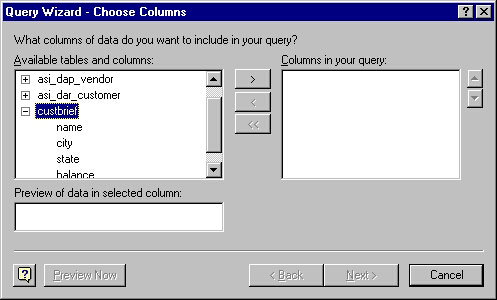
When the creation of the view is completed, a message appears under the RESULT tab and indicates that no data was returned and that no rows were selected. This message is normal because no query was actually performed. The new view is not added to the WinSQL Catalog but can be accessed from programs using the APPX/ODBC interface as in the Excel example in Figure 26.