
Chapter 5: Read APPX Data with Excel, Access and LibreOffice
Access Import Fails with the Supplied Driver
Access import fails repeatedly with the supplied 5.5.2 driver. No working Access import procedure has been verified for this configuration. Nearest verified Access success: the 5.5.3 Access recipe passes with the 5.5.3 engine, gateway and matching ASQL, the 32-bit Dharma 14.01 driver from the official APPX 6.2.1 package, and Microsoft 365 Access 16.0.20430.20182, 32-bit. Reproducing that result requires its complete documented configuration; a driver-only repair on the 5.5.2 gateway has not been verified.
The native test used External Data → New Data Source → From Other Sources → ODBC Database → Import, then Machine Data Source → AppxODBC. Access authenticated and listed COUNTRY, but selecting it returned ODBC--connection to 'AppxODBC' failed. A fresh Access process failed again after selecting the other listed COUNTRY entry. Neither attempt produced an accepted COUNTRY table. A further fresh-process check with the newly installed default DSN and Service left empty returned the same error; clearing Service did not fix Access. Repeating the import is not a verified workaround.
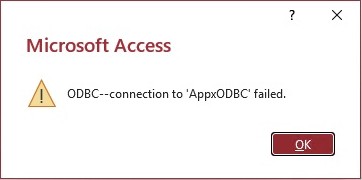
A separate fresh PowerShell ODBC count and complete query immediately afterward returned 7 records and all 9 fields, agreeing with the independently checked APPX sample. That successful query ran in PowerShell, not Access. It shows that the gateway answered a separate client; it does not accept Access or establish the cause of its failure. Do not assume that a different edition's IM006 or SQLSetConnectAttr error was observed here: these 5.5.2 attempts displayed the general connection error above.
For this edition, use the verified Excel procedure, Base direct SQL procedure, or PowerShell query.