
Chapter 2: Initial Setup File Maintenance
Option 1Parameters
The Parameters file defines options that specify how the Purchase Orders application functions. The information in this file specifies interfaces with other applications as well as other information.
The Purchase Orders application refers to this file during routine processing. Remember that any changes to this file will have a major impact on your system and should be made only after careful consideration of the consequences. (Refer to the Special Considerations section of this manual for a discussion of the effects of various options on system operation.)
Parameters screen
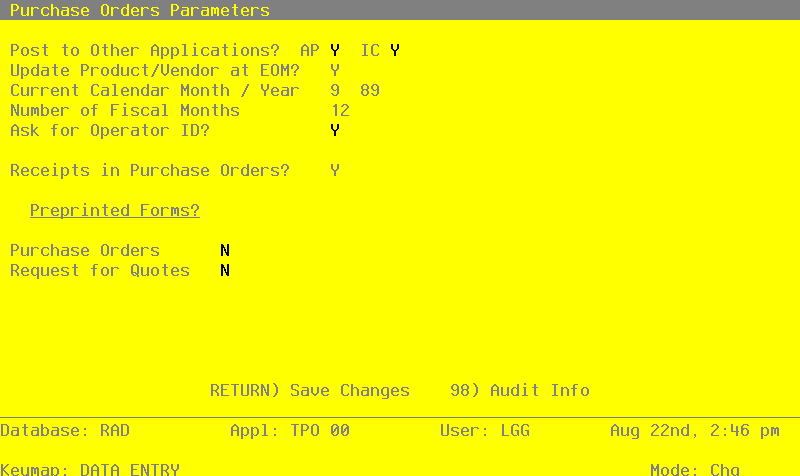
Data items for the preceding screen are described below:
- Post to Other Applications?
Enter ‘Y’ or ‘N’ to tell the system whether or not to allow information transfer to each of the applications listed. Abbreviations are:
- AP
- Accounts Payable
- IC
- Inventory Control
Enter ‘Y’ for AP or IC if data will be transferred from Purchase Orders to that application. Enter ‘N’ if data will not be transferred from Purchase Orders to that application. You must enter ‘N’ if that application is not part of the system.
If you enter ‘N’ for AP, you must also enter ‘N’ for IC. (That is, your system must post to Accounts Payable if it will post to Inventory Control.)
- Update Product/ Vendor at EOM?
Enter ‘Y’ or ‘N’ to indicate whether or not the Purchase Orders application will update history in the Products By Vendor file during end-of-month processing.
Y: Purchase Orders will update history in the Products By Vendor file during end-of-month processing. You must enter ‘Y’ if the Inventory Control application is not part of your system.
N: Purchase Orders will not update history in the Products By Vendor file during end-ofmonth processing. Products By Vendor history will be updated through the Inventory Control application.
When the Products By Vendor file is updated, these changes occur:
- The Price 1 Month Ago field is set to the current price.
- The Price 1 Month Ago through Price 5 Months Ago buckets are rolled back one month. That is, the Price 1 Month ago becomes the Price 2 Months ago, the Price 2 Months ago becomes the Price 3 Month Ago, and so on.
- If this is the final month of the year, the LY Units and LY Purchases fields are set to the amounts in the YTD Units and YTD Purchases fields. The YTD Units and YTD Purchases fields are cleared.
The Inventory Control Parameters file specifies whether the “final month” is the final month of the fiscal or calendar year.
- Current Calendar Month/Year
Enter the calendar month and year for the first live month. The calendar month can be a value between ‘1’ and ‘13’, depending on the entry you make in the Number of Fiscal Months field (see below).
- Number of Fiscal Months
Enter ‘12’ or ‘13’ to specify the number of periods in the fiscal year.
- Ask for Operator ID?
If this field is set to ‘Y’, the operator ID is requested at the beginning of Receipts entry within this application. This permits editing of another operator’s transactions. If this field is set to ‘N’, then the system does not request an operator ID at the beginning of Receipts entry. Transactions “belong” to the operator who entered the transactions; therefore it is not possible to edit another operator’s transactions.
- Receipts in Purchase Orders?
Enter ‘Y’ or ‘N’ to specify whether or not product receipts will be entered through the Purchase Orders application. Y: Product receipts will be entered through Purchase Orders.
If the Inventory Control application is part of the system, receipt entry will update the on order, uncosted, and on hand quantities in the Products By Warehouse file.
If the Inventory Control application is not part of the system, this option must be set to ‘Y’, and receipt entry will update only the on order quantity.
N: Receipts will not be entered through Purchase Orders; they must be entered through the Inventory Control application. Receipts will not update posted purchase orders.
In Order Processing for Purchase Orders during the Live Operations phase, the Receipts Data Entry, Journal, and Post functions, and the Receipt Whole PO Special Program, will be disabled.
- Preprinted Forms?
It is possible to get special forms that have been designed specifically for this Purchase Orders application. However, you can print the forms on standard 9-1/2” by 11” paper if you prefer. Enter ‘Y’ to indicate that you are using the special preprinted form indicated.
The entered data is validated. Press RETURN to save the information on this screen.