
Chapter 4: Recovery Processing
Option 3Parameters
This function allows entry and maintenance of the Parameters record.
Select “Parameters” from the Recovery Processing menu. Here is the Parameters entry screen:
Recovery Processing Parameters screen
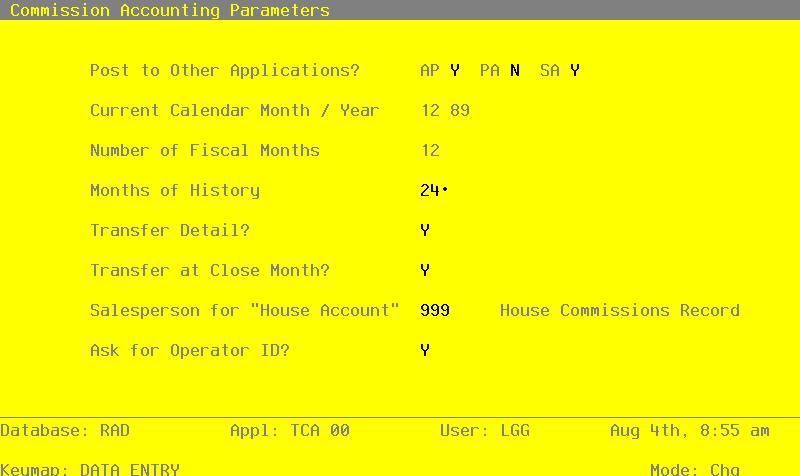
The entries on this screen will be automatically displayed. In some cases, the displayed entry can be changed. If an asterisk (*) appears next to one of the fields listed below, it indicates a “display only” entry, which cannot be changed.
Data items for the preceding screen are described below:
- Post to Other Applications
The system displays ‘Y’ or ‘N’ to indicate whether or not information can be transferred to each of the applications listed. Abbreviations are:
- AP
- Accounts Payable
- SA
- Sales Analysis
- Current Calendar Month/Year*
The system displays the current calendar month and year.
Number of Fiscal Months*
The system displays ‘12’ or ‘13’ to indicate the number of periods in the fiscal year.
Months of History
The system displays the number of months of salesperson history that are kept in the Sales History file. After the system reaches this number, the records for the oldest month are deleted during Close Month processing. If you will be printing 1099 forms in Commission Accounting, you will need to keep at least 12 months of history; however, this number should be at least twice the Number of Fiscal Months so that history for the previous and current years is available for reporting.
Transfer Detail?
The system displays ‘Y’ or ‘N’ to indicate whether or not detail information is transferred to Accounts Payable:
Y: Transfer detail to Accounts Payable. Create one invoice or time card entry record for each Unpaid Commissions record.
N: Do not transfer detail to Accounts Payable. Create one invoice or time card entry record for each salesperson.
Transfer at Close Month?
The system displays ‘Y’ or ‘N’ to indicate whether or not the Commissions Transfer function is run automatically during Close Month processing. This display can be changed.
Y: Run the Commissions Transfer function automatically during Close Month processing.
N: Do not run the Commissions Transfer function automatically during Close Month processing. Commissions Transfer must be manually selected from the Transaction Processing menu.
Salesperson for “House Account”
Enter a code to identify the “house account” set up in the Salespersons file.
- Ask for Operator ID?
If this field is set to ‘Y’, the operator ID is requested at the beginning of transaction entry within this application. This permits editing of another operator’s transactions. If this field is set to ‘N’, then the system does not request an operator ID at the beginning of transaction entry. Transactions “belong” to the operator who entered the transactions; therefore it is not possible to edit another operator’s transactions.
The entered data is validated. Press RETURN to save the information on this screen.
APPX Software, Inc.
Commission Accounting System Administration Manual
Published 5/95