
Chapter 4: Recovery Processing
Option 1Sales History
This function allows access to the Sales History files.
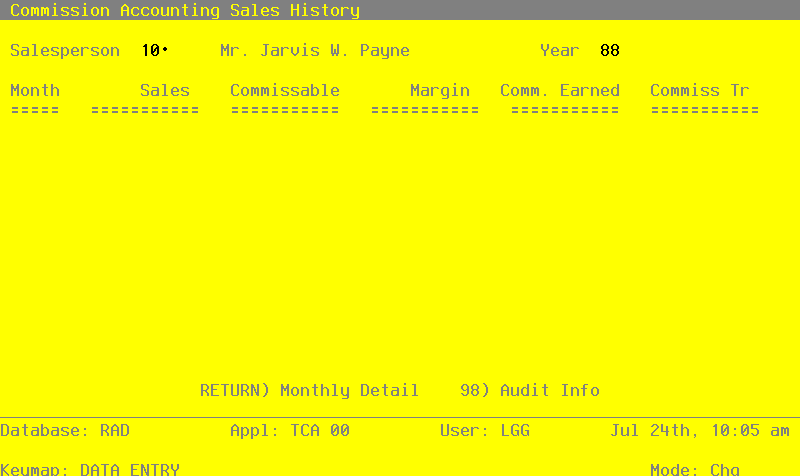
Select “Sales History” from the Recovery Processing menu. Here is a sample Sales History screen:
Sales History screen
When the key value for a particular record is requested, you can review all the records in the file by selecting the Scan option. The records will be presented on an “Access” screen, and you will be allowed to scan the available data until you find the record you want. Then, position the cursor by that record and press RETURN; the record will be displayed for editing.
Data items for the preceding screen are described below:
- Salesperson
Enter a valid salesperson number from the Salespersons file. You can use the Scan option to find an appropriate entry. The system displays the corresponding salesperson name so that you can verify your entry.
- Year
Enter 2 digits for the calendar year in which commissions were recorded.
The entered data is validated. Press RETURN to on to the Sales History Line Items screen.
Select Next Record to go to the next Sales History record.
At this screen the use of the MODE keys—ADD, DEL, CHG, or INQ—pertain to those records in the Sales History file.
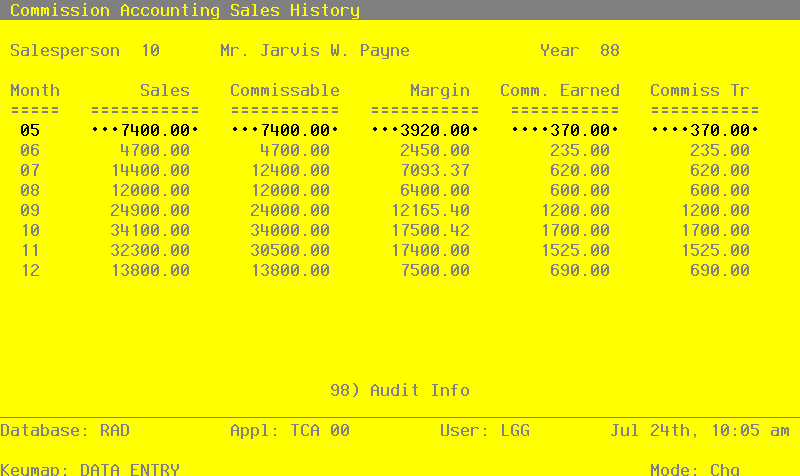
The screen shown below allows you to enter Sales History line item information.
Sales History Line Items screen
When the key value for a particular record is requested, you can review all the records in the file by selecting the Scan option. The records will be presented on an “Access” screen, and you will be allowed to scan the available data until you find the record you want. Then, position the cursor by that record and press RETURN; the record will be displayed for editing.
Data items for the preceding screen are described below:
- Month
Enter 2 digits for the calendar month in which the commission was recorded.
- Sales
Enter up to 7 digits and 2 decimals for the total sales amount earned by this salesperson during the designated month and year.
- Commissionable
Enter the total commissionable sales for this month and year.
- Margin
Enter up to 7 digits and 2 decimals for the total margin amount attributed to this salesperson during the designated month and year. (Margin is the difference between sales and cost.)
- Commissions Earned
Enter up to 7 digits and 2 decimals for the total amount of commissions earned for this salesperson during the designated month and year.
- Commissions Transferred
Enter up to 7 digits and 2 decimals for the total amount of commissions transferred (to Accounts Payable for payment) for this salesperson during the designated month and year.
Press RETURN to save the information on this screen.
Select Previous Image to go back to the Sales History screen. Select Next Record to go to the next Sales History Line Items record. Select End to go to the Next Sales History record.
At this screen the use of the MODE keys—ADD, DEL, CHG, or INQ—pertain to those records in the Sales History Line Items file.