
Chapter 2: Initial Setup File Maintenance
Option 2Descriptions
This file contains descriptions of the pay status codes that are included on Unpaid Commissions records. The pay status code defines the timing with which commissions are to be paid to the salesperson identified on the Unpaid Commissions record.
The description of each pay status code can be changed; however, the meaning associated with each code cannot be changed. For example, the first pay status code on the screen represents “normal” pay status. You can enter any description you like in this first field, but when you assign a pay status code of ‘N’ to an Unpaid Commissions record, the system assumes that commissions will be paid to the salesperson when invoices are fully receipted in Accounts Receivable.
Select “Descriptions” from the File Maintenance menu. A sample Descriptions record is shown below:
Descriptions screen
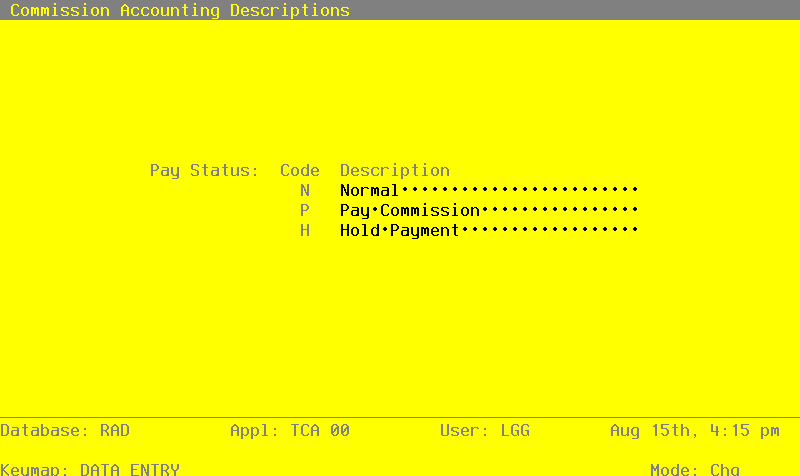
- Pay Status
The system displays the codes that define the timing with which commissions are paid to a salesperson. Each status has a code that has already been defined by the system. Listed below are descriptions for each pay status code. You may use these descriptions or enter your own (up to 14 characters). Explanations of their meanings follow:
N (Normal): Pay commissions only after the invoice has been fully receipted in Accounts Receivable.
P (Pay Commission): Pay commissions regardless of the invoice status in Accounts Receivable.
H (Hold Payment): Do not pay commissions for the invoice until this status is changed.
Press RETURN to save the information on this screen.